Buttons not working after switching scenes

godot 4.7.2

i have a menu that pops up once the player loses, that can send them to the main menu, retry the game or send them to an upgrade tree, the problem is that once i switch back to those scenes ( for example the main menu scene ), the buttons stop working, they do work normally if i start the game on those scenes tho

heres the code for the buttons

@warning_ignore("missing_tool")
extends Button
class_name redirect_button

@export var target_scene : PackedScene

func _ready() -> void:
		print("a")
		pressed.connect(switch_to)


func switch_to():
	print("pressed")
	GlobalFunctions.switch_scenes_packed(target_scene)

thanks!!

You might have a circular dependency if you use a PackedScene like this.

Say Scene A references Scene B, and Scene B references Scene A so you can go back and forth. As far as I know, Godot is REALLY not happy with things like this.

I recommend using the scene’s UID instead, and dynamically loading it then setting it as the current scene.

what do you mean by dynamically loading it?, u mean using preloads?

What I mean is that instead of using PackedScene as the target, use a string, and in the switch_to function, you can do something like this:

var packed_scene = ResourceLoader.load(target_scene_path) as PackedScene
GlobalFunctions.switch_scenes_packed(packed_scene)

PS: You can get a packed scene’s UID by right clicking them and selecting “Copy UID” or something similar, forgot the exact wording.

i tried this and it still didnt work, the first scene switch in the game over screen works, but once i get to the menu the button still cant be clicked

Could you show me your code now?
Did you set the Scene UID in both scenes to the correct one in the inspector?

heres the code for the buttons

@warning_ignore(“missing_tool”)
extends Button
class_name redirect_button
@export var target_scene_path : String

func _ready() → void:
print(“a”)
pressed.connect(switch_to)

func switch_to():
var packed_scene = ResourceLoader.load(target_scene_path) as PackedScene
GlobalFunctions.switch_scenes_packed(packed_scene)

and yes, i did set the uid in the scenes to be correct

also heres the “switch_scenes_packed()” function code in case u need it

func switch_scenes_packed(Scene : PackedScene):
	var scene_transition = preload("res://scenes/scene_transition.tscn").instantiate()
	add_sibling(scene_transition)
	await get_tree().create_timer(0.5).timeout
	get_tree().change_scene_to_packed(Scene)
	

Why do you have this here? Try to avoid using await as they can cause a lot of issues and hard to identify bugs.

i was using it to make the scene change a bit after the scene transition animation started, ill remove it now to see what happens

removed it and it still doesnt work sadly

Are you able to confirm that the button is being pressed?
Does the “pressed” string get printed at all? And when they do stop working, do you get any warnings or errors in the console?

the button doesnt run the switch_to() function once it gets clicked, but it does print “a” (its in the ready function), whats weird is when i hover over the button it doesnt even get highlighted, so i dont know what could be the problem.

That means another Control node is blocking your button, you likely loaded some kind of HUD or other menu element(s) that stay even after you switch your scene back. If you launch your game and get to that state where your button doesn’t work, try clicking it, then open up Godot’s debugger and go to the “Misc” tab, you will be able to see what you actually clicked on, and you can figure out how to remove it.
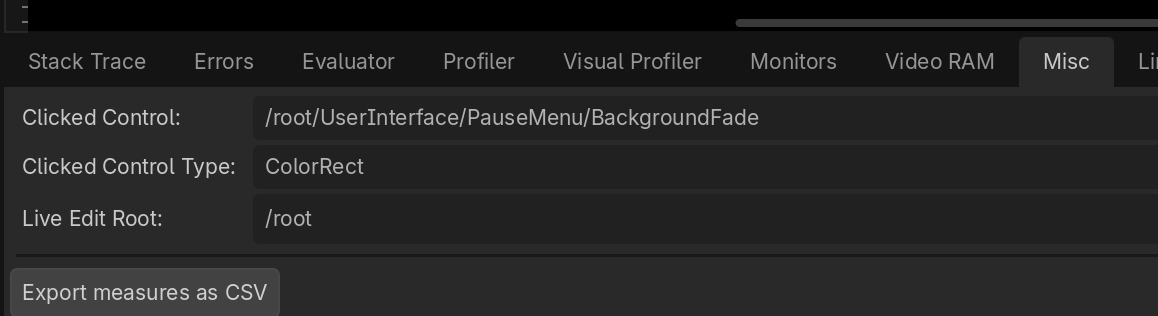
thank you!! it turned out the scene transition colorrect never got deleted, so it laid on top of the scene