Godot Version
v4.7.2.stable.official [ed1daf0bf]
Question
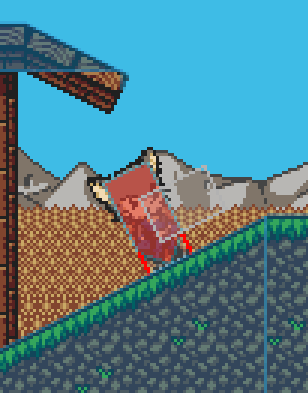
I’m trying to implement an attack that would launch the player in the direction they’re currently facing, also taking into account whether they’re standing on a slope. However, for some reason, when dashing on a slope, the character is angled further off the ground than he should be. It’s very subtle when facing upward but very noticeable when facing downward. What’s going on here and how do I fix it?
func _physics_process(delta: float) -> void:
	input_vector = get_input_vector()

	position.x = round(position.x)
	position.y = round(position.y)

	if is_affected_by_gravity:
		if velocity.y < 0:
			velocity.y += GRAVITY * delta
		else:
			velocity.y += GRAVITY * delta * fall_gravity_multiplier

	if input_vector.x == 0:
		if is_on_floor() and movement_mode != MovementModes.ATTACK:
			velocity.x = lerp(velocity.x, 0.0, ground_friction)
		else:
			velocity.x = lerp(velocity.x, 0.0, air_friction)

	if flip_sprite_in_movement_direction:
		if input_vector.x > 0:
			$Sprite.flip_h = false
		elif input_vector.x < 0:
			$Sprite.flip_h = true

	if !$Sprite.flip_h:
		$AttackBox.position.x = hitbox_pos
		$NpcDetectionRay.position.x = raycast_pos
		$NpcDetectionRay.target_position = raycast_length
	else:
		$AttackBox.position.x = -hitbox_pos
		$NpcDetectionRay.position.x = -raycast_pos
		$NpcDetectionRay.target_position = -raycast_length

	var camera_node: ShakingCamera = GameWindow.ingame_cam
	if camera_node and movement_mode != MovementModes.GLITCH:
		position.x = clamp(position.x, camera_node.limit_left, camera_node.limit_right)

	match movement_mode:
		MovementModes.REGULAR_MOVEMENT:
			state_move(delta)
		MovementModes.ATTACK:
			state_attack()
		MovementModes.HURT:
			state_hurt()
		MovementModes.DEAD:
			state_dead()
		MovementModes.LADDER:
			state_ladder()
		MovementModes.GLITCH:
			state_glitch()

	move_and_slide()

	velocity.x = round(velocity.x)
	velocity.y = round(velocity.y)

	if is_on_floor():
		rotation = move_toward(rotation, get_floor_normal().angle() + PI / 2, 0.05)

		jumped = false
		coyote_timer = COYOTE_TIME

	else:
		if charge_timer > 0:
			rotation = move_toward(rotation, 0, 0.05)

		if coyote_timer > 0:
			coyote_timer -= delta

		if jump_buffer_timer > 0:
			jump_buffer_timer -= delta

	if ladder_buffer_timer > 0:
		ladder_buffer_timer -= delta

	if charge_timer > 0 and is_charging:
		charge_timer -= delta

	if (!$RaycastLeft.is_colliding() or !$RaycastRight.is_colliding()
			or $SemisolidDetector.has_overlapping_bodies()):
		$CollisionRect.disabled = false
		$CollisionPoly.disabled = true
	else:
		$CollisionRect.disabled = true
		$CollisionPoly.disabled = false


func state_attack() -> void:
	if Input.is_action_pressed("attack"):
		is_charging = true
		await get_tree().create_timer(0.1).timeout
		if (is_charging
				and anim_state.get_current_node() != "attack"
				and anim_state.get_current_node() != "attack2"):
			anim_state.travel("bash_charge")
			if charge_timer <= 0 and current_palette_anim != PaletteAnims.CHARGE:
				_flash_bash_charged()

	if Input.is_action_just_released("attack"):
		is_charging = false
		if charge_timer > 0:
			if $AttackCooldown.time_left == 0:
				$AttackBox/AttackCollision.disabled = false
				$AttackCooldown.start()
				$AttackTimer.start()

				if is_on_floor():
					velocity.x = move_toward(velocity.x, 0.0, 50)

				if $AttackTimer.time_left > 0:
					if attack_combo == 0:
						anim_state.travel("attack")
						attack_combo = 1
					else:
						anim_state.travel("attack2")
						attack_combo = 0

		else:
			$AttackBox/AttackCollision.disabled = false
			$Hitbox/HitboxCollision.disabled = true
			is_affected_by_gravity = false
			floor_snap_length = 0
			floor_constant_speed = true

			velocity = Vector2.ZERO

			if !$Sprite.flip_h:
				velocity = get_floor_normal().normalized().rotated(PI / 2) * dash_speed
			else:
				velocity = get_floor_normal().normalized().rotated(PI / 2) * -dash_speed

			anim_state.travel("bash")
			palette_tween.kill()
			palette.set_color(0, Color("202020"))
			current_palette_anim = PaletteAnims.NONE

			$BashTimer.start()
			await $BashTimer.timeout
			$AttackBox/AttackCollision.disabled = true
			$Hitbox/HitboxCollision.disabled = false
			is_affected_by_gravity = true
			floor_snap_length = 15
			floor_constant_speed = false
			movement_mode = MovementModes.REGULAR_MOVEMENT

		charge_timer = CHARGE_TIME
Have you tried offsetting your character perpendicularly to surface?
I believe this issue is because godot’s physics engine thinks your character is pushed into the ground and it tries to push it up, when you go up the slope then it’s not so much visible because you’re going up anyways, but when going down it blocks you from going down and thus pushes you out of terrain
Could you also send screenshot of how collisionbox is rotated & positioned in that moment, it would help a lot
Okay so I have this weird setup where he switches between a rectangular collision and a downward triangle one based on whether both raycasts are touching the ground or not, for proper interaction with slopes, also the whole thing is pixelated like hell so it’s hard to tell
But if I ask it to print rotation_degrees, it returns a value of around 26.5 instead of expected 22.5, so there’s clearly something wrong here
Although if I try this on a 45-degree slope, it returns ~44.9 but also pushes him off the ground so idk
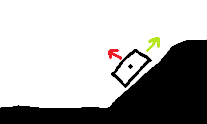
I think the problem might be engine trying to solve collisions while you’re moving, try offsetting your character slighty in perpendicular direction like this:
red arrow is the direction you want your character to be moved by some degree
green arrow is the direction of your velocity
If it will fix the problem then it means that engine bugs out due to these small angle imprecisions
Increase character body’s floor_snap_length or manually call apply_floor_snap() every frame for the duration of the dash state.
But I specifically disabled snapping to floor so he can dash over gaps? If I enable it back, he doesn’t dash off upward slopes anymore
Also for some reason it doesn’t work when dashing up regardless, he does stick to the slope when dashing down but still flies off of it when dashing up, maybe even more noticeably so
Well tune the snapping distance value so it doesn’t snap on vertical gaps but it snaps on slopes.
If you cannot get automatic snapping to work in a satisfactory way, you’ll have to use some raycasts to determine the current terrain configuration under/around the player and if the conditions are met - explicitly call the snapping function.
you sound really tired, a lot of stupid questions today huh?
Yeah I figured, trying to do exactly that right now
@normalized okay but I’m still curious what pushes him off the floor tho? Because when dashing off the very edge of that slope, he doesn’t gain that extra height, he only gains it when dashing from the middle or lower end
Nothing. It just continues in the velocity direction without snapping. What’s your snap length? If that gets exceeded at some point - the character won’t snap.
In that case I guess there’s something wrong with my velocity direction? (Just so we’re on the same page, he is supposed to dash off upper edges of slopes, he’s just not supposed to gain extra height while doing so.)
Here’s another example of what I’m trying to say, I put a line to show the direction he’s supposed to continue his dash in, and my problem is that the velocity is slightly off but it adds up and so gets really noticeable by the end
I don’t get it. Do you want to stick to ground or not?
If your dash launches at the velocity that’s aligned with the white line and you want to keep going in that direction, then disable the gravity while the dash lasts.
I want it to stick to the ground only when it’s at a concave angle. If it’s convex, I want the character to keep traveling along the side he was standing on.
Thing is, I already kinda did, up there in my code it says is_affected_by_gravity = false and yet the initial launch velocity seems to be wrong for some reason? Shouldn’t it be perpendicular to the floor if I get it with get_floor_normal().rotated(PI / 2) * dash_speed?
Also like, how would gravity not being disabled even affect the result this way, if anything, it would drag the character down, not up
Maybe your jump is interfering.
Learn to debug by isolating problematic things. Otherwise there’d be too many moving parts to easily figure out the problem. Observe weird behavior and code without interference from other things. Temporarily comment out as much code as possible except the feature in question. You can also disable potentially problematic features one by one until the problem disappears. The last one you disabled is the likely culprit. Divide and conquer.
If you want different behavior for concave vs convex situation, you’ll need to implement a way to determine which situation you’re dealing with and branch your code accordingly.
Okay I finally fixed it. The problem was the friggin friction, which decreased horizontal velocity but not vertical, so it looked like it was messing with the initial velocity direction. Never would’ve guessed it without your advice.
As for concave vs convex, I repurposed existing raycasts for detecting the difference between how sloped the ground I’m standing on is compared to what I’m moving towards, seems to work fine so far.
Code for anyone who might have the same problem (unlikely but still):
func bash() -> void:
	$AttackBox/AttackCollision.disabled = false
	$Hitbox/HitboxCollision.disabled = true
	is_affected_by_gravity = false
	use_friction = false
	floor_constant_speed = true

	velocity = get_floor_normal().rotated(PI / 2) * dash_speed * facing_direction
	bash_timer = BASH_DURATION


func state_bash(delta: float) -> void:
	var ray_left_length: float = ($RaycastLeft.get_collision_point()
			- $RaycastLeft.global_position).length()
	var ray_right_length: float = ($RaycastRight.get_collision_point()
			- $RaycastRight.global_position).length()
	const MAX_SNAP_LENGTH := 9

	if max(ray_left_length, ray_right_length) < MAX_SNAP_LENGTH:
		floor_snap_length = SNAP_LENGTH
	else:
		floor_snap_length = 0

	if bash_timer > 0:
		bash_timer -= delta
	else:
		$AttackBox/AttackCollision.disabled = true
		$Hitbox/HitboxCollision.disabled = false
		is_affected_by_gravity = true
		use_friction = true
		floor_snap_length = SNAP_LENGTH
		floor_constant_speed = false
		movement_mode = MovementModes.REGULAR_MOVEMENT