Character moving with mouse click. How to implement boundaries=

Godot Version

4.5.stable

Question

Hello,

I’m currently developing a small game with a friend to learn Godot and I’m stuck thinking how to implement something.
I’m doing a level selector where there’s a map and the player moves with left mouse clicks. Overall, it’s working almost as expected, but the thing is that I want the player not to be able to pass through certain parts of the map when travelling from one point to another. I’m attaching pictures to illustrate this:
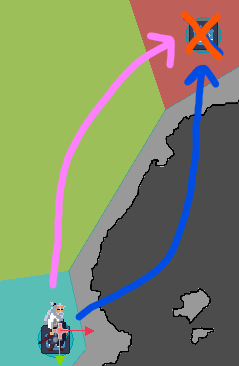
If I click on the upper right icon (orange X), my player moves to the target position, but it exits the area and goes through the darker grey zone (blue arrow). I want him to move alongside the pink arrow.

I’m going to explain my configuration and code. It might be bad, so if it should be reworked, please tell me so.

First of all, the player is a CharacterBody2D set to Floating and it’s not using move_and_slide().

My implementation of movement is:

  • WorldMap has an Area2D
  • When you click inside the Area2D it makes the player move with these lines:
############## WORLD MAP ##############
func _physics_process(delta: float) -> void:
	world_player._flip_movement(world_player.position.x > target_pos.x)
	if world_player.position != target_pos:
		world_player._start_moving(true)
		world_player.position.x = move_toward(world_player.position.x, target_pos.x, MOVEMENT_SPEED * delta)
		world_player.position.y = move_toward(world_player.position.y, target_pos.y, MOVEMENT_SPEED * delta)
	else:
		world_player._start_moving(false)


func _on_input_event(_viewport: Node, event: InputEvent, _shape_idx: int) -> void:
	if event is InputEventMouseButton and event.pressed:
		if event.button_index == MOUSE_BUTTON_LEFT:
			moving = true
			target_pos = event.position
			print("target_pos is: ", target_pos)
			print("Player pos is: ", world_player.position)
			print("")
############## PLAYER SCRIPT ##############
func _physics_process(_delta: float) -> void:
	if !moving:
		player_sprite.animation = "default"
	else:
		player_sprite.animation = "walking"


func _start_moving(new_state: bool) -> void:
	moving = new_state


func _flip_movement(new_state: bool) -> void:
	player_sprite.flip_h = new_state

I believe that moving the character with “position.x/y = move_toward” is wrong, but I’m not reaching another solution. On top of that, I’m not being able to find a solution to limit the player inside the WorldMap’s Area2D.

Could you bring me some knowledge?

It seems like this is not really about moving a character body, its more like moving an character icon on a map screen, which is pathfinding problem. So I’d starting by moving away from characterBody2D which uses physics and collision bodies in this map selector screen.

the simplest thing to do might be to put in some path2D nodes, and draw the line yourself between the levels, then you combine it with a ‘PathFollow2D’ node (there are youtube tutorials on this) to snap your sprite to a point on the line.

as they hold the mouse down, count up a ‘progress’ value from 0 to 1 (over 1-2 seconds) and set your path follow to that progress value

1 Like

Seems like you should be using NavigationAgents. Here you can find explanation on how to use it with examples.

1 Like

About the CharacterBody2D, do you think that I should replace it with StaticBody2D?

Apart from that, using Path2D and PathFollow2D was the initial idea, but doing it this way has a dumb, but cool “feature” which is that you can click any point in the Area2D and the character will move there too. In other words, it feels good that the character is not limited to only moving to the levels.

Do you know any way to avoid moving outside the area2D having this base code? Or at least using something different from Path2D?

I’ll investigate about it! Thanks
4.5 says it’s experimental, tho

EDIT: sorry I actually misread your reply.
If you just want to limit where the user can click, then you just need to check if that point is outside the area2d and if it is, set target_pos to their current position (or keep the old target_pos)
If your area3d has a collision polygon, you can get the polygon data from it, and run it through geometry2d.is_point_in_polygon() to check for intersection.
But that wont stop them running through the zone unless you add a pathfinding system or collision boxes

Okay, in that case in that case you you need either a real pathfinding solution (more complicated) or, if you want movement freedom:

  1. Give the characterbody a collision circle (if they dont already)
  2. Each frame assign the character a velocity in the direction the user clicks
  3. add a static body to the scene with however many collision polygons needed to cover the reatricted areas
  4. Each frame run move_and_slide so the character bumps into and slides along those areas
  5. Let the user click anywhere not just level icons , otherwise they could get stuck on walls of collision polygons between them and the target level