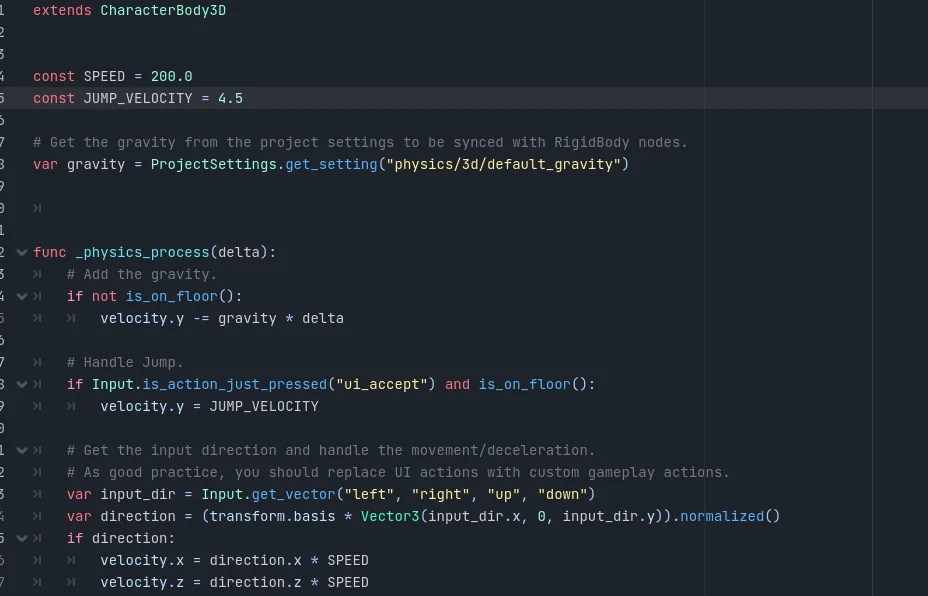
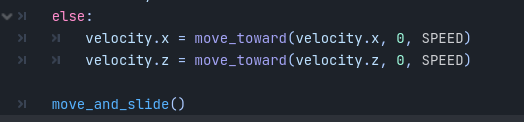
Currently trying to make a Petscop-like game (2.5D is the word I believe) for a horror unfiction series. However, while I can implement sprites both static and animated, I cannot get the basic movement of the character to work. I’ve tried several different codes from various tutorials online but nothing seems to be working.
I’m still very raw when it comes to coding overall and I’m mostly a visual learner because of that. Any help is greatly appreciated.
Also, where you call normalized, be careful about normalizing vectors that can have all-zero components, which this one can. Reason being, vectors are normalized by dividing it by their magnitudes to produce a unit vector (vector with a magnitude of 1), but if the magnitude is 0 and you divide by 0, you’re producing NaN values.
As far as I could tell, your code looks like it should work. If you tried a bunch of different things from a lot of different tutorials and you’re getting no errors, maybe it’s not an issue of code.
Some other things to check:
Make sure your script is attached to a CharacterBody3D node.
Make sure you’re running a scene that holds the player and not just a player scene independently.
Make sure the arguments you’re passing into get_vector are defined in the project input map.
Some things we usually do during the debugging process which are really helpful for finding bugs is either using breakpoints or print statements to make sure the code is reaching those places when we expect, and to check the values of variables like velocity. If you can’t figure it out by staring at your code, try to collect information and print things.
That’s very helpful for narrowing down the error. Some possibilities:
Again, make sure the script is attached to a node
Check your output for errors. I know I’ve asked for errors these past few messages but you didn’t confirm whether you had any or not.
Make sure your scene tree isn’t paused anywhere.
Make sure the CharacterBody3D process_mode isn’t set to when paused or something.
Another thing: where are you printing? In a conditional (if direction)? If so, try another print outside the conditional, like right before you call move_and_slide.
That’s alright, debugging is a process of gathering information and deducting the problem. Try my suggestion with a print statement right before calling move_and_slide. It’s also easier to help you when you show your code after each change.
Another possibility is if your Sprite isn’t a descendant of your CharacterBody3D, so make sure it’s a descendant and not a sibling or parent. Otherwise the Sprite will not move with it.
It is easier to determine the error, however, if you follow the debug process with printing. There are too many possible reasons so without collecting more info, the best we can do is guess.