Godot Version
4.6.2.stable
Question
Hey there! I’m starting to transition my project from Roblox to Godot, so far, I’m amazed at how many new features I wanted for a long time are already available in Godot!
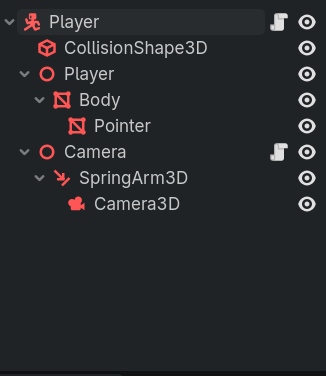
One of them, is specific CollisionShape3D objects, currently, I have a very basic character made up out of 2 TubeTrailMesh to denote which direction it’s facing, with a Capsule CollisionShape3D.
Now, my problem is that, every time I play the project, while holding any direction, the CollisionShape3D is offset a random amount, without me making any changes to the script or the positioning of the Nodes.
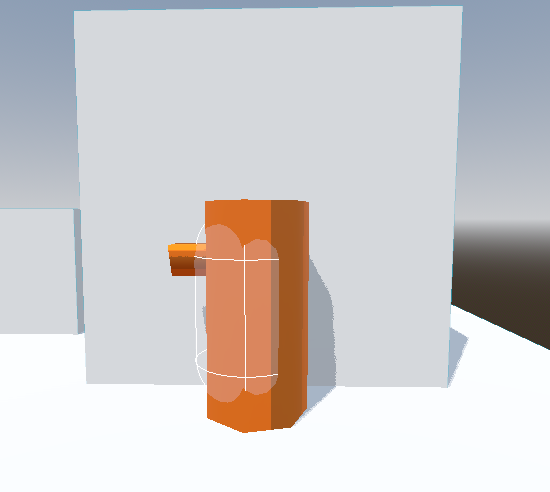
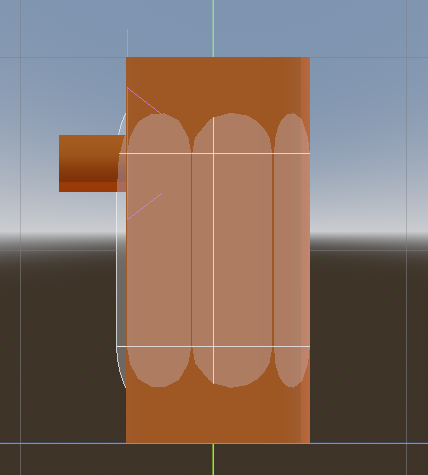
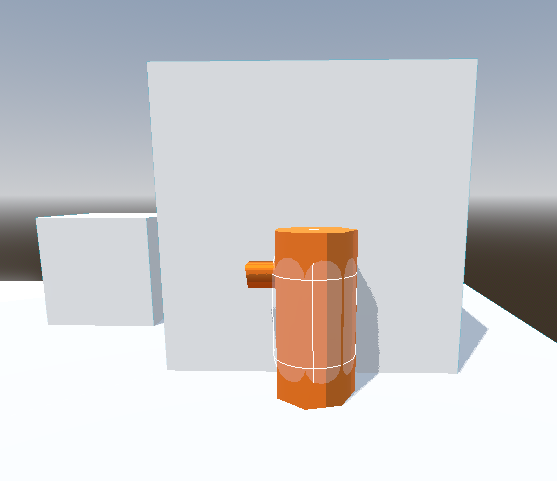
As you can see in the screenshots, it varies from barely noticeable, to very dislocated, its also worth noting that functionally, the CollisionShape3D will go back to the correct position when pressing against another object, and so, this only happens when running without anything getting in the way.
Also, when the offset is particularly negligible, the CollisionShape3D also rapidly flickers from being further away and returning to being closer.
Here is my movement script:
extends CharacterBody3D

@export_range(1.0, 15.0, 1.0, “or_less”, “suffix:M”) var speed: float = 6.0
@export_range(1.0, 20.0, 1.0, “suffix:M/s”) var jump_velocity: float = 8.0
var max_jump = 30

@export var camera: Camera3D
@export var player: Node3D

func _physics_process(delta: float) → void:

# Apply Gravity
if not is_on_floor():
	velocity += get_gravity() * delta

# Handle Jump
if Input.is_action_just_pressed("ui_accept") and is_on_floor():
	velocity.y += jump_velocity

# Get Direction
var input_dir := Input.get_vector("ui_left", "ui_right", "ui_up", "ui_down")
var direction := Vector3(input_dir.x, 0, input_dir.y).normalized()
direction = direction.rotated(Vector3.UP, camera.global_rotation.y)

# Move Player
if direction:
	velocity.x = direction.x * speed
	velocity.z = direction.z * speed

# Look Direction
	if velocity.length_squared() >= 0.1:
		player.look_at(position + direction + Vector3.UP)

# Slow Down
else:
	velocity.x = move_toward(velocity.x, 0, speed)
	velocity.z = move_toward(velocity.z, 0, speed)

# Actuate
move_and_slide()

# Quit Game
func _input(event: InputEvent) → void:if event.is_action_pressed(“quit”):get_tree().quit()
I suspect it has to do with the Look Direction segment, since it uses the Node3D where the player model is stored, however, the pivot for said Node3D is position in the center of the bigger tube, besides, if it was the culprit, the offset wouldn’t change each time right?
Anyways, thanks for reading my question, if you need any more details, feel free to ask!