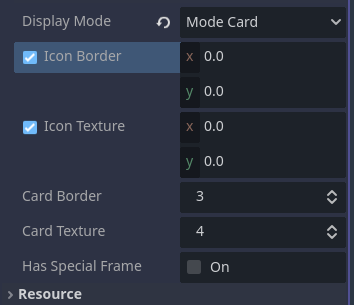
All three variations will add the checkbox to the property, but the checkbox seems to always default to ‘checked’. I can’t get it to add an unchecked checkbox.
As I explained in one of the post you linked before, the @export variable can’t have a Variant type like Vector2 or int or Dictionary because those types can’t be null and the checkbox only works if the variable can be null.
The way to know if the checkbox is checked or not is to compare the variable to null. If the variable is null then the checkbox will be unchecked. The default state of the checkbox is the default value you give to the variable. If you give the variable the value null then the checkbox won’t be checked. If you give the variable any other value then the checkbox will be checked.
Example:
@tool
extends Node


@export var test = Vector2.ZERO


func _validate_property(property: Dictionary) -> void:
	if property.name == "test":
		property.type = TYPE_VECTOR2
		property.usage |= PROPERTY_USAGE_CHECKABLE | PROPERTY_USAGE_EDITOR
		if test != null:
				property.usage |= PROPERTY_USAGE_STORAGE | PROPERTY_USAGE_CHECKED
I’m used to scripting UI and having the checkbox be a property of the variable, like val.enabled, that you can set or query to find out if you can interact with the value in the UI.
But here GDScript is showing whether or not the value itself is null. That just wasn’t clicking for me. Thank you.
The whole concept of property usage flags, combining them, hints and hint strings is going to take some getting used to.
Thanks again for helping me understand it finally.
So, I’m having some trouble understanding the checkable behavior applied to a Node export variable.
When the variable is unchecked, the value returns null like you’d expect.
But when I check the variable’s box, even though no Node is assigned, the variable’s value returns nothing in the output log, but is also NOT null.
So, node_var == null returns false, but print(node_var) returns nothing.
Usually for error checking I’d ask something like:
if node_var != null:
     get_node(node_var).get_property_list()
But in this case the error check won’t work because the value isn’t technically null, but it’s functionally null, and so it throws errors.
How do you handle a situation like this?
EDIT:
This seems to work.
	set(value):
		node_var = value
		if value != null:
			if get_node_or_null(value) != null:
		#tween_settings_delay_node = value
				print(get_node(value).get_property_list())
Is this a decent way to do this or is this dangerous for any reason?
It prints nothing because the exported Node is a NodePathVariant and when you enable the checkbox the default unassigned value is NodePath() which prints nothing. You can use NodePath.is_empty() instead if you want:
set(value):
		node_var = value
		if value != null and not value.is_empty():
			print(get_node(value).get_property_list())