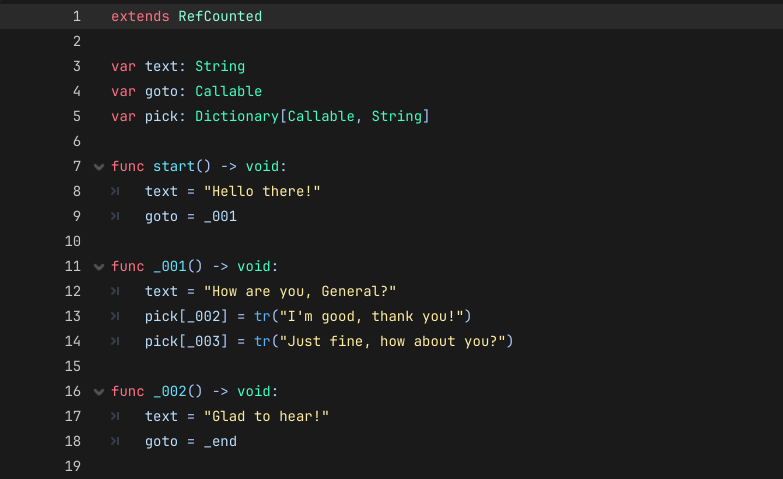
Hello. I made a little demo project where I whipped up a dialogue system using Callables as “nodes”. I got inspired in part by Godoversation and in part by how Ren’Py does things.
It’s also designed to work with the default translation parser, so you won’t have to write your own to extract the strings.
I actually wouldn’t want the tr() calls. I do localization through a CSV, and I use Labels. If you use SCREAMING_SNAKE_CASE for your text, Godot automatically pulls the translation from the appropriate translation file for you and replaces it in the Label.
I’m happy to answer any questions. I figured it wouldn’t do to just copy-paste what I’ve already written on Github, especially since if someone’s interested, they’ll probably want to check the repo anyway.
Control nodes will automatically translate their text if a translation is available. The main reason tr() is used in the screenshot example is to tell the translation parser to grab said strings, so you don’t have to manually add them to your translation file.
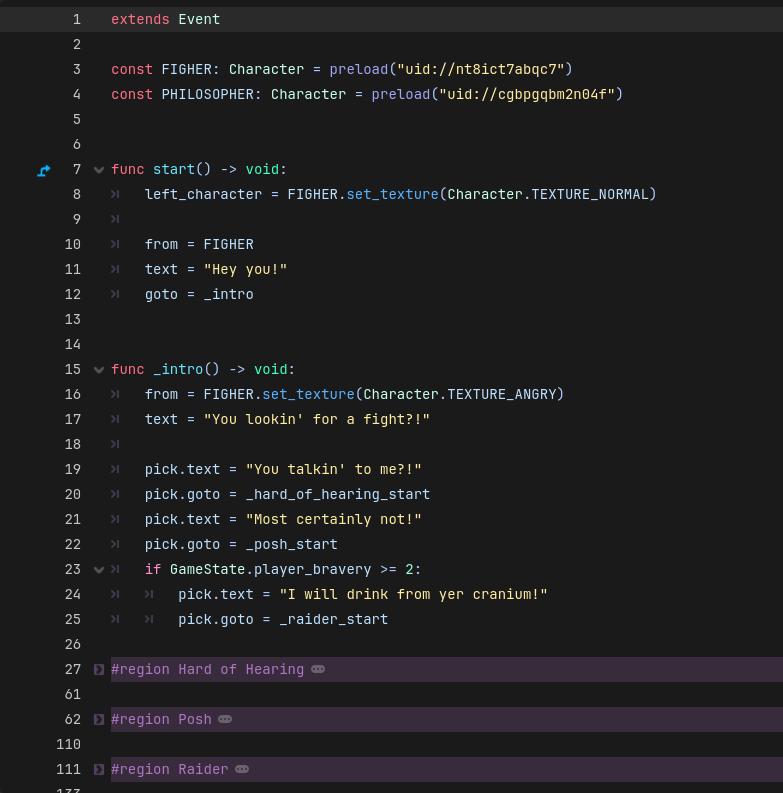
The GDScript Translation Parser will also grab any string assignments to properties called text, or arguments from set_text() methods (as well as tr(), tr_n(), atr(), atr_n()). That is why tr() is only used for the dictionary assignments.
It also works with CSV keys and, since Godot 4.6, you can also automatically generate the CSV translation file. tr(“GREETING“) will correctly return the corresponding value based on locale/settings, and will extract “GREETING” as a key.
In the demo project, I use an object which has a text property for the choices, which means no tr() calls are needed for template generation:
If you go to Project → Project Settings → Localization → Template Generation, you can choose which files in your project contain strings that should be translated.
Let’s say you have a menu scene which has 4 buttons with the text set to:
“New Game”, “Load Game”, “Options”, “Quit Game” if you are using Gettext
“MENU_NEW”, “MENU_LOAD”, “MENU_OPTIONS”, “MENU_QUIT” if you are using CSV
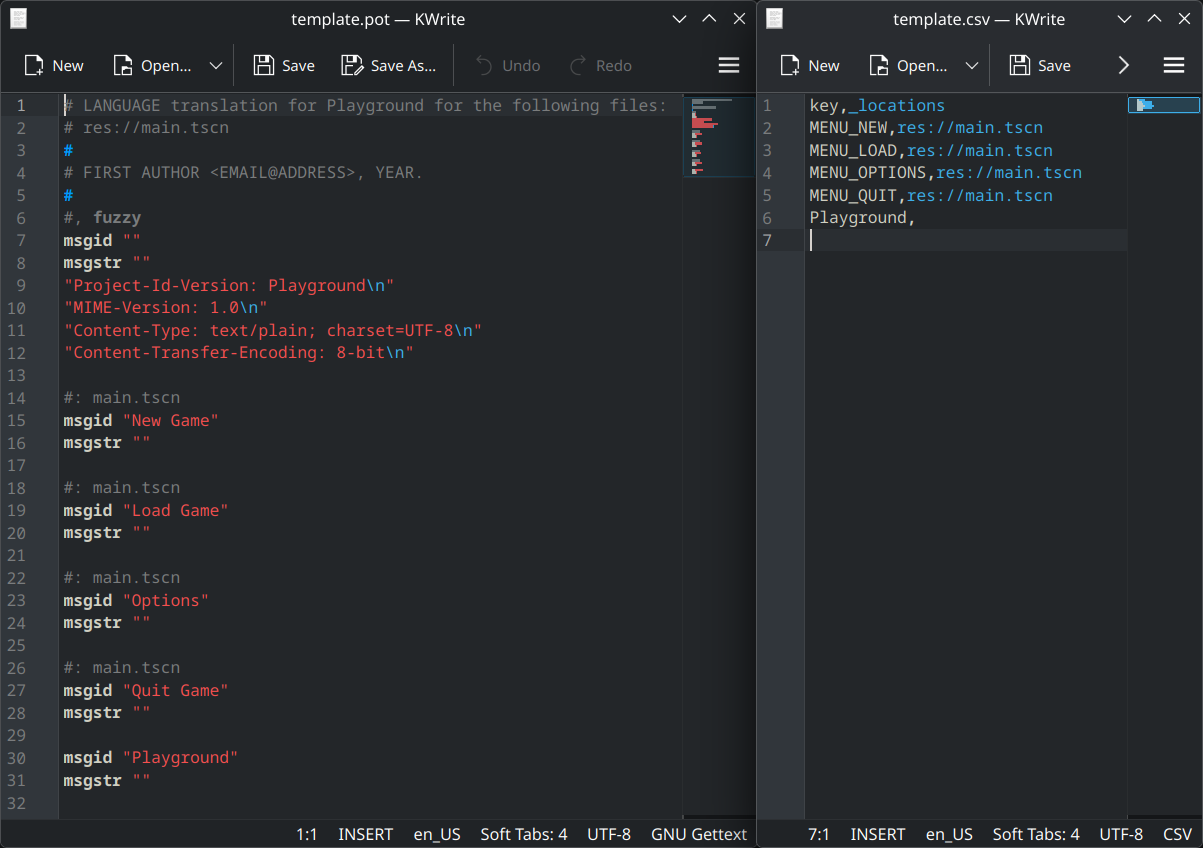
You then select the scene file in the template generator, and it will automatically grab all those strings/keys and put them into either a .pot file or a .csv file like so:
“Playground” is the name of the project in this case. Those are the files that will collect all the translatable strings from your project. You would then translate those files into your target languages, and import the translations back into your project.
In this case, those strings were already set on the Buttons, so they were grabbed automatically because they are part of Control nodes (here’s the PackedScene parser if you want to see what it looks for).
If you have strings in your script that you also want to be extracted and added to those files, you either have to use tr(), or assign them to a variable/property called text:
var shop_sign: String = "All are welcome at The Prancing Pony"
# This will NOT get added to the file

var shop_sign: String = tr("All are welcome at The Prancing Pony")
# This will

var text: String = "All are welcome at The Prancing Pony"
# This will
Once you have a translation imported, Control nodes will automatically check if their text has an available translation. If it does, they will automatically use it. That is not the case for scripts:
var text: String = "I wish the Ring had never come to me"
# This got added to the generated translation file because
# of the variable name. However, even though there is a
# translation available for this string, it will not be
# automatically translated.

var text: String = tr("I wish the Ring had never come to me")
# This will be correctly translated
If you were to assign the first string to a Control node, however, it would get translated without you having to call tr(). That’s what I meant when I said Controls automatically translate their text. They basically call tr() for everything you assign to their text.
If by “automatically translate” you mean extract all the strings to a file that you can then translate yourself, then yes: Translations - Dialogic 2 Documentation
As for the requirements you’ve mentioned, arguably all of them are solved by keeping dialogue in scripts:
Using the entire editor seems like it would tick those boxes.
There are multiple ways of approaching this, but in keeping with how the demo does things, you could add a wait: float property, which could work something like this:
func _battle_conclusion() -> void:
    text = "That's it... we..."
    wait = 1.5
    goto = _abandon_ship

func _abandon_ship() -> void:
    text = "...we've lost. The ship is lost! Every man for himself!"
    goto = _end
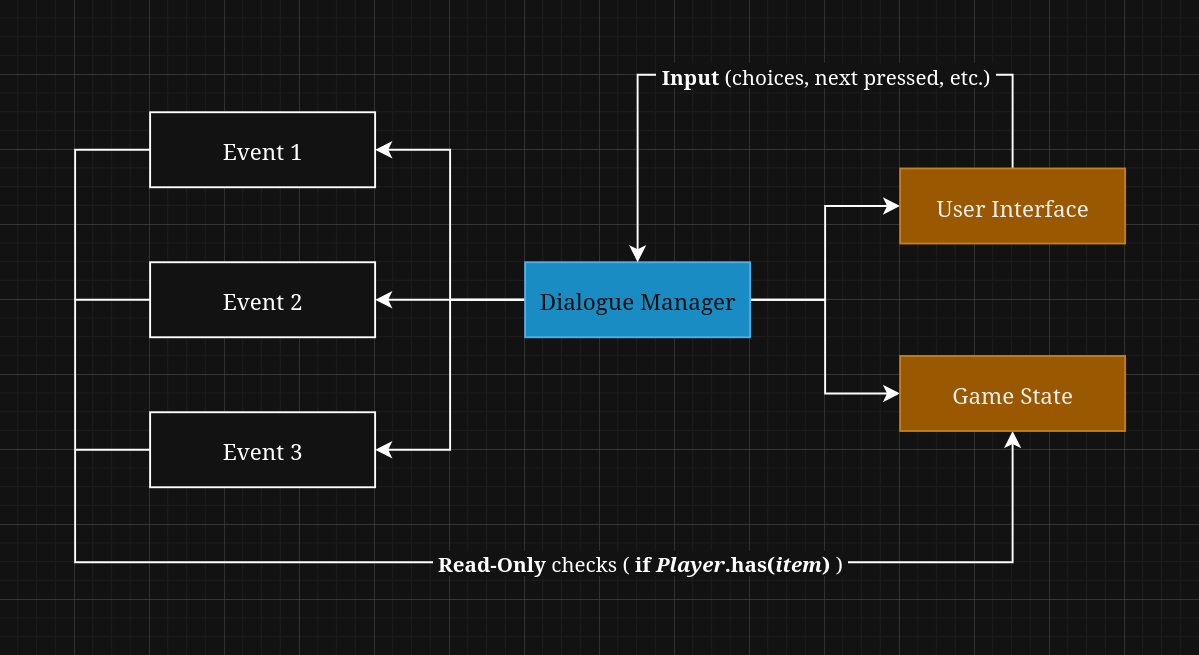
How you would handle this is up to you. Since all those script files are essentially just property assignments, the real logic of the system happens in the manager.
So you could check if after you call a function, there’s a delay (wait != 0.0). If there is, start a timer. When you call the next function, you append instead of replace the text in the UI. You’d have to call tr() in the manager in that case, because those will be concatenated strings (so no one translation will fit).
Since you are writing scripts, you can literally do anything you can think of. Ask for input, display buttons, etc.
You can structure things in two ways:
The dialogue script only modifies its own state, and lets the manager handle project-wide side effects, in which case the script signals/sets a property when it wants to do something (like take user input, play a song, and so on).
You directly modify things via the script itself. You could even pass in UI references and handle everything right there (dependency injection).
In general, I would say the first option is the better choice. It requires a bit more abstraction, because you can’t just go:
You don’t have to do it like this. You’re essentially building your own dialogue system from scratch, you can decide what it should or should not do.
My only claim is to consider using functions as dialogue nodes, as opposed to JSON, YAML, or other common solutions (especially if you are the only one working on your project), because it’s arguably easier (if you’re looking to build your own system).
You don’t have to write your own parser to extract translations, and you get the benefit of having auto-complete, type safety, etc.
Regarding the drawbacks mentioned, you’d most likely have a “dialogue/event” directory where you store those files. Depending on how your game is structured, you could have multiple of the following directories:
events/main_quests/*.gd
events/side_quests/*.gd
events/random_encounters/*.gd
events/act_1/*.gd
[ . . . ]
That doesn’t seem all that cluttery. As for “portability”, I’m not quite sure what that means here.
Well then your method seems to satisfy the abstract list of requirements, although perhaps theres a bit of work to fix the GUI up. Animation player can also sequence events.
The big plus is obviously the translation of strings, as the method you have described for dialogic seems confusing and hectic.