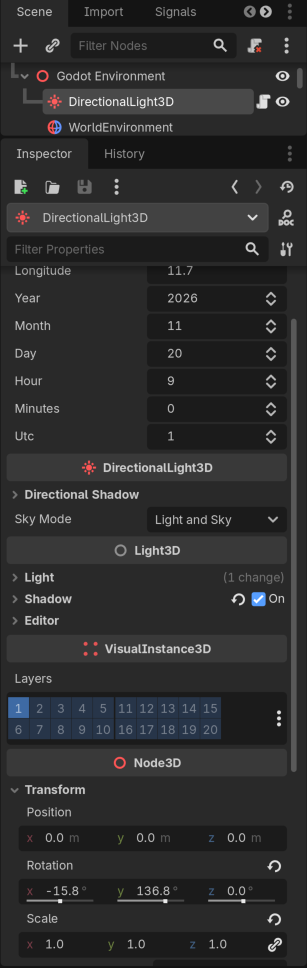
@hatmix @normalized thank you for your suggestions! @export with setters did the trick. The only caveat is that, since angles must be computed from all inputs, I have to call the same setAngles function from all setters. This is how things look like now:
@tool
extends DirectionalLight3D

var angles : Vector2
@export var latitude : float = 42.5:
	set(value):
		latitude = value
		setAngles(year,month,day,hour,minutes,UTC,latitude,longitude)
@export var longitude : float = 11.7:
	set(value):
		longitude = value
		setAngles(year,month,day,hour,minutes,UTC,latitude,longitude)
@export var year : int = 2026:
	set(value):
		year = value
		setAngles(year,month,day,hour,minutes,UTC,latitude,longitude)
@export_range(1,12) var month : int = 11:
	set(value):
		month = value
		setAngles(year,month,day,hour,minutes,UTC,latitude,longitude)
@export_range(1,31) var day: int = 20:
	set(value):
		day = value
		setAngles(year,month,day,hour,minutes,UTC,latitude,longitude)
@export_range(8,22) var hour : int = 9:
	set(value):
		hour = value
		setAngles(year,month,day,hour,minutes,UTC,latitude,longitude)
@export_range(0,59) var minutes : int = 0:
	set(value):
		minutes = value
		setAngles(year,month,day,hour,minutes,UTC,latitude,longitude)
@export_range(-11,11) var UTC : int = 1:
	set(value):
		UTC = value
		setAngles(year,month,day,hour,minutes,UTC,latitude,longitude)