Godot Version
4.7
Question
My girlfriend and I have been making a 2D game since late July, and I’m working a lot on the UI right now, to make everything be navigated by a keyboard and a console controller.
By just looking at all the Control node properties and docs, I have discovered today that there is a way to link the neighbors in all directions, so you can have an easy keyboard navigation, and I loved that! And overall, it’s working quite well.
But there is a big visual problem: for example, when I am focused on the first scroll. If I scroll to the right, the value gets higher, but if I scroll to the left, the value lowers AND the visual focus goes to the node at the bottom. And that happens to every other Node, and I simply don’t understand what I did or what happened…
I’m linking a short video showing my problem, and at the right of the screen you can see the actual index that is selected (0 to 2).
I’d be glad if someone helped me with this!
(I couldn’t upload the video because it says I’m a new user, but here’s a link with the video instead that I posted on Twitter! Shark Hive on X: "Guys, what do I do? If I press right, the visual focus goes down, if I press left, it goes up 😭 Godot UI has its uniqueness haha" / X )
As asked, here is the Node structure. It is inside a ‘start_menu’ node, with other code. Maybe they are conflicting? (I can’t upload more than 1 image as a new user)
start_menu
|- everything else here
|- settings_menu            #the node I'm in
|  |- music_controls        #a 'list' of the scrolls
|  |  |- Label
|  |  |- master_volume_scroll  #scroll #0
|  |  |- Label2
|  |  |- music_volume_scroll  #scroll #1
|  |  |- Label3
|  |  |- sfx_volume_scroll  #scroll #2
|  |- hovering_label   #the label to show the current scroll number
This is the master_volume_scroll configuration. No mouse can use it, and I linked its bottom neighbor, and also set the two other modes, just as the other 2 scroll nodes:
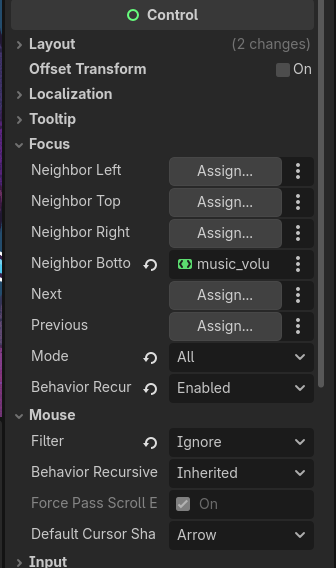
This is the whole code of the ‘settings_menu’, with some adjustments to not show all:
extends Control

var hovering_scroll: int = 0
signal is_shown(show: bool)

@onready var master_volume_scroll: HScrollBar = %master_volume_scroll
@onready var music_volume_scroll: HScrollBar = %music_volume_scroll
@onready var sfx_volume_scroll: HScrollBar = %sfx_volume_scroll

func _ready() -> void:
	hide()
    #signal emmited by the parent node to set the master_volume_scroll as the main focused (I saw it in the docs)
	is_shown.connect(set_start_focus)

	$hovering_label.text = str(hovering_scroll)
    #[code to set scroll values here...]


func set_start_focus(shown: bool) -> void:
	if shown:
		master_volume_scroll.grab_focus.call_deferred()

func _input(event: InputEvent) -> void:
	if (event.is_action_pressed("cancel") or event.is_action_pressed("esc")) and visible:
		#just to close the window

    # IMPORTANT CODE STARTS HERE
	if event.is_action_pressed("left") and visible:
		match hovering_scroll:
			0:
				master_volume_scroll.value -= 0.1
				AudioServer.set_bus_volume_db(0, linear_to_db(master_volume_scroll.value))
			1:
				music_volume_scroll.value -= 0.1
				AudioServer.set_bus_volume_db(1, linear_to_db(music_volume_scroll.value))
			2:
				sfx_volume_scroll.value -= 0.1
				AudioServer.set_bus_volume_db(2, linear_to_db(sfx_volume_scroll.value))
	if event.is_action_pressed("right") and visible:
		match hovering_scroll:
			0:
				master_volume_scroll.value += 0.1
				AudioServer.set_bus_volume_db(0, linear_to_db(master_volume_scroll.value))
			1:
				music_volume_scroll.value += 0.1
				AudioServer.set_bus_volume_db(1, linear_to_db(music_volume_scroll.value))
			2:
				sfx_volume_scroll.value += 0.1
				AudioServer.set_bus_volume_db(2, linear_to_db(sfx_volume_scroll.value))

    # change the variable value to use in the match blocks above
	if event.is_action_pressed("down") and hovering_scroll < 2:
		hovering_scroll += 1
	if event.is_action_pressed("up") and hovering_scroll > 0:
		hovering_scroll -= 1
	$hovering_label.text = str(hovering_scroll) #just to see the number

	SaveLoad.save_to_file() #save the volume in a save file
Maybe my problem is that I have to save the settings_menu and the scrolls as different screnes? Well, if it is needed anything else, tell me 
