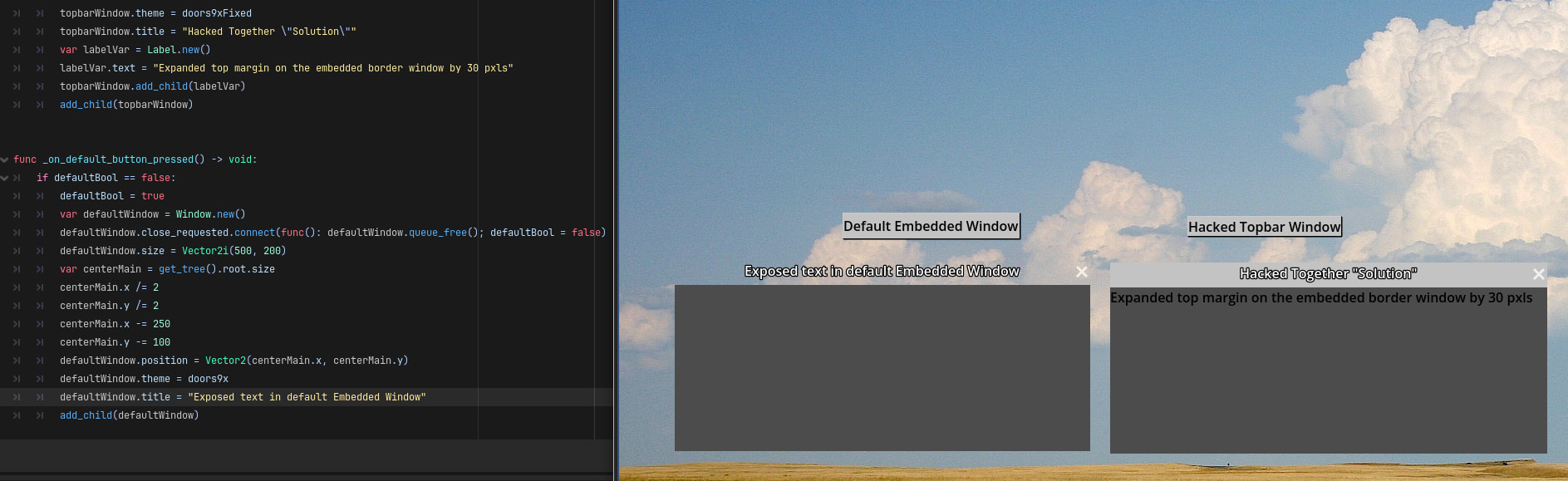
So, my game is going for a “retro PC” type of feel, and as such I was hoping to avoid using the player’s native Window Manager as much as possible by using embedded windows in Godot. I’m glad that embedded windows are available, but the problem I’m having is that embedded windows don’t have a top bar/navbar native to them.
In my prototype, which can be found here, I solved this problem by setting expand_margin_top to 30, thus making the close button and the window’s title both have a background. This prototype solution works since I only have a single theme that the user can access, but for my full game I am hoping to have multiple themes the user can select from.
My question is, is there a way I could create a class that extends window and has a top bar that’s customizable using the Theme editor? I really truly do not want to open an issue in the Godot engine repo proper and learn the engine’s linting, proper integration, and other such stuff to create a simple top bar for embedded windows. I will if that’s the only option, but I’d rather not.
Thank you for reading and big thank you for any responses received.
I’m not sure I understand.
Godot has the Window class that can be used to create a window.
The Window can use a theme style from the theme.
It also interacts with Control nodes. If your first Control node has the theme, all children will inherit it, including windows.
You can then use theme_type_variations for different window styles.
You can also inherit from Window with: extends Window
and add your own code and even change the theme_type_variation from code.
Now, the window has limitations, the top bar cannot have more than a close button, and that doesn’t support things like hover.
The thing window does is allow to move it and resize it with the mouse, which no other control can, but it will eat up all inputs, which is annoying. I’m currently fighting it and thinking about creating a custom node instead, and even going to the proposals too.
For this the idea was to create two new nodes, one extending Container to resize, and on extending something like Panel to drag around. Both of these can be made with gdscript, but it’s a bit of work.
If you don’t need to move and resize it, you can just use panels and buttons:
The problem is that the embedded windows don’t actually have a “top bar.” The window’s title text as well as the close button are not given any background, just free floating text and button. Hence my question, and the solution I’m looking for. I hope your custom panel works out, but I kind of need a window top bar for the congruence of my game. That said, I might be able to cobble something together using inheritance from the base window class, since my game is not time sensitive for inputs and as such lag/chugging for a couple of frames during window generation will be more easily ignored by my player base.
Ugh, I guess I should implement a similar solution to yours. Thank you for your help, and I hope your panel solution works out!
Here is an example of what I am talking about. I don’t know how to make this any clearer. Normally when people interact with programs they expect contained windows, not free floating text
What makes the right side a hacked together solution? This looks like it’s all running within Godot, the applied Theme is different, presumable with the mentioned 30px expand margin. So far this seems satisfactory, what about it breaks down and fails you?
it’s hacked together because certain desktops I’ll be emulating the style of allow for the top bar of the window to be a different colors and this solution feels like bad practice to be honest
I just want to know if it’s possible to create a node class with both an embedded window and, say, a label that could be stylized in the theme editor. This is because I want my players to be able to select what popular OS stylization they want for the GUI. Such as Windows 9x, Windows 7, Mac OSX, etc.
I think Window nodes will inherit their parent’s theme, if you change the parent theme to 9x/7/OSX then it will propagate down to child nodes. I feel like you’d only need a few themes for each style of operating system, and only a few nodes would hold such themes, if not (and at worst) you could use groups to swap the theme on every Control/Window node.
If you mean some specific windows will have a different color than others, like an Alert popup having a red border versus a file browser with a blue border for example; then I’d recommend making theme Type Variations or Overrides.
Marking your last message as the solution. I figure I can use labels/colorRects/etc. to construct the top bars I want and instantiate both in a compound class