Godot Version
4.5
Question
I am trying to make a raycast vehicle using this tutorial:
https://www.youtube.com/watch?v=9MqmFSn1Rlw
In the tutorial, they put a speed cap on the vehicle, but I need a vehicle which can go faster.
Using the basic suspension, I made a test car, but the car slowly gets pushed into the ground (loses suspension force) when going fast (not accelerating or anything). The springs also clip into the ground, as shown by the wheels, which are fixed to the springs.
I have done testing with the built-in VehicleWheel3D and they don’t have this problem at all. Increasing physics ticks per second does help but doesn’t fix it completely (it still does the same thing, just at higher speeds). How can I fix this?
Here’s a demo of the problem:
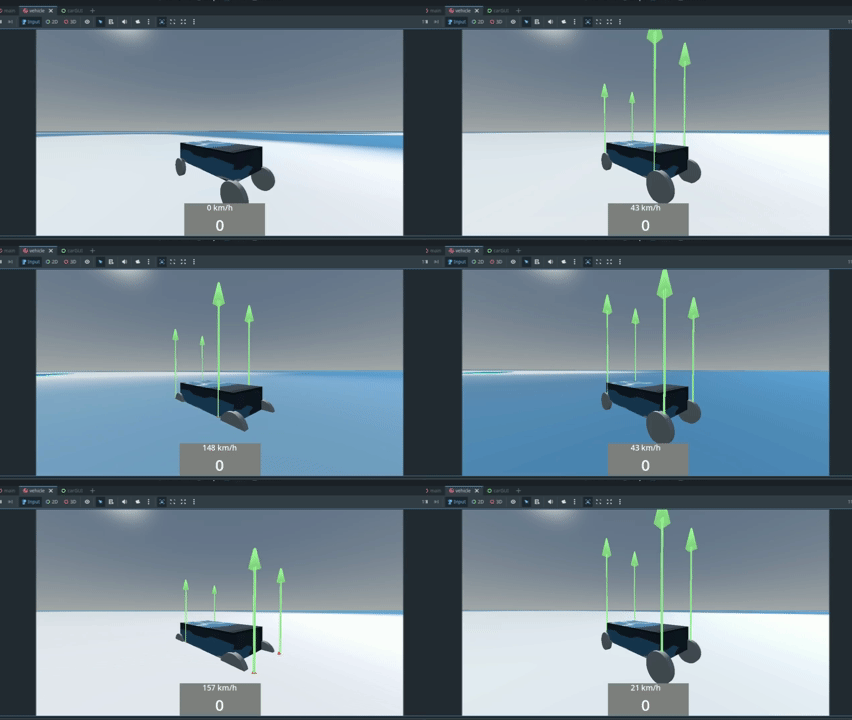
Here’s my code of the raycast vehicle:
extends Node3D

@export var wheels: Array[RayCast3D]

@onready var car := get_parent()

# Called when the node enters the scene tree for the first time.
func _ready() -> void:
	set_raycasts_length()

func do_all_wheels_suspension() -> void:
	for i in wheels.size():
		var wheel = wheels[i]
		do_single_wheel_suspension(wheel)

func set_raycasts_length() -> void:
	for wheel in wheels:
		wheel.target_position.y = -wheel.rest_length

func get_point_velocity(point: Vector3) -> Vector3:
	return car.linear_velocity + car.angular_velocity.cross(point - car.global_position)

func do_single_wheel_suspension(wheel: RayCast3D) -> void:
	if wheel.is_colliding():
		var contact_point : Vector3 = wheel.get_collision_point()
		var spring_up_dir : Vector3 = wheel.global_transform.basis.y
		var spring_length : float = wheel.global_position.distance_to(contact_point)
		var offset : float = wheel.suspension_max_travel - spring_length

		var world_velocity : Vector3 = get_point_velocity(contact_point)
		var relative_velocity : float = spring_up_dir.dot(world_velocity)

		var damping_force : float = wheel.suspension_damping * relative_velocity
		var spring_force : float = wheel.suspension_stiffness * offset

		var force_vector : Vector3 = (spring_force - damping_force) * spring_up_dir
		car.apply_force(force_vector, wheel.get_collision_point() - global_position)

		DebugDraw3D.draw_arrow_ray(wheel.get_collision_point(), force_vector, 0.05, Color(0,0,0,0), 0.1)

		for node in wheel.get_children():
			node.position.y = -spring_length + wheel.radius
	else:
		for node in wheel.get_children():
			node.position.y = -wheel.rest_length + wheel.radius
(I call do_all_wheels_suspension() in the main car node)