i got a really weird bug happening with me, it will be long so sit down
for a project of mine i decided to make a custom StyleBox to help it with the theme of the game, mainly to take control of the drawing process, because i wanted to be able to choose a color for the background without having to edit the image directly and put a new variant with a different color
this it what it should look like:
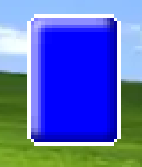
this stylebox that i made is composed of 2 parts, the background, and the shading and lighting effect, the color blue is replaced by the color that i pick in the inspector.
heres how the workflow should be like:
the material for the background gets created and initialized, it is used to hold the shader, the shader searches for the color blue and replaces it with the desired color:
const DYNAMIC_COLOR_SHADER = preload(“uid://xq4y0vuhhmwq”)

static var BACKGROUND_MATERIAL := ShaderMaterial.new()


static func _static_init() → void:
    BACKGROUND_MATERIAL.shader = DYNAMIC_COLOR_SHADER
    BACKGROUND_MATERIAL.set_shader_parameter("mask_color", Color.BLUE)
a canvas item for the background is created (and its auto-freed in NOTIFICATION_PREDELETE), this is where the material gets applied:
@export var background_color: Color:
	set(new_color):
		background_color = new_color
		RenderingServer.canvas_item_set_instance_shader_parameter(
			background_ci,
			"paint_color",
			background_color
		)

var background_ci: RID = RenderingServer.canvas_item_create()

func _init() → void:
    RenderingServer.canvas_item_set_material(background_ci, BACKGROUND_MATERIAL)

func _notification(what: int) → void:
    if what == NOTIFICATION_PREDELETE:
        RenderingServer.free_rid(background_ci)
finally the drawing happens, this is the part where i struggled so maybe i will have to write some pseudocode here:
func _draw(to_canvas_item: RID, rect: Rect2) -> void:
    RenderingServer.canvas_item_add_nine_patch(
		background_ci,
		rect,
		Rect2(Vector2.ZERO, PANEL_BACKGROUND.get_size()),
		PANEL_BACKGROUND,
		MARGIN,
		MARGIN
	)

    # draw the background into 'to_canvas_item'

	RenderingServer.canvas_item_add_nine_patch(
		to_canvas_item,
		rect,
		Rect2(Vector2.ZERO, PANEL_SHADING.get_size()),
		PANEL_SHADING,
		MARGIN,
		MARGIN
	)
and that should be it, but godot has thrown me into some weird issues, especially when trying to use the canvas item for the background into the to_canvas_item
a solution that i found would be to draw everything into to_canvas_item:
func _draw(to_canvas_item: RID, rect: Rect2) -> void:
	RenderingServer.canvas_item_add_nine_patch(
		to_canvas_item,
		rect,
		Rect2(Vector2.ZERO, PANEL_BACKGROUND.get_size()),
		PANEL_BACKGROUND,
		MARGIN,
		MARGIN
	)

    RenderingServer.canvas_item_add_nine_patch(
	    to_canvas_item,
	    rect,
	    Rect2(Vector2.ZERO, PANEL_SHADING.get_size()),
	    PANEL_SHADING,
	    MARGIN,
	    MARGIN
    )
that works but i lose the main point that i trying to achieve, the ability to pick any color for the background, i use the background_ci to only apply the material to the background, maybe i could apply the material into to_canvas_item but i maybe it could cause some issues so i didn’t do it
the first try at this was to set the parent of the background_ci and clear at every call of _draw:
RenderingServer.canvas_item_clear(background_ci)
RenderingServer.canvas_item_set_parent(background_ci, to_canvas_item)
but it didnt work, when i select it the background turns invisible but the shading appears, but when i move it the background appears but the shading does not:
when i select it when i move it
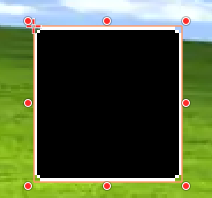
(hope you guys are willing to discover how to fix it, this is a super weird bug to me)
one more detail:
when doing something similar to this in one of my attempts:
if previous_parent != to_canvas_item:
	print("New parent: ", to_canvas_item)
	previous_ci = to_canvas_item
when i click it and it enters the selected mode, it prints 2 canvas items, and it appears that those are created for this because the rid is never the same, when i move it for the first time a new canvas item also appears, but this time is the same rid each time
maybe this wont matter but maybe its better to talk about it