Question
Not sure where the best place is to ask this but… i made several Dialogic character and timeline files. i don’t like what i named them or where i saved them. Unlike normal Godot files, there is no rename option i’ve been able to find and if i move a Dialogic file then Dialogic breaks. Is there a way to move/rename things in Dialogic or do i need to recreate those files?
you would probably have to edit the desired files in your file explorer manually, and then search for those instanced names and match them again exactly wherever it breaks.
I think this question is better suited for the Dialogic Discord server, as this isn’t really a Godot question, it’s a question regarding a specific addon.
i never found a good place to ask this question but i did figure out how to do this, which has been a lifesaver.
First, my original mistake was moving and renaming them outside the IDE. If i had moved/renamed the files inside the Godot IDE then Dialogic would have kept up with the changes.
Second, Dialogic’s timelines and characters use an indirect reference to a file. If you have a file named Alice, it creates an ID named Alice and the timelines and characters use that. If you rename Alice to Bob, the timeline and characters still refer to Alice. And as long as Dialogic knows its internal Alice ID maps to the Bob filename, everything is good.
And if it’s not, Dialogic has a reference editor with two screens. Which i could not find until ChatGPT of all people told me about it.
It’s the weird icon to the right of the New Timeline / New Character buttons. Click that and you get two screens:
- Unique Identifiers. Shows you the mapping of IDs to files. On the left are files Godot knows about (i assume because of the
.uid files it creates) and the corresponding Dialogic ID, which you can edit.
- Broken References. After you change and ID, the Broken References screen will show you what you’ve changed recently and let you search (Check Selected) to see if any Dialogic resource was using the old ID (and might therefore now be broken).
i’ve had a lot fewer problems now that i’ve figured this out.
The one little thing: If you move or rename a file it will no longer show up in the Dialogic resource list, making it a pain to edit. Here’s what i’ve learned about that:
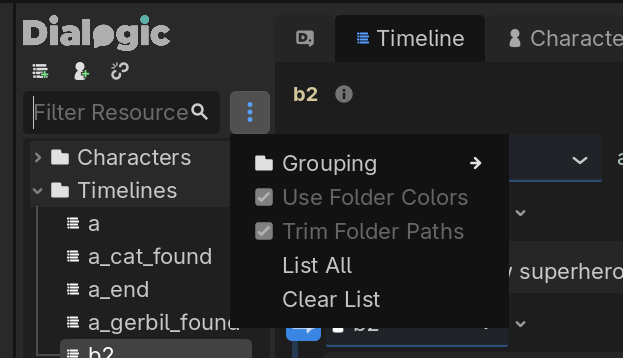
- You can force them to show up (one time) by clicking the 3 dots next to the Filter Resource box and picking List All.
- You can double click on the item in the Godot file list and Dialogic will open it.
- For timelines you can open them in Notepad and edit them there, which is a hack but has turned out to be waaaaay more efficient for me for various, maybe game-specific reasons (i have hundreds of these files and benefit from autogenerating them). You can also edit the character files but those have a specific format you need to follow. The timelines in contrast are super easy.
Hope this helps someone else someday.