im new to godot. ive tried searching for answers, cant find it, maybe searching for the wrong thing, but basically theres hidden panels with labels, and i want for one of them to appear when button is pressed, then when the same button is pressed again, i need for another one to appear, and so on. ive tried adding $Panel.show() to on button pressed function, but all of them appear at the same time then.
It’s very difficult to know for sure without seeing any code or your scene tree, but I would probably create an array of Control items (whatever it is you need to show) as an @export, put them in, and keep a counter of which one you showed last time.
For example, you keep an int of currentIndex, when a button is pressed, you can do: array[index].visible = true, then increment that value. Make sure you check for out of range values, so always do a check of how long the array is.
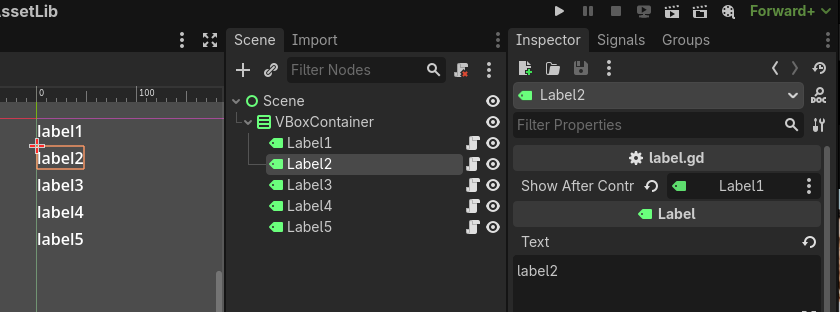
Alternative way to what @tibaverus suggested would be to have this script on all Control nodes you want show in sequence
extends Control

@export var show_after_control: Control

func _ready() -> void:
	hide()

func _unhandled_input(event: InputEvent) -> void:
	if event.is_action_pressed("ui_accept"):
		if (show_after_control == null or show_after_control.visible) and not visible:
			show()
Then you just need to assign the controls in the inspector which one should be showing after which one control.