Godot Version
Godot 4.7.1
Question
I've been trying to create a system to generate a dungeon in Godot. I've tried so many different methods but I can't get it working how I want it to.
I want to create a line of Godot icons that resembles a dungeon.
This is what it can do so far:
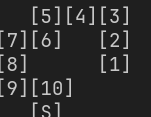
It creates a line like this at random inside the terminal, and I’m trying to translate it into an actual physical dungeon.
This is what the output is:
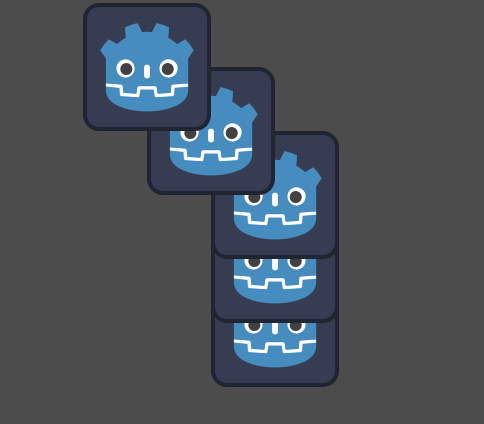
This is the code:
extends Node2D
class_name dungeonGen

@export var dimensions : Vector2i = Vector2i(8, 5)
@export var start : Vector2i = Vector2i(-1, 0)
@export var path_length : int = 10
var dungeon : Array
var room_scene : PackedScene = load("res://Scenes/room_test.tscn")


func _ready() -> void:
	initialize()
	place_entrance()
	generate_path(start, path_length)
	print_dungeon()


func place_entrance() -> void:
	if start.x < 0 or  start.x >= dimensions.x:
		start.x = randi_range(0, dimensions.x-1)
	if start.y < 0 or  start.y >= dimensions.y:
		start.y = randi_range(0, dimensions.y-1)
	dungeon[start.x][start.y] = "S"


func initialize() -> void:
	for x in dimensions.x:
		dungeon.append([])
		for y in dimensions.y:
			dungeon[x].append(0)


func generate_path(from: Vector2i,length: int) -> bool:
	if length == 0:
		return true
	var current : Vector2i = from
	var direction : Vector2i
	match randi_range(0, 3):
		0:
			direction = Vector2i.UP
		1:
			direction = Vector2i.DOWN
		2:
			direction = Vector2i.LEFT
		3:
			direction = Vector2i.RIGHT
	for i in 4:
		if (current.x + direction.x >=0 and current.x + direction.x < dimensions.x
		and current.y + direction.y >= 0 and current.y + direction.y < dimensions.y and
		not dungeon[current.x + direction.x][current.y + direction.y]):
			current += direction
			dungeon[current.x][current.y] = length
			if generate_path(current, length - 1):
				return true
			else:
				dungeon[current.x][current.y] = 0
				current -= direction
		direction = Vector2i(direction.y, -direction.x)
	return false


func print_dungeon():
	var dungeon_as_string : String = ""
	var rooms : int = 0
	for y in range(dimensions.y - 1, -1, -1):
		var thing = room_scene.instantiate()
		for x in dimensions.x:
			if dungeon[x][y]:
				add_child(thing)
				thing.position = Vector2(x * 64, y * 64)
				dungeon_as_string += "[" + str(dungeon[x][y]) + "]"
			else:
				dungeon_as_string += "   "
		dungeon_as_string += '\n'
		rooms += 1
	print(dungeon_as_string)
	print(rooms)
On line 69(nice), it gives me an error that says: Can’t add child ‘@Node2D@2’ to ‘Node2D’, already has a parent ‘Node2D’
can anyone help me with this?