Godot Version
Godot v4.1.1
Question
I am trying to create a 2D puzzle game that splits the screen into an area on the left with controls and an area on the right where the puzzle actually appears. I have been able to do this by adding various panels, margin containers, and hbox containers into the scene:
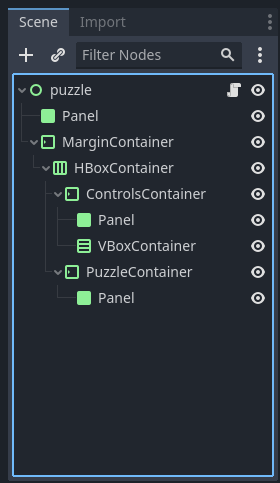
Once those objects are added to the scene, I am able to set the size and color of those panels through code. So far, so good.
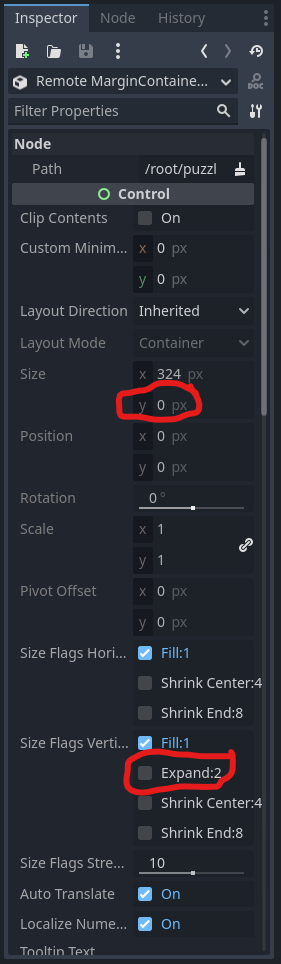
However, in the control area on the left, I want to have a vertical stack of different controls. And different puzzles will have different numbers of controls stacked in that area. So, instead of manually adding a set number of margin containers and panels to a vbox container, I want to dynamically create them through code and dynamically set their size and color through code. However when I do this, the dynamically created objects don’t display.
Here’s the code I have (stripped to the relevant parts). In the sample code I try to dynamically create two margin containers as child nodes of the vbox container and dynamically give those margin containers panels as children. I then set the margin containers’ size and the panels’ colors the same way I did the two windows:
extends Control

@onready var h_box_container = $MarginContainer/HBoxContainer as HBoxContainer
@onready var margin_container = $MarginContainer as MarginContainer
@onready var controls_container = $MarginContainer/HBoxContainer/ControlsContainer as MarginContainer
@onready var puzzle_container = $MarginContainer/HBoxContainer/PuzzleContainer as MarginContainer
@onready var outline_panel = $Panel as Panel
@onready var controls_panel = $MarginContainer/HBoxContainer/ControlsContainer/Panel as Panel
@onready var puzzle_panel = $MarginContainer/HBoxContainer/PuzzleContainer/Panel as Panel
@onready var v_box_container = $MarginContainer/HBoxContainer/ControlsContainer/VBoxContainer as VBoxContainer

var _outline_thickness = 5
var _controls_area_ratio = 2
var _puzzle_area_ratio = 5
var _outline_color = Color.YELLOW
var _control_area_background_color = Color.BLUE
var _puzzle_area_background_color = Color.RED

func _ready():
	# This is the part where I can successfully use code to set the size and
	# color of the UI objects built into the scene
	margin_container.add_theme_constant_override("margin_top", _outline_thickness)
	margin_container.add_theme_constant_override("margin_bottom", _outline_thickness)
	margin_container.add_theme_constant_override("margin_left", _outline_thickness)
	margin_container.add_theme_constant_override("margin_right", _outline_thickness)
	h_box_container.add_theme_constant_override("separation", _outline_thickness)
	controls_container.size_flags_stretch_ratio = _controls_area_ratio
	puzzle_container.size_flags_stretch_ratio = _puzzle_area_ratio
	outline_panel.modulate = _outline_color
	controls_panel.modulate = _control_area_background_color
	puzzle_panel.modulate = _puzzle_area_background_color

	# This is where I try unsuccessfully to dynamically create new UI objects
	# through code and set their size and color
	var control_1_container = MarginContainer.new()
	var control_1_panel = Panel.new()
	var control_2_container = MarginContainer.new()
	var control_2_panel = Panel.new()
	v_box_container.add_child(control_1_container)
	control_1_container.add_child(control_1_panel)
	v_box_container.add_child(control_2_container)
	control_2_container.add_child(control_2_panel)
	control_1_container.size_flags_stretch_ratio = 10
	control_2_container.size_flags_stretch_ratio = 20
	control_1_panel.modulate = Color.WHITE
	control_2_panel.modulate = Color.BLACK
And here’s what it looks like when I launch the scene:
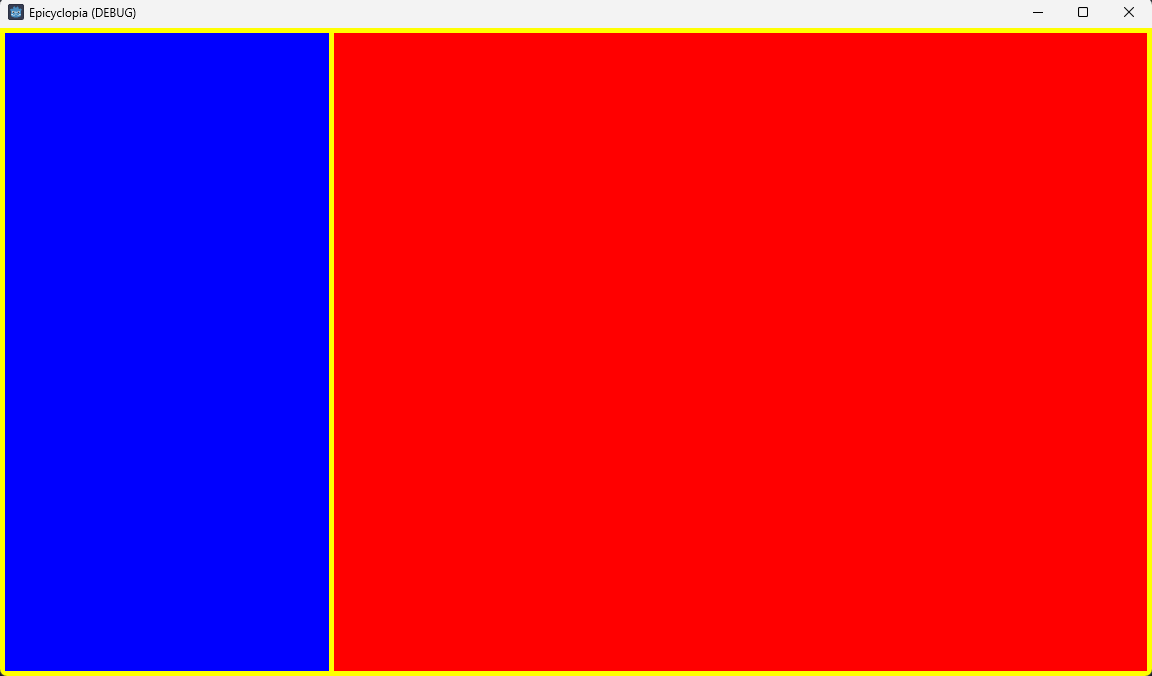
So, while all the objects that were manually added to the scene are able to get their size and color set through the code, the objects created through the code itself don’t show up at all.
What do I need to do to get those dynamically created objects to show up on the screen and to set their size and color through code?