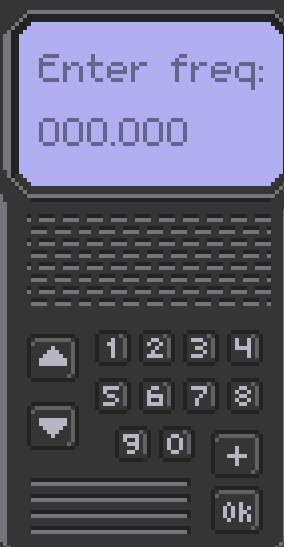
How would I implement a system where I can enter the frequency using the UI number buttons as shown below? With each digit pressed, one zero on the screen should be replaced by that digit. I tried using the line edit node, but it ended up being a bit of an immersion breaking mess.
#device.gd

var value = 0.0
@onready var multiplier = 1000.0 # So that the first place will actually be the 100s place

func update_value(number: float) -> void:
	if multiplier <= 0.0001: #If all the numbers are filled in
		return
	multiplier = multiplier / 10
	value += number * multiplier
	text = "Enter freq: %6.3f" % [value] #6.3f means six places total and 3 are after the decimal
#button.gd

@export var device: Control
@export var number: float  = 1.0


func _ready() -> void:
	pressed.connect(_on_button_pressed)


func _on_button_pressed() -> void:
	device.update_value(number)
You are correct. I wrote all that code on here. I didn’t test it. I caught myself using float as a variable in one place but not the other. Apologies. I fixed my previous post. If that worked for you, please mark the post as the solution to help others find it in the future when googling.