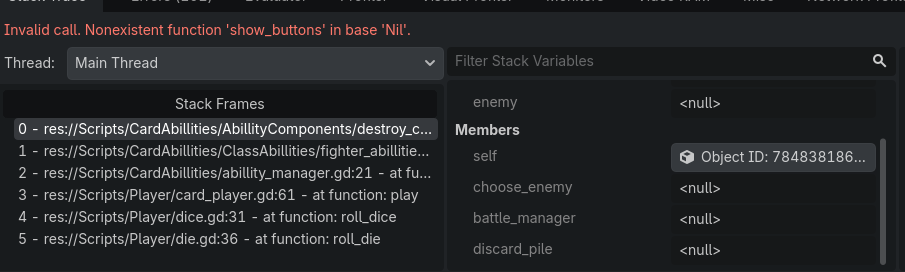
Hello, so I have this problem with @onready when I try to instantiate the “destroy_card” ability.
What is happening: ChooseEnemy, DiscardPile and BattleManager remain null after add_child() so when destroy_multiple_cards() is called I get an error saying that I cannot call choose_enemy.show_buttons() on ‘Nil’.
extends ClassAbillities

class_name FighterClass

const DESTROY_CARD_SCENE = "res://Scenes/Abillities/DestroyCard.tscn"

const NUMBER_OF_CARDS_TO_BE_DESTROYED: int = 2

func use() -> void:
	var abillity_scene: PackedScene = preload(DESTROY_CARD_SCENE)
	var destroy_card: DestroyCard = abillity_scene.instantiate()

	add_child(destroy_card)

	destroy_card.destroy_multiple_cards(NUMBER_OF_CARDS_TO_BE_DESTROYED)


extends Node

class_name DestroyCard

@onready var choose_enemy: ChooseEnemy = $GameLogic/ChooseEnemy
@onready var battle_manager: BattleManager = $GameLogic/BattleManager
@onready var discard_pile: DiscardPile = $CardPiles/DiscardPile

func destroy_card(card: Card, enemy: EnemyClass) -> void:
	enemy.remove_card_from_party(card)

	card.animate_card_to_position(card, discard_pile.get_discard_pile_position(), card.DEFAULT_CARD_MOVE_SPEED)

	discard_pile.add_to_discard_pile(card)

func destroy_multiple_cards(number: int) -> void:
	choose_enemy.show_buttons()

	await choose_enemy.any_button_pressed

	var enemy_to_attack: int = choose_enemy.get_button_pressed()

	var enemy: EnemyClass = battle_manager.get_enemy(enemy_to_attack)

	for n in number:
		var random_card: Card = enemy.cards_played_by_opponent.pick_random()
		self.destroy_card(random_card, enemy)
Thanks for the response! But this wasn’t it as I tried multiple times to setup the paths.
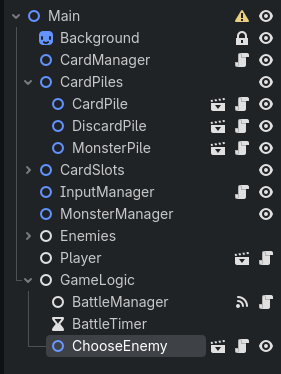
I am not sure if the screenshot below is visible, but there can be seen that the paths are correct according to the place where the node will be added in the tree.
If you come up with any other ideas I would really appreciate to hear them!
So in this method here I call “add_child()” without any other variable before it, and this script is not tied to any scene in the tree. So by my understanding the scene I instantiate will be added to “main” node, that is the root of the project.
Again, as a beginner I might be wrong so correct me if my logic is flawed.
func use() -> void:
	var abillity_scene: PackedScene = preload(DESTROY_CARD_SCENE)
	var destroy_card: DestroyCard = abillity_scene.instantiate()

	add_child(destroy_card)

	destroy_card.destroy_multiple_cards(NUMBER_OF_CARDS_TO_BE_DESTROYED)
If the node is added at the root, giving it a path as “$GameLogic/ChooseEnemy” should work from what I already implemented before. Now by dragging and holding CTRL i get this version:
@onready var choose_enemy: ChooseEnemy = $GameLogic/ChooseEnemy that is exactly the same as I already use.
Could it be that you try to assign choose_enemy a value before there is an available enemy? You have it as an onready but it is not guaranteed that anything is there for the GameLogic to assign. Also, if you want to reuse the variable you could have to reassign a value as the assigned enemy will be destroyed after the first call of destrot_multiple_cards.
Not sure how it is all supposed to work. But I would look closer at the onready and how to reassign a value if needed.
You never add fighter (and the rest of them) to the scene tree, so any @onready initialization in their scripts won’t happen. @onready runs the same time _ready() does - after the addition of the node to the scene tree. If you don’t add the fighter node to the tree, all its @onready vars will be left at default values, which is null for object references.
Looks like you based your whole convoluted system on some assumptions that are not correct. Might require re-thinking and rebuilding the while thing from the ground up.
As a quick fix you could try adding those nodes to the scene tree before calling use()
So even if I instantiate the “destroy_card” scene and fighter only uses it after being added to the root, the @onready annotated variables will still remain with a null value?
I am asking this because the @onready variables are part of destroy_card.gd attached to the scene with the same name, that I try to load and instantiate in the fighter script to used it afterwards.
Sorry if the questions are dumb and repetitive, and thanks again for trying to help so far!
If you instantiate it before you use it and there are no enemies there, the empty ChooseEnemy variable will still remain. You need to set the variable when you use the card instead of in onready.
You create the fighter node via new() but you don’t add it to the scene tree, which techincally makes it an orphan node.
Next you call use() on that fighter node which instantiates the DestroyCard.tscn and adds it as fighter’s child. Now you have a small orphaned branch of nodes. This add_child() won’t trigger ready signal because fighter is not in the main scene tree, so everything in DestroyCard script that relies on the ready state - won’t run. Including all of the @onready assignments.
You can test this by implementing _ready() in DestroyCard:
func _ready():
	print("READY")
If READY is never printed, your @onready initializations didn’t happen as well because they run just before _ready() is entered.
Note that @onready var foo = something is just a shorthand for doing:
Ok so I modified the code so everything has a parent, no more orphan nodes, yet the error persists, and yes it does print “READY” so I am really starting to think I messed up the paths somehow.
Fighter:<Node2D#47462745873>
[Fighter:<Node2D#47462745873>]
Fighter:<Node2D#47462745873> is now being played!
7
By rollign we got: 3
By rollign we got: 6
Roll result is: 9
READY
class_name DestroyCard

var choose_enemy: ChooseEnemy
var battle_manager: BattleManager
var discard_pile: DiscardPile

func _ready() -> void:
	choose_enemy = $GameLogic/ChooseEnemy
	battle_manager = $GameLogic/BattleManager
	discard_pile = $CardPiles/DiscardPile
	print("READY")
But holy moly I never thought about orphan nodes before as a cause. THANKS A LOT!
If READY now prints, then paths are definitely the problem. The paths you assign there are interpreted as relative to the node the script is attached to. So if you’re assigning a path $GameLogic/ChooseEnemy that would mean that the node has a child GameLogic which is clearly not the case.
Yeah the path is $“../../../GameLogic/ChooseEnemy” as from the start destroy_card was a child of fighter that should have been a child of abillity manager that should have been a child of another thing and so on.
I defined abillity manger as it’s own node and now things work. The problem was a combination of paths and orphan nodes.
Thanks a lot, I will note the comment about orphan nodes as a solution!