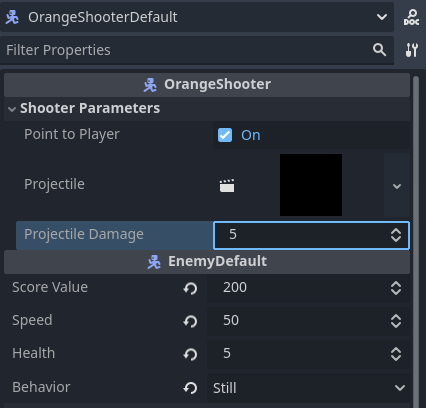
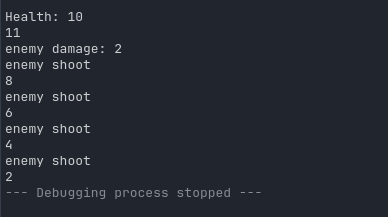
Currently I have an export variable called projectile_damage with a default value of 2 and I am trying to change its value from the inspector so that the spawned projectile has the correct amount of damage assigned to it. However, whenever I run my project, the value is not changed from the default. Here is my code:
extends EnemyDefault
class_name OrangeShooter

@export_group("Shooter Parameters")
@export var point_to_player := false
@export var projectile : PackedScene
@export var projectile_damage : int = 2

@onready var enemy := self
@onready var main = get_tree().get_first_node_in_group("main")

#note: rotation_speed and rotation_time has to be hardcoded otherwise the smooth rotation feature won't work
#properly
var rotation_speed = 0.25
var rotation_time = 0.1
var damage : int

func _ready() -> void:
	$AnimatedSprite2D/AnimationPlayer.play("Charge_And_Shoot")
	player = get_tree().get_first_node_in_group("player")
	#if spawnPos and spawnRot are initialized, then set the position and rotation
	if spawnPos:
		global_position = spawnPos
		#global_rotation = spawnRot
	await get_tree().process_frame
	print("enemy damage: " + str(projectile_damage))


func shoot():
	#spawn in projectile
	var instance = projectile.instantiate()
	instance.dir = rotation + deg_to_rad(180)
	instance.spawnPos = $ProjectileSource.global_position
	instance.spawnRot = rotation + deg_to_rad(180)
	instance.z_index = (enemy.z_index -1)
	instance.target = "player"

	instance.damage = projectile_damage

	instance.add_to_group("enemy_projectiles")
	main.add_child.call_deferred(instance)
	print("enemy shoot")

func _process(delta: float) -> void:
	if point_to_player and is_instance_valid(player):
		#smooth rotate to player
		player_pos = player.global_position
		var direction = (player_pos - position)
		var target_angle = direction.angle() - deg_to_rad(90)
		rotation = lerp_angle(rotation, target_angle, (rotation_speed * delta) / rotation_time)
From my testing, everything works correctly except for the exported variable not changing from its default value since replacing it with a hard-coded value result in the expected behavior. Any idea what could be causing this?
Based on your screenshot, you have the Projectile Damage field highlighted. If you don’t tab off that value, or click off it before saving, it doesn’t get saved. Try changing the value, pressing Tab, then saving, and play again.
@export_group("Shooter Parameters")
@export var point_to_player := false
@export var projectile : PackedScene
@export var projectile_damage : int = 2:
	set(value):
		projectile_damage = value
@onready var enemy := self
@onready var main = get_tree().get_first_node_in_group("main")
Ok, I just implemented the set value for the OrangeShooter class and ran it. I set projectile_damage to 5 within the inspector beforehand and saved the changes but the code is still using the default value. The code is otherwise identical to the post I made earlier.
extends CharacterBody2D
class_name OrangeProjectile

@export var SPEED : float

var damage := 2
var dir : float
var spawnPos : Vector2
var spawnRot : float
var target := "enemy"

func _ready() -> void:
	global_position = spawnPos
	global_rotation = spawnRot
	await get_tree().process_frame
	$Hitbox.damage = damage


func _physics_process(delta: float) -> void:
	velocity = Vector2(0, -SPEED).rotated(dir)
	move_and_slide()


#this is used to remove the projectile after it exists for too long or after it explodes
func _on_life_time_timeout() -> void:
	queue_free()


#this allows for the projectile to specifically despawn when it detects the hitbox of an enemy
func _on_hurtbox_area_entered(area: Area2D) -> void:
	print(target)
	if area.owner.is_in_group(target):
		print("hit")
		explode()

#function that creates particle effects on the removal of the projectile
func explode():
	$ExplosionParticles.emitting = true
	$TrailParticles.emitting = false
	$LifeTime.start(1.0)
	SPEED = 0
	$Hitbox.queue_free()	#here we remove hitbox and hurtbox to prevent the projectile from detecting
	$Hurtbox.queue_free()	#other objects as it is exploding. Prevents extra damage and crashing
	$Sprite2D.visible = false
Does having a value set to a variable within a parent class affect the exporting of variables to the child class? I don’t think that I am doing anything wrong otherwise because if I hardcode the variable assigned to instance.damage within OrangeShooter then it works perfectly fine.
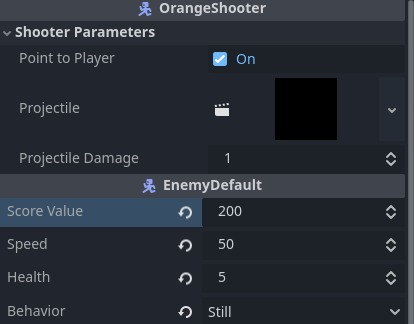
I did not mean inherited classes (i.e. declaring something extends something else in the script), but inherited scenes - you can create those in the editor. What I’m saying is: check every scene that you are using that contains something that is or extends OrangeShooter, that they don’t overwrite your default value with the value 2 (you can see the “reset icon” in the inspector if a value is set/overwritten from the default).
E.g. if you’re trying to change the default value in your “Orange Shooter” scene, but a main / game scene that has an instance of that scene already overwrites the value with 2, you wouldn’t see the change you’re trying to make. In that case you’d need to reset the value in that main/game scene.
YES! This is exactly what was happening! I had a OrangeShooter instance within my testworld scene which I was using for testing (of course). I had assumed that when I was making changes via the inspector for my OrangeShooter scene that said changes would carry over to my OrangeShooter instance within my testworld since this was the case for some of my other variables. However, my OrangeShooter instance was not keeping some of the changes made with the inspector from the OrangeShooter scene.
Making changes to the Orangeshooter instance export variables directly in my testworld scene solved my issue.
Weirdly though, if I change the point_to_player export value within the OrangeShooter scene’s inspector, it does carry over to the OrangeShooter instance and override the default value. Any idea why this behavior would exist for point_to_player but not projectile_damage? The inconsistancy just strikes me as odd.
This happens to me too, once every other project.
I believe that once you overwrite a default value with something different, it becomes “unlinked” with the previous value until you press the reset button. Values that are not overwritten just take over new default values.
You can probably also see this when opening a scene in the text editor. Whenever a value shows up in a referenced scene, it uses a different value than the default.
I assume that in your testworld scene, you only changed the projectile_damage value to something different once, but not point_to_player.
Alright, I’ll just make sure to add checking export variables for both scenes and their instances to my debugging checklist. Thank you so much for your help!