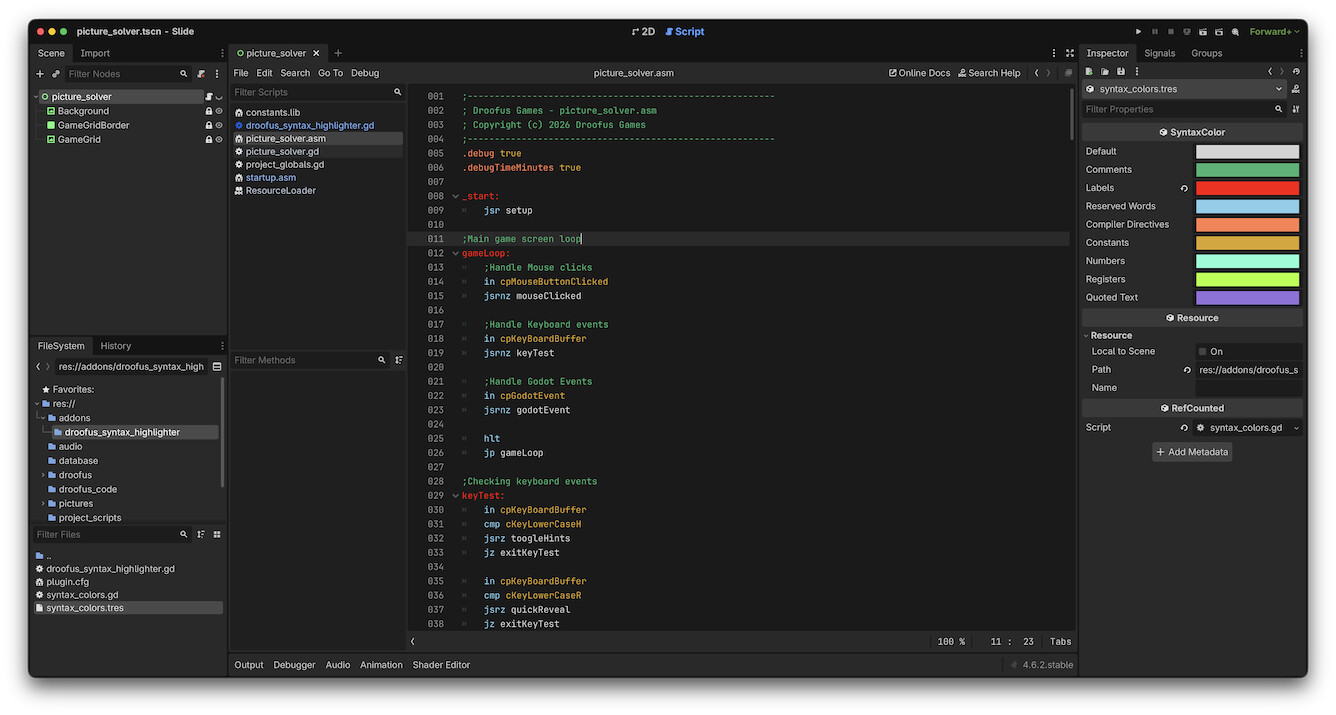
Okay, I admit it I’m lost, and probably an idiot or both, not uncommon Not having created tool scripts or plugins in the past I have no idea what I’m doing.
I have an editor plugin script which is used for syntax highlighting, we all know that by now. I want to be able to expose the colours for each element so each dev can set their own preferences. I have the following for each colour in the script, the script is working properly, but I have no idea where to find them in the editor or even if I’m doing it correctly, any help would be appreciated.
	@export var comments: Color = Color.MEDIUM_SEA_GREEN:
		set(new_comments):
			comments = new_comments
I tried using metadata and though that worked it is lost between sessions, apparently a known bug that meta data is not saved when added in the editor or attached to a script.
Cannot find member “default” in base “SyntaxColor”
The code as you suggested I hope, script is called syntax_color.gd and scene syntax_color.tscn
class_name SyntaxColor extends Node

@export var default: Color  = Color.LIGHT_GRAY
@export var comments: Color = Color.MEDIUM_SEA_GREEN
@export var labels: Color = Color.GOLD
@export var reserved_words: Color = Color.SKY_BLUE
@export var compiler_directives: Color = Color.CORAL
@export var constants: Color = Color.GOLDENROD
@export var numbers: Color = Color.AQUAMARINE
@export var registers: Color = Color.GREEN_YELLOW
@export var quoted_text: Color = Color.MEDIUM_PURPLE
The class name SyntaxColor is certainly resolved just can see any of its variables, so none of the colours are available. If I open the scene in the editor then yes all the colours are there, so one step closer.
Just realized that won’t work, because you have to declare them static and you can’t do that with export variables. This is where Autoloads come in handy.
Remove the class name from your script (because Autoloads can’t have class names).
Add the .tscn file as an Autoload.
That should work, and then you can add the file as an Autoload as part of activating the plugin.
You must think me so dumb, even adding the scene manually as an autoload doesn’t work. And I’ve not been able to figure out how to load it as part of the plugin. Give me assembly any day.. Not sure what I’m doing wrong.. Sorry, though this is how we learn..
In this case does it need to be a tool script and extend from EditorPlugin or Node.. ???
Not at all. I remember how daunting Godot plugins were when I started, and I’ve been programming professionally for 30 years. It’s just learning a new skill.
I will try to do a prototype for you tomorrow if you can’t get it working, but I’m winding down now.
Ahh I missed the const bit so I’ll give that a type. Yes, admitting we don’t know something is often the only way forward. Take guts sometimes to admit it and ask for help..
Well no go, not sure what the issue is. Would love to see a working example of how to do it, but only if you have time. It’s odd I can load and set all the colours as meta_data on the script during runtime and even recall and use them. You just can see the meta_data when added through a script, a bug apparently. Would be my preferred method.. Many thanks
Thank you, Thank you, Thank you, it works. Easy when you know how. And I’ve learned something today so a bonus. Always a good day when that happens. Now to add hot reloading to the resource if changed, while editing.
 Not having created tool scripts or plugins in the past I have no idea what I’m doing.
 Give me assembly any day.. Not sure what I’m doing wrong.. Sorry, though this is how we learn..