I created a custom resource that contains a non-static function, and I gave it a class_name. I should be able to call that function from other scripts that use the resource, but there seems to be a bug in Godot that doesn’t recognize the custom class. Everytime I call the function I get the following error:
Invalid call. Nonexistent function ‘loadScene’ in base ‘Resource’.
It doesn’t seem to recognize the resource’s custom class, it still just treats it as simply Resource.
After creating this resource did you fill in the item property in the inspector? Are you sure you made a “CustomResource” or just created a “Resource”? What script is attached to your Resource?
Yes, the item property is filled in.
The script attached is the one that contains the function, and starts with class_name CustomResource, which I thought was enough to create a custom resource.
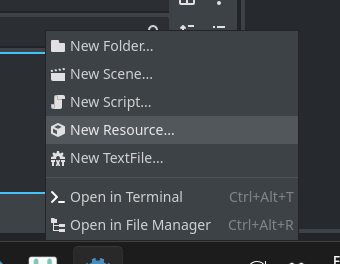
To create the resource I right click in the file dock, go to New Resource, and select my custom resource which now appears in the menu.
Can you show us its actual code, instead of a stripped down or generalized version?
I suspect there’s something else in that file that you’re doing that’s causing the problem.
I will tell you I use a lot of complex custom resources, and I never have the problem you are having.
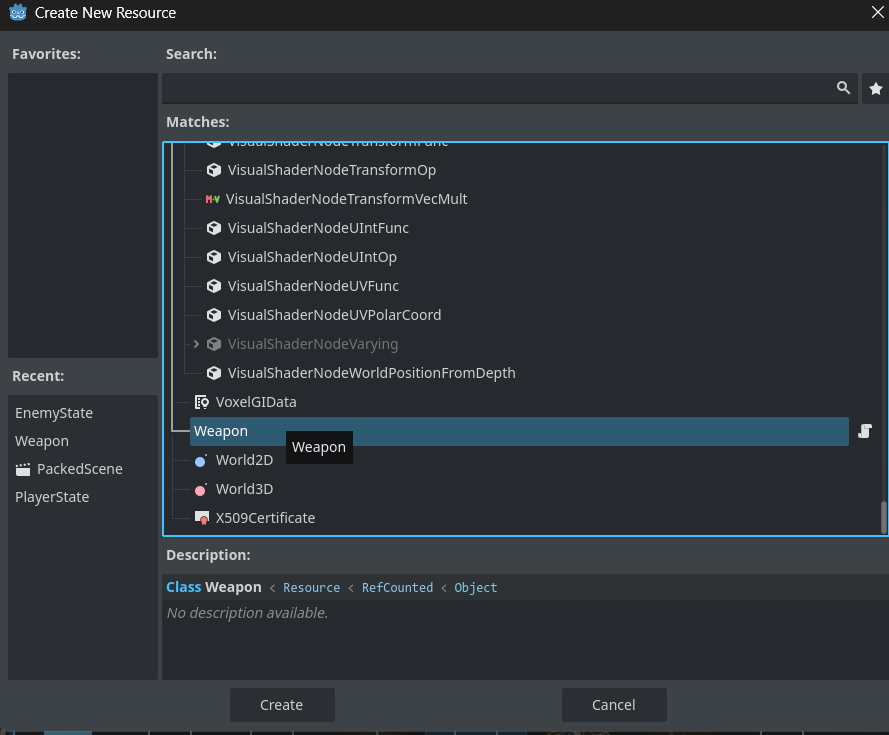
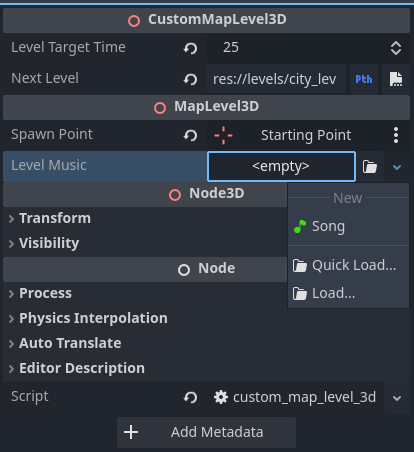
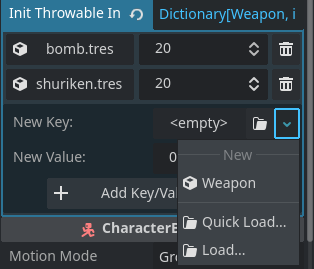
This may be your problem. It should be saying New CustomResource. I suspect your resource is of type Resource and not of type CustomResource.
Again, I think it would help not to obfuscate your code in this post. And if CustomResource is actually the name of your class, consider making it more descriptive of what’s inside it. It will help you down the road when you have multiple custom resources.
Here’s an example of my Song resource. When the export variable is empty, it says “New” then under that “Song” with the icon I have loaded in the script. See the screen shot below.
The fact that yours does not indicates the system isn’t picking it up.
In this case, I think there are two things that might be tripping you up. First, you are using a StringName for an @export variable. While technically you can do that, when creating it in the editor, you will always be using a String. So you’re not really saving anything. I do not think this is causing your problem, but it might cause you problems in the future. It’s a premature optimization.
Second, I believe it is specifically your _init() function that is causing the problem. First, it serves little to no purpose. You cannot instantiate a Resource the way you can a Node. You can use new, and pass values in, but to do so, you need to be very careful. If you want to initialize values in the constructor using _init(), typically it only works if they are straight up vars. @export and @onready variables may not work because init happens before _ready() and so nothing else exists in the object yet.
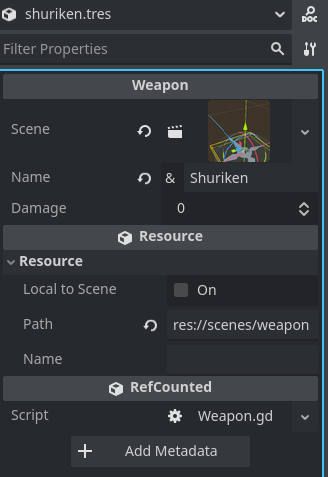
I suspect if you remove the code, your Weapon resource will start working. Then if you really have a reason for the _init(), you can debug making that work. I recommend starting with this code and seeing if it works:
class_name Weapon extends Resource

@export var scene: PackedScene
@export var name: String
@export var damage: int

func loadWeapon() -> Node3D:
	return scene.instantiate()
Here’s how it works at runtime. When a resource object is created either by loading a tres or via new(), the constructor _init() is first always called. For new()'d resources, nothing else happens. For loaded resources, all @export vars will be re-initialized if they have non-default values (aka you messed with them in the inspector), effectively overriding their initializations done by _init(). For @export vars whose values are keept at default, the results of _init() won’t be overridden. If _init() has arguments, and there are no default values provided for all of them, loading a resource from tres will throw an error and fail, because the engine expects to be able to call the constructor with no arguments.
@seabask Some puzzle pieces are still missing here. Can you make a minimal reproduction project?
This function is what I was using to get the resource during runtime, not from an exported variable. For some reason this function is spitting out a plain Resource instead of a Weapon.
Next time I won’t try to simplify my code when asking for help lol
This does beg the question of why the function is not returning Weapon as instructed, tho
It can. It’s not strictly about type. You’re referencing a specific object, that in turn references itself again. Turtles all the way down.
You may try making that dict not const and use load instead of preload. Making the dict static may work as well. Looks like a bad design choice though. Maybe it’s time to rethink the whole thing.
To build on normalized’s response preload and @exporting specifically can create a circular dependency, both load the selected resource with the script, Godot attempts to package anything preloaded together with the object. But now your weapons are preloading themselves, sadly Godot resolves this by silently removing the circular dependency after one loop.
Using load will attempt to load the object as soon as possible without a dependency, but I’d recommend storing the UID strings and loading as the weapons are needed.