I’ve been trying to utilize “live” painting effects in the game I’m working on, and am running into some trouble. I found this useful project someone worked on a while back, but it’s unfortunately in Godot 3, which I’m working in 4.3 ( Project: Alfred Reinold Baudisch - Software Engineer, Database Architect, Artist )
I managed to convert the shader and scripts over to Godot 4 compatible format, and the game works and shader looks correct in all the ways - even confirmed w/ a custom mask on it. However, I’m running into one issue: Clicking doesn’t seem to paint on the object. I was able to narrow it down to get_vertex_uv, and found something super confusing, in which I’m seeing no other people mention - so wondering if this is something I’m doing wrong in my conversion of this code.
Basically, I’ve got the get_uv_coords method that was written, as the following:
func get_uv_coords(point, normal, transform = true) -> Vector2:
	# Gets the uv coordinates on the mesh given a point on the mesh and normal
	# these values can be obtained from a raycast
	transform_vertex_to_global = transform

	var face = get_face(point, normal)
	if face.is_empty():
		return -Vector2.ONE

	var bc = face[2]

	var uv1 = meshtool.get_vertex_uv(_local_face_vertices[face[0]][0])
	var uv2 = meshtool.get_vertex_uv(_local_face_vertices[face[0]][1])
	var uv3 = meshtool.get_vertex_uv(_local_face_vertices[face[0]][2])

	return (uv1 * bc.x) + (uv2 * bc.y) + (uv3 * bc.z)
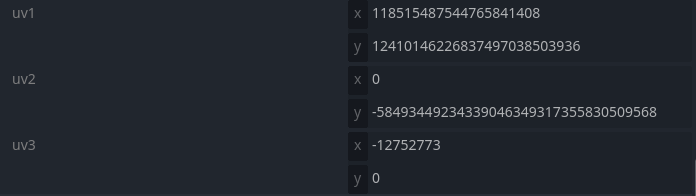
I added some debug statements and all that to right before get_vertex_uv, and compared the conversion to the original project in a separate installation of Godot 3… And I verified the face values and all that are exactly the same, however, get_vertex_uv in Godot 4 keeps returning values like the following to me:
What reasons would this method result in such crazy values, and is there a different way I should be doing this check to get the uv coordinate in Godot 4 vs. 3? Or is this just a bug no one’s reported (and if so - any suggestions on a way around it?)
If you’re trying to use the uv coords logic stuff for something else, then I’m not sure this is working or not. Here’s the github issue I opened back then: get_vertex_uv seems to return improper values · Issue #100003 · godotengine/godot · GitHub - I was intending on eventually finding time to test this in 4.7 to see if it works the way I was hoping it would so that I could probably close that issue out. Hopefully this helps you for whatever you’re working on.
I implemented the drawing feature with the new drawable textures. I only need to implement the get_uv_coordinates() function to make the code work. I struggled to find working code online and I’m not good enough to write that part myself
as far as I understand the new drawable texture doesn’t have any feature to implement the painting on 3d meshes
there are some addons for godot that implement texture painting, but it seems they rely on shaders rather than gdscript
I honestly envy unity and unreal for having this functionality natively. godot developers should also focus on implementing these kinds of small but useful features. I shared my code in case someone needs it
@onready var static_body: StaticBody3D = $Object
@onready var mesh: MeshInstance3D = $Object/Mesh
@onready var camera: Camera3D = $Camera

const RAY_LENGTH: float = 1000

var drawable_texture := DrawableTexture2D.new()
const TEXTURE_DIMENSION := Vector2i(1024, 1024)

const BRUSH_DIMENSION := Vector2i(100, 100)
const BRUSH_COLOR := Color.RED


func _ready() -> void:
	drawable_texture.setup(TEXTURE_DIMENSION.x, TEXTURE_DIMENSION.y, DrawableTexture2D.DRAWABLE_FORMAT_RGBA8, Color.BLUE)
	var mesh_material := mesh.mesh.surface_get_material(0)
	mesh_material.albedo_texture = drawable_texture
	$debug_sprite.texture = drawable_texture #debug


func _physics_process(_delta: float):
	static_body.rotate_y(_delta) #debug

	if Input.is_action_just_pressed("paint"):
		var space_state = get_world_3d().direct_space_state
		var mouse_pos: Vector2 = get_viewport().get_mouse_position()

		var origin = camera.project_ray_origin(mouse_pos)
		var end = origin + camera.project_ray_normal(mouse_pos) * RAY_LENGTH
		var collision_mask: int = static_body.collision_layer
		var query = PhysicsRayQueryParameters3D.create(origin, end, collision_mask)

		var result = space_state.intersect_ray(query)
		if result:
			var global_hit_position: Vector3 = result.position
			var local_hit_position: Vector3 = mesh.to_local(global_hit_position)
			var uv_hit_position: Vector2 = get_uv_coordinates(mesh, local_hit_position, result.normal)

			#paint
			if uv_hit_position:
				uv_hit_position.x *= TEXTURE_DIMENSION.x
				uv_hit_position.y *= TEXTURE_DIMENSION.y
				print(uv_hit_position) #debug
				var source_image = Image.create_empty(1, 1, false, Image.FORMAT_RGBA8)
				drawable_texture.blit_rect(
					Rect2i(int(uv_hit_position.x), int(uv_hit_position.y), BRUSH_DIMENSION.x, BRUSH_DIMENSION.y),
					source_image,
					BRUSH_COLOR
				)