Godot Version
v4.7.stable.official [5b4e0cb0f]
Question
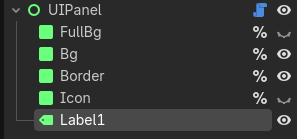
the output in editor curses at me saying that “label” doesnt exist, but it actually exists. And once i launch the scene not in the editor it works perfectly fine. i already tried restarting project and reloading current saved scene, but it doesnt work
@tool class_name UIPanel extends Control

@export var ui_panel_resource: UIPanelResource = UIPanelResource.new():
	set(v):
		if not v: return
		_disconnect_signals()
		ui_panel_resource = v
		_connect_signals()

@onready var full_bg: Panel = %FullBg
@onready var bg: Panel = %Bg
@onready var border: Panel = %Border
@onready var icon: Panel = %Icon
## HERE!!!!!!!!!!!!!!!!!!!!!!!!!!!!!!!
@onready var label: Label = %Label1
##!!!!!!!!!!!!!!!!!!!!!!!!!!!!!!!

@onready var panels_dic: Dictionary[UIPanelResource.Panels, Control] = {
	UIPanelResource.Panels.FULL_BG : full_bg,
	UIPanelResource.Panels.BG : bg,
	UIPanelResource.Panels.BORDER : border,
	UIPanelResource.Panels.ICON : icon,
	UIPanelResource.Panels.LABEL : label
}

func _ready() -> void:
	_setup_all()


func _connect_signals() -> void:
	ui_panel_resource.set_color.connect(_set_color)
	ui_panel_resource.set_visible.connect(_set_visiblity)
	ui_panel_resource.set_box.connect(_set_stylebox)
	ui_panel_resource.set_text.connect(_set_text)


func _disconnect_signals() -> void:
	if ui_panel_resource.set_color.is_connected(_set_color): ui_panel_resource.set_color.disconnect(_set_color)
	if ui_panel_resource.set_visible.is_connected(_set_visiblity): ui_panel_resource.set_visible.disconnect(_set_visiblity)
	if ui_panel_resource.set_box.is_connected(_set_stylebox): ui_panel_resource.set_box.disconnect(_set_stylebox)
	if ui_panel_resource.set_text.is_connected(_set_text): ui_panel_resource.set_text.disconnect(_set_text)


func _setup_all() -> void:
	_setup_panel(UIPanelResource.Panels.FULL_BG, ui_panel_resource.full_bg_box, ui_panel_resource.full_bg_color, ui_panel_resource.full_bg_visible)
	_setup_panel(UIPanelResource.Panels.BG, ui_panel_resource.bg_box, ui_panel_resource.bg_color, ui_panel_resource.bg_visible)
	_setup_panel(UIPanelResource.Panels.BORDER, ui_panel_resource.border_box, ui_panel_resource.border_color, ui_panel_resource.border_visible)
	_setup_panel(UIPanelResource.Panels.ICON, ui_panel_resource.icon_box, ui_panel_resource.icon_color, ui_panel_resource.icon_visible)
	_setup_text(ui_panel_resource.text, ui_panel_resource.h_alignment,
	ui_panel_resource.v_alignment, ui_panel_resource.label_settings, ui_panel_resource.label_visible)


func _setup_panel(panel_p: UIPanelResource.Panels, box: StyleBoxTexture, color: ColorDataResource.ColorNames, visible_p: bool) -> void:
	_set_stylebox(panel_p, box)
	_set_color(box, color)
	_set_visiblity(panel_p, visible_p)


func _set_stylebox(panel_p: UIPanelResource.Panels, box: StyleBoxTexture) -> void:
	var panel: Panel = panels_dic[panel_p]
	if panel:
		if panel.has_theme_stylebox("panel"):
			panel.remove_theme_stylebox_override("panel")
		panel.add_theme_stylebox_override("panel", box)


func _set_color(box_p: StyleBoxTexture, color: ColorDataResource.ColorNames) -> void:
	if box_p: box_p.modulate_color = ui_panel_resource.color_resource.colors_dict[color]


func _set_visiblity(panel_p: UIPanelResource.Panels, visible_p: bool) -> void:
	var panel: Control = panels_dic[panel_p]
	if panel: panel.visible = visible_p


func _setup_text(text_p: String, h_alignment: HorizontalAlignment, v_alignemt: VerticalAlignment,
label_settings: LabelSettings, visiblity: bool) -> void:
	_set_text(text_p, h_alignment, v_alignemt, label_settings)
	_set_visiblity(UIPanelResource.Panels.LABEL, visiblity)


func _set_text(
	text_p: String, h_alignment: HorizontalAlignment, v_alignemt: VerticalAlignment, label_settings: LabelSettings) -> void:
	label.text = text_p
	label.horizontal_alignment = h_alignment
	label.vertical_alignment = v_alignemt
	label.label_settings = label_settings
@tool class_name UIPanelResource extends Resource

signal set_color(panel: Panels, color: ColorDataResource.ColorNames)
signal set_visible(panel: Panels, visible: bool)
signal set_box(panel: Panels, box: StyleBoxTexture)
signal set_text(text_p: String, h_alignment: HorizontalAlignment, v_alignemt: VerticalAlignment, label_settings: LabelSettings)

@export_group("Colors")
@export var color_resource: ColorDataResource = preload("uid://ct2cpgrfewlv3")
@export var full_bg_color: ColorDataResource.ColorNames = ColorDataResource.ColorNames.FULL_BG_COLOR:
	set(v):
		full_bg_color = v
		set_color.emit(full_bg_box, v)
@export var bg_color: ColorDataResource.ColorNames = ColorDataResource.ColorNames.BG_COLOR:
	set(v):
		bg_color = v
		set_color.emit(bg_box, v)
@export var border_color: ColorDataResource.ColorNames = ColorDataResource.ColorNames.BORDER_COLOR:
	set(v):
		border_color = v
		set_color.emit(border_box, v)
@export var icon_color: ColorDataResource.ColorNames = ColorDataResource.ColorNames.DEBUG_WHITE:
	set(v):
		icon_color = v
		set_color.emit(icon_box, v)
@export_group("Visiblity")
@export var full_bg_visible: bool = false:
	set(v):
		full_bg_visible = v
		set_visible.emit(Panels.FULL_BG, full_bg_visible)
@export var bg_visible: bool = true:
	set(v):
		bg_visible = v
		set_visible.emit(Panels.BG, bg_visible)
@export var border_visible: bool = true:
	set(v):
		border_visible = v
		set_visible.emit(Panels.BORDER, border_visible)
@export var icon_visible: bool = false:
	set(v):
		icon_visible = v
		set_visible.emit(Panels.ICON, icon_visible)
@export var label_visible: bool = true:
	set(v):
		label_visible = v
		set_visible.emit(Panels.LABEL, label_visible)
@export_group("Styleboxes")
@export var full_bg_box: StyleBoxTexture = preload("uid://c0bnhyrul060l").duplicate():
	set(v):
		if full_bg_box == v: return
		full_bg_box = v
		set_box.emit(Panels.FULL_BG, full_bg_box)
@export var bg_box: StyleBoxTexture = preload("uid://b6sw43kbtlh01").duplicate():
	set(v):
		if bg_box == v: return
		bg_box = v
		set_box.emit(Panels.BG, bg_box)
@export var border_box: StyleBoxTexture = preload("uid://dlol4qtr11n62").duplicate():
	set(v):
		if border_box == v: return
		border_box = v
		set_box.emit(Panels.BORDER, border_box)
@export var icon_box: StyleBoxTexture = preload("uid://dtxm82e7pjwhy").duplicate():
	set(v):
		if icon_box == v: return
		icon_box = v
		set_box.emit(Panels.ICON, icon_box)
@export_group("Text")
@export var text: String = "":
	set(v):
		text = v
		_emit_set_text()
@export var h_alignment: HorizontalAlignment = HorizontalAlignment.HORIZONTAL_ALIGNMENT_CENTER:
	set(v):
		h_alignment = v
		_emit_set_text()
@export var v_alignment: VerticalAlignment = VerticalAlignment.VERTICAL_ALIGNMENT_CENTER:
	set(v):
		v_alignment = v
		_emit_set_text()
@export var label_settings: LabelSettings = LabelSettings.new():
	set(v):
		label_settings = v
		_emit_set_text()

enum Panels {
	FULL_BG,
	BG,
	BORDER,
	ICON,
	LABEL
}


func _emit_set_text() -> void:
	set_text.emit(text, h_alignment, v_alignment, label_settings)
Godot Engine v4.7.stable.official (c) 2007-present Juan Linietsky, Ariel Manzur & Godot Contributors.
— Debug adapter server started on port 6006 —
Could not find version of build tools that matches Target SDK, using 35.0.1
GdUnit4 TCP Server: Successfully started checked port: 31002
No GdUnit4Net found.
Loading GdUnit4 Plugin success
— GDScript language server started on port 6005 —
ERROR: res://src/ui/custom_ui/ui_panel/ui_panel.gd:85 - Invalid assignment of property or key ‘text’ with value of type ‘String’ on a base object of type ‘Nil’.
ERROR: res://src/ui/custom_ui/ui_panel/ui_panel.gd:85 - Invalid assignment of property or key ‘text’ with value of type ‘String’ on a base object of type ‘Nil’.
ERROR: res://src/ui/custom_ui/ui_panel/ui_panel.gd:85 - Invalid assignment of property or key ‘text’ with value of type ‘String’ on a base object of type ‘Nil’.
ERROR: res://src/ui/custom_ui/ui_panel/ui_panel.gd:85 - Invalid assignment of property or key ‘text’ with value of type ‘String’ on a base object of type ‘Nil’.
ERROR: res://src/ui/custom_ui/ui_panel/ui_panel.gd:85 - Invalid assignment of property or key ‘text’ with value of type ‘String’ on a base object of type ‘Nil’.
ERROR: res://src/ui/custom_ui/ui_panel/ui_panel.gd:85 - Invalid assignment of property or key ‘text’ with value of type ‘String’ on a base object of type ‘Nil’.
ERROR: res://src/ui/custom_ui/ui_panel/ui_panel.gd:85 - Invalid assignment of property or key ‘text’ with value of type ‘String’ on a base object of type ‘Nil’.
ERROR: res://src/ui/custom_ui/ui_panel/ui_panel.gd:85 - Invalid assignment of property or key ‘text’ with value of type ‘String’ on a base object of type ‘Nil’.
ERROR: res://src/ui/custom_ui/ui_panel/ui_panel.gd:85 - Invalid assignment of property or key ‘text’ with value of type ‘String’ on a base object of type ‘Nil’.
ERROR: res://src/ui/custom_ui/ui_panel/ui_panel.gd:85 - Invalid assignment of property or key ‘text’ with value of type ‘String’ on a base object of type ‘Nil’.
ERROR: res://src/ui/custom_ui/ui_panel/ui_panel.gd:85 - Invalid assignment of property or key ‘text’ with value of type ‘String’ on a base object of type ‘Nil’.
ERROR: res://src/ui/custom_ui/ui_panel/ui_panel.gd:85 - Invalid assignment of property or key ‘text’ with value of type ‘String’ on a base object of type ‘Nil’.
ERROR: res://src/ui/custom_ui/ui_panel/ui_panel.gd:85 - Invalid assignment of property or key ‘text’ with value of type ‘String’ on a base object of type ‘Nil’.
ERROR: res://src/ui/custom_ui/ui_panel/ui_panel.gd:85 - Invalid assignment of property or key ‘text’ with value of type ‘String’ on a base object of type ‘Nil’.
ERROR: res://src/ui/custom_ui/ui_panel/ui_panel.gd:85 - Invalid assignment of property or key ‘text’ with value of type ‘String’ on a base object of type ‘Nil’.
ERROR: res://src/ui/custom_ui/ui_panel/ui_panel.gd:85 - Invalid assignment of property or key ‘text’ with value of type ‘String’ on a base object of type ‘Nil’.
ERROR: res://src/ui/custom_ui/ui_panel/ui_panel.gd:85 - Invalid assignment of property or key ‘text’ with value of type ‘String’ on a base object of type ‘Nil’.
Label1:<Label#1887822749962>
Label1:<Label#1887822749962>
Running test discovery ..
Scanning for test suites in: res://test
Discover tests done, 0 TestSuites and total 0 Tests found.
Recovered last test session successfully, 1 tests restored.