Godot Version
v4.3.stable.official [77dcf97d8]
Question
I am creating an idle game with a lot of repeated UI elements. I have created a subscene called products that looks like this:
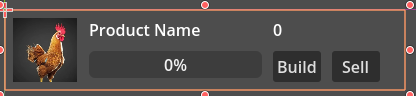
It is generated in the ready function of my main scene like this where ProductList is a FlowContainer in a Scroll Container:
var chicken = product.instantiate()
chicken.populate(“Chicken”, “res://01_chicken.jpg”)
$Scroll/ProductList.add_child(chicken)

var cow = product.instantiate()
cow.populate("Cow", "res://02_cow.jpg")
$Scroll/ProductList.add_child(cow)
This works and I can display 50 products and it scrolls and resizes.
Also note that product is defined outside of the ready function as:
const product = preload(“res://Product.tscn”)
What I am trying to do is when the build button is toggled on a specific product increment the quantity by 1. In the product scene I have created product.gd and attached the build button to ‘_on_build_toggled()’ here is the product gd code:
extends Control

@onready var base = $“../..”
var current_time = 0
var current_value = 0
@onready var current_button = $Build
@onready var current_quantity = $Quantity
@onready var current_progress = $ProgressBar

Called when the node enters the scene tree for the first time.

func _ready() → void:
  pass # Replace with function body.

func populate(product_name: String, image:String) → void:
  $Image.texture = load(image)
  $Name.text = product_name
  pass

func _on_build_toggled(toggled_on: bool) → void:
  current_value = current_value + 1
  $Quantity.text = str(current_value)
  pass # Replace with function body.
When I try and run this program nothing happens when I hit the button. I have tried print statements, and breakpoints. In the misc section of the debugger it shows:
/root/Game/Scroll/ProductList/@Control@3/Build
I figure I must be missing something because it is a scene inside of another scene any help would by appreciated.