Having trouble trying to smooth a gradient to use as ALPHA

Godot Version

4.5

Question

I’m trying to create a very smooth gradient effect on a 3D object that will be attached to the camera in XR. I don’t want to use the built in vignette as I’ll be applying this to different effects and different eyes. This is a spatial shader.

I’m using a radial black to white gradient as a texture 2d and putting it into the ALPHA output of the shader, but it’s giving a much sharper distinction between the black and the transparent than I’d like.

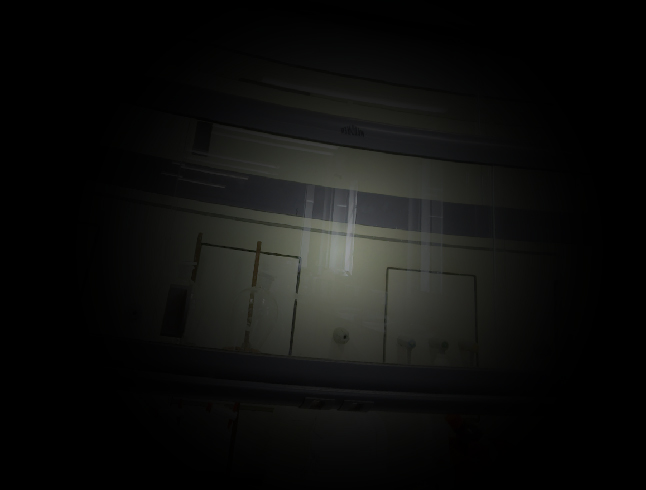
e.g. This is what I would like to see - a very long transition between black to clear.

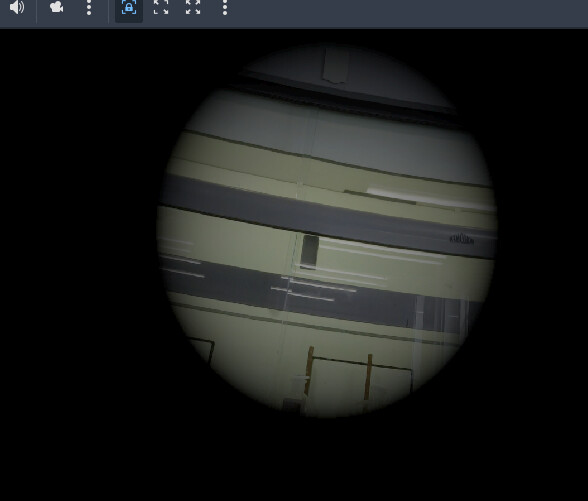
But this is what is actually happening:

Any ideas on how to smoothen that out? I’ve tried using an external file as a texture for the alpha but it’s the same.

Happy for visual / coded shader ideas

How do you calculate the falloff?

It’s not calculated it’s using a gradient resource in a texture2d attached to the alpha but happy to do it calculated if it would work better?

P.s. forgot to mention it’s using mobile renderer

Show your exact setup.

Thanks, although I’ve tried a few things, the shader is essentially - a black solid going into ALBEDO, and a radial gradiant going into ALPHA (multiplied by a float for changing opacity by script).

shader_type spatial;
render_mode depth_test_disabled, skip_vertex_transform, unshaded, cull_disabled;
uniform float fp = 1.0;
uniform sampler2D tex_frg_4;
// Modify VERTEX.xy using the projection matrix to correctly center the effect.
void vertex() {
        vec2 vert_pos = VERTEX.xy;

        if (length(vert_pos) < 0.99) {
                vec4 offset = PROJECTION_MATRIX * vec4(0.0, 0.0, 1.0, 1.0);
                vert_pos += (offset.xy / offset.w);
        }

        POSITION = vec4(vert_pos, 1.0, 1.0);
}

void fragment() {
	vec3 n_out5p0;
	vec3 n_in5p0 = vec3(0.00000, 0.00000, 0.00000);
	vec3 c = n_in5p0;
	float max1 = max(c.r, c.g);
	float max2 = max(max1, c.b);
	n_out5p0 = vec3(max2, max2, max2);
	float n_out7p0 = fp;

	vec4 n_out4p0 = texture(tex_frg_4, UV);
	float n_out6p0 = n_out4p0.x * n_out7p0;
		//if (VIEW_INDEX == VIEW_RIGHT) {
        ALBEDO =  vec3(0.0, 0.0, 0.0);
        ALPHA = n_out6p0;
//}
//else ALPHA = 0.0;
}

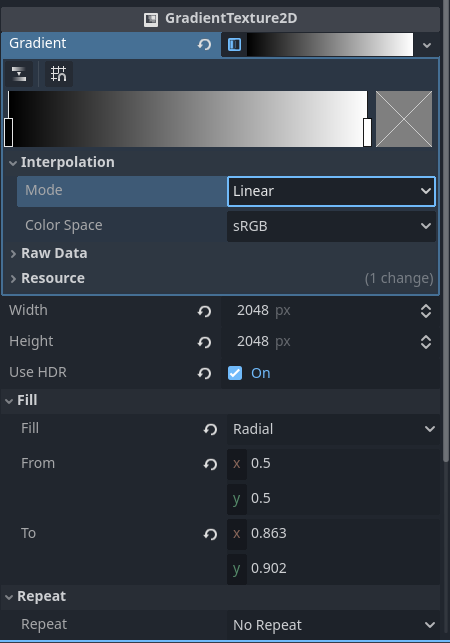
And the gradiant.tres I made which goes into “tex_frg_4” is setup like this.

Cheers

Switch texture interpolation color space to linear and interpolation mode to cubic.

You can further soften the falloff by adding the following as the last line:
ALPHA = pow(ALPHA, exponent);

exponent needs to be between 0.0 and 1.0

In general a better approach might be to use a curve texture. This will let you explicitly control the falloff using a curve but you’ll need to draw the circle in the shader. Something like:
float d = distance(UV, vec2(0.5)) * 2.0;
ALPHA = texture(your_curve_texture, vec2(d, 0.0)).r;
1 Like