I’ve tried to make a score that keep track of how many iron the player have collected so far. It work relatively bad, the score doesn’t upadate on the label and does not actually keep track of how many iron the player has picked up
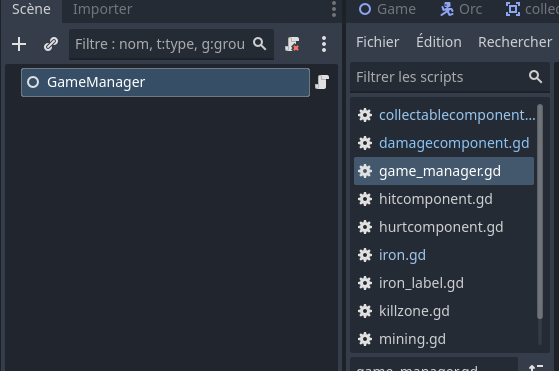
To make my score I have made a Game manager, where the increase_iron is situated ;
extends Node

#iron
@export var iron_tt: int = 0
#iron score increase when collectable taken by the player
func increase_iron() :
	print("iron+1")
	iron_tt +=1
	print(iron_tt)
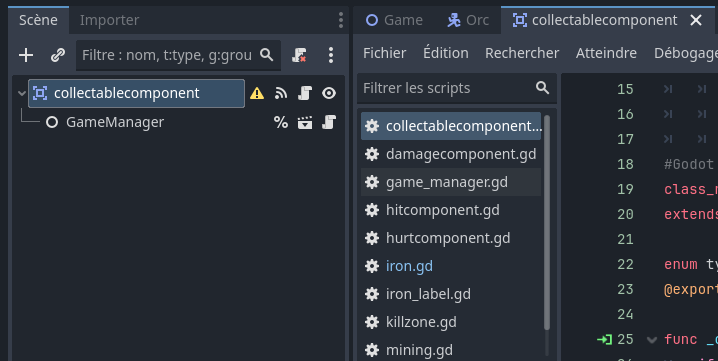
This Game manager is also link to a Collectable component, that keep track and remove the item when the player pick it up
class_name CollectableComponent
extends Area2D

@onready var game_manager: Node = %GameManager
enum type_minable {Stone, Iron,}
@export var collectable_name : type_minable

func _on_body_entered(body: Node2D) -> void:
	if body is Player:
		print("collected")
		get_parent().queue_free()

		#type of collectable
		#iron got point score +1
		if collectable_name == type_minable.Iron :
			game_manager.increase_iron()
and then the Label (iron_label) that show the score in game, and should update depending on the iron_tt
extends Label

@onready var game_manager: Node = %GameManager
#label that update when iron_tt +1 (working I think)
var default_text = "Iron : "
func _process(delta):
	var text = str(default_text, str(game_manager.iron_tt))
	self.text = (text)
When I collect something in game this is what appear in the console :
"
collected
iron+1
1
collected
"
This will print each time the player pick up an iron
I don’t really know why “collected” appear twice..
and the label stay at “Iron : 0” even when I collect more iron
Thanx in advance for your help and sorry for the grammar mistake, it’s not my first language…
Something that will help with simplifying this would be using auto loading. Autoloading is what is called a singleton in other languages. So if you have a game handling script, which I imagine you would need only one of across the game, you can make it into an autoloaded script so that you can access it from anywhere. In addition you can make custom signals so that the labels would update in response to a signal instead of updating god knows how many times a second. So I would do something like:
GameManager.gd
# this is the autoloading script
extends Node

# declare signals
signal iron_changed

# declare variables
var iron_tt : int = 0

func increase_iron():
    iron_tt += 1
    iron_changed.emit()
Then go to project settings > globals and find the file and add it to the list of autoloads.
Then in your collectable component you can just do the following:
class_name CollectableComponent
extends Area2D

enum type_minable {Stone, Iron,}
@export var collectable_name : type_minable

func _on_body_entered(body: Node2D) -> void:
	if body is Player:
		print("collected")
        # I am hoping that freeing the parent and not the node is intended here
		get_parent().queue_free()

		#type of collectable
		#iron got point score +1
		if collectable_name == type_minable.Iron :
			GameManager.increase_iron()
If you didn’t see my comment in the code, I was hoping that you are freeing the intended node when calling “get_parent().queue_free()” and something to maybe consider would be to reuse the collectable objects instead of creating and destroying them over and over. So maybe you can use the game manager script to manage how many of what collectible is available and visible and when an obj is collected you can just move it to the non-visible section. I am not good at explaining so I will just link you this:
which gives nice examples that are relatively easy to follow and this other video which is basically legendary:
I myself am definitely not using the concepts introduced here all that well but it is still a very good video and I feel like my brain is opening up each time I watch it. Sorry forgot to make the connected funciton callable.
Hey thanks for the reply ! Love the documentation you gave me, will definitely gave it a look when I have time !
I tried to do what you told me and the signal for the GameManager work great, I will keep this in my tools kit from now on !
The get get_parent().qeue_free() refere to the iron nuget itself, as it is the parent of the collectable component here
Unfortunatly it still does not update the label I tried to change it a bit but I don’t thinks it’s really working…
The iron total (iron_tt) doesn’t seem to update or if does it’s not changing the label, I tried to print it (print(iron_tt)) to see if it added up like I whanted it to but it’s not priniting anythings into the console
I tried @hexgrid méthode as well but since the game manager is not directly linked to the label I can’t refer to it this way (I thinks)
Thanx again for taking some of your time for this, it help a lot
How odd, I do have a dynamic label system in my game as well and the only difference with your game is that I don’t use collisions. Can you try checking if the game even passes the loop guard: “collectable_name == type_minable.Iron”, with a simple print like print(1)? Because I am assuming that you can visually see the collectable items being destroyed as you test the game, so the only other possible reason I can see why this won’t work is that it fails to pass that condition ever.
All of those are presumably children of your Game hierarchy?
The node tree is an actual tree, there’s only one hierarchy, so you can find a path in it from anything to anything. If you print_tree_pretty() from a node, you can see some of it…
Everything is ultimately attached to $/root, so at a guess I think your label is at:
$/root/Game/iron_label
I might have that wrong? But it’s probably something like that. If you print(get_path()) in the _ready() function of iron_label you should see the exact path.
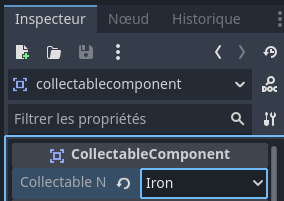
Omg I’m so mad at myself @hexgrid, @JAB_Studio I found what the problem was, @JAB_Studio 's code work fine I just dind’t asign the iron enum to the iron collectable
I’m so sorry for this and thanks again you helped me so much with this ! The label work perfectly now too. Thanks for your time