How can I apply a dithering effect to a GradientTexture?

Godot Version

v4.7.2.stable.official [ed1daf0bf]

Question

I’m not sure if I’ll ever need this in any of my projects, but I decided to do a little challenge or whatever and make a shader that would dither a gradient texture. So far, here’s what I have:
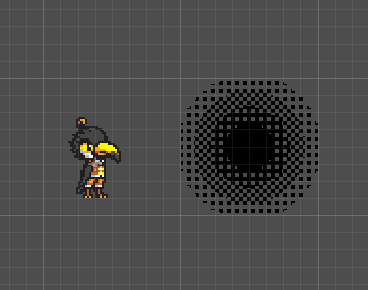
This black-hole-looking mess is the gradient texture, and as you can see, it clearly doesn’t align with screen/texture pixels, I assume it’s because I’m using FRAGCOORD but I haven’t figured out how to do it any other way yet. How do I determine where a pixel is relative to the texture, not the screen?

Another problem is that the dithering isn’t properly pixelated, it’s just circular bands that end wherever they happen to.

The code so far:

shader_type canvas_item;

uniform int mode: hint_enum("Linear", "Radial") = 1;
uniform int bayer_size: hint_enum("2x2", "4x4", "8x8") = 2;


const int bayer2[4] = {
	0, 2,
	3, 1
};

const int bayer4[16] = {
	0, 8, 2, 10,
	12, 4, 14, 6,
	3, 11, 1, 9,
	15, 7, 13, 5
};

const int bayer8[64] = {
	0, 32,  8, 40,  2, 34, 10, 42,
	48, 16, 56, 24, 50, 18, 58, 26,
	12, 44,  4, 36, 14, 46,  6, 38,
	60, 28, 52, 20, 62, 30, 54, 22,
	3, 35, 11, 43,  1, 33,  9, 41,
	51, 19, 59, 27, 49, 17, 57, 25,
	15, 47,  7, 39, 13, 45,  5, 37,
	63, 31, 55, 23, 61, 29, 53, 21
};

float get_bayer2(vec2 coord, float alpha) {
	int x = int(mod(coord.x, 2.0));
	int y = int(mod(coord.y, 2.0));
	int index = y * 2 + x;
	float limit = (float(bayer2[index]) + 1.5) / 6.0;
	return alpha < limit ? 0.0 : 1.0;
}

float get_bayer4(vec2 coord) {
	int x = int(mod(coord.x, 4.0));
	int y = int(mod(coord.y, 4.0));
	int index = y * 4 + x;
	return (float(bayer4[index]) + 1.0) / 16.0;
}

float get_bayer8(vec2 coord) {
	int x = int(mod(coord.x, 8.0));
	int y = int(mod(coord.y, 8.0));
	int index = y * 8 + x;
	return (float(bayer8[index]) + 1.0) / 64.0;
}


void fragment() {
	// these are supposed to work with linear/radial mode
	// but I'd rather just get the dithering to work first
	vec4 color1;
	vec4 color2;
	if (mode == 0) {
		color1 = texture(TEXTURE, vec2(0.0));
		color2 = texture(TEXTURE, vec2(1.0));
	} else {
		color1 = texture(TEXTURE, vec2(0.5));
		color2 = texture(TEXTURE, vec2(0.0));
	}
	
	COLOR = (COLOR * get_bayer2(FRAGCOORD.xy / 4.0, COLOR.a));
	
	if (COLOR.a < 0.25){
		COLOR = vec4(COLOR.rgb, 0.0);
	} else {
		COLOR = vec4(COLOR.rgb, 1.0);
	}
}

If you want dithering to correspond to actual pixels, use UV multiplied by the sprite size in pixels, as an argument to the bayer function. You’ll have to pass this size to the shader as an uniform.

If you don’t need the pattern to be “anchored” to sprite’s origin, you can also use SCREEN_UV / SCREEN_PIXEL_SIZE as the argument. Although this might flicker when scrolling.

Yay, thanks, it worked. Except now if I try to rotate the node instead of rotating the texture pattern, it rotates the entire thing instead of the dithering.

Also if I’m working with 2 colors instead of 1 color with/without alpha, how do I compare them?

Well you can’t have it both ways. Your reference frame can be either screen uv space or the object uv space. Do you need to rotate?

As I said in your previous thread regarding this problem (which btw you should have just continued instead of making a new thread) - step the gradient value against the value returned by the bayer function. This will either be 0.0 or 1.0, and use that as a mixing factor for the two colors:

COLOR.rgb = mix(color1, color2, step(gradient, bayer)); 

Do you need to rotate?

Not really I guess, unless I wanna make some god rays without using a big-ass texture half of which probably won’t even be used

(which btw you should have just continued instead of making a new thread)

:sweat_smile: can I be honest here? I didn’t continue that thread cuz I thought I wouldn’t get more useful answers out of you and just hoped I would talk to someone different this time

step the gradient value against the value returned by the bayer function.

Wait, hold on, what is the gradient value here and which of the bayer functions do I step it against? There’s the edited 2x2 one that returns an alpha thing and 2 other ones that don’t work with this setup

All bayer functions should work.

A bayer function returns some value between 0 and 1 for a pixel at specific coordinates. Try displaying that value directly as the shader output to get the idea how it works. The dithering is then done by comparing the bayer value with the gradient value: if the gradient value is less than the bayer value, the pixel should be displayed, otherwise it shouldn’t. The larger the gradient value, the more pixels from the bayer matrix will be displayed, resulting in dithering.

Doing it with step() is just an optimized shorthand for:

float display_pixel;
if (gradient < bayer){
	display_pixel = 1.0;
}
else{
	display_pixel = 0.0;
}

So that’s the same as:

float display_pixel = step(bayer, gradient);

The usefulness of the answers you get will generally depend on the effort you put into your initial question and the followup discussion. It’s not realistic to expect elaborate answers if you don’t show much enthusiasm and initiative for solving the problem. Sometimes you may get lucky, and someone just drops an elaborate solution out of the blue, that happens to be just what you’re looking for. But that won’t happen often.

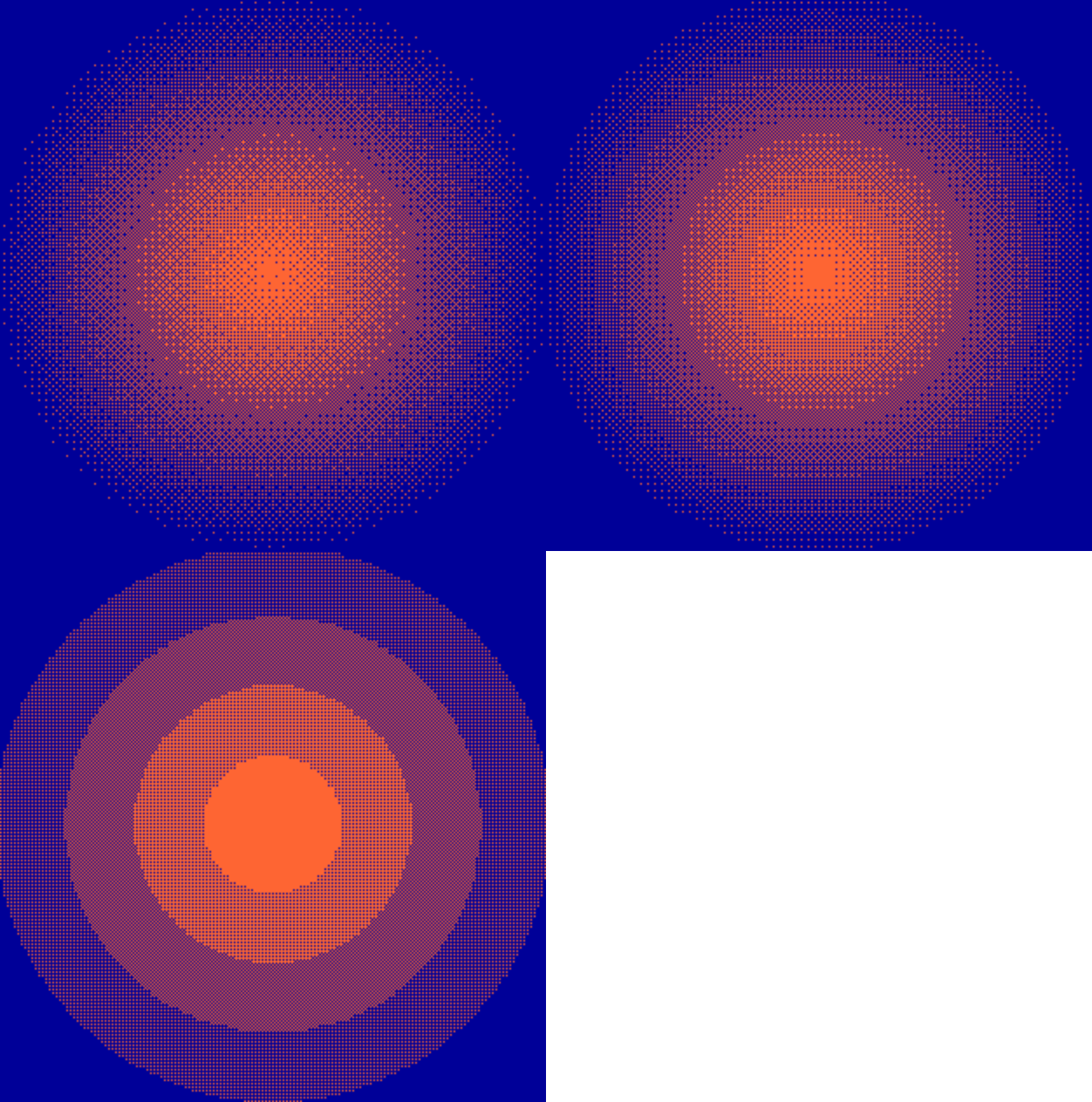
For the completeness sake, here’s the shader. I used bayer functions from your last version. It works with all 3 bayer matrix sizes

shader_type canvas_item;

uniform sampler2D gradient_texture;
uniform vec2 sprite_size = vec2(256.0, 256.0);
uniform vec3 color1: source_color = vec3(0.0, 0.0, 0.6);
uniform vec3 color2: source_color = vec3(1.0, 0.4, 0.2);

const int bayer2[4] = {
	0, 2,
	3, 1
};

const int bayer4[16] = {
	0, 8, 2, 10,
	12, 4, 14, 6,
	3, 11, 1, 9,
	15, 7, 13, 5
};

const int bayer8[64] = {
	0, 32,  8, 40,  2, 34, 10, 42,
	48, 16, 56, 24, 50, 18, 58, 26,
	12, 44,  4, 36, 14, 46,  6, 38,
	60, 28, 52, 20, 62, 30, 54, 22,
	3, 35, 11, 43,  1, 33,  9, 41,
	51, 19, 59, 27, 49, 17, 57, 25,
	15, 47,  7, 39, 13, 45,  5, 37,
	63, 31, 55, 23, 61, 29, 53, 21
};

float get_bayer2(vec2 coord) {
	int x = int(mod(coord.x, 2.0));
	int y = int(mod(coord.y, 2.0));
	int index = y * 2 + x;
	return (float(bayer2[index]) + 1.0) / 4.0;
}

float get_bayer4(vec2 coord) {
	int x = int(mod(coord.x, 4.0));
	int y = int(mod(coord.y, 4.0));
	int index = y * 4 + x;
	return (float(bayer4[index]) + 1.0) / 16.0;
}

float get_bayer8(vec2 coord) {
	int x = int(mod(coord.x, 8.0));
	int y = int(mod(coord.y, 8.0));
	int index = y * 8 + x;
	return (float(bayer8[index]) + 1.0) / 64.0;
}

void fragment() {
	float bayer = get_bayer8(SCREEN_UV / SCREEN_PIXEL_SIZE);
	float gradient = texture(gradient_texture, floor(UV * sprite_size) / sprite_size).r;
	COLOR.rgb = mix(color1, color2, step(gradient + 0.001, bayer)); 
	COLOR.a = 1.0;
}

Note that this now samples the bayer pattern in the screen uv space but the gradient texture is sampled in sprite’s uv space. This appears to be perceptually the most stable approach. It behaves reasonably well even with rotation although there may be some moire patterns with 8x8 matrix noticeable during motion.
dither

Thanks for the shader, now I finally understand what you meant by the gradient value. It doesn’t seem to work with alpha anymore though, is alpha calculated differently than simply mixing color values?

Regarding rotation and sprite size in general, I decided I’d write a tool script to update it every time the value changes but I couldn’t figure out how to do it with signals so I tried to do it in process but for whatever reason it doesn’t work in the editor? If I run the scene in-game, everything works just fine

No, it’s the same thing. The gist is that you calculate a single float value that represents the dither pattern “mask”. This will always be either 0.0 or 1.0. You do it by:

float dither_pattern_mask = step(gradient + 0.001, bayer);

Once you have that, it can either represent the alpha so you use it like this:

COLOR.a = dither_pattern_mask;

Or it can represent the color mixing parameter, in which case you use it like in the shader I posted earlier:

COLOR.rgb = mix(color1, color2, dither_pattern_mask);
COLOR.a = 1.0;

In both those cases, the mix() and step() functions are used as the “shader way” of doing the if, to avoid explicit code branching per pixel.

The only thing you need to update is sprite_size uniform. Rotation should take care of itself when the bayer matrix is sampled in screen uv space. It’s fine to do this update in _process() in a tool script. You may need to reload the scene in order for tool script to start working properly.

So basically what you’re saying is I can’t use 2 colors with different transparency levels?

Rotation should take care of itself when the bayer matrix is sampled in screen uv space.

Well yes, it does, but I kinda wanna be able to preview it in the editor more accurately to how it would look in-game

You can do whatever you want. Dithering creates a binary information per pixel. You can map that information to whichever shader output you want. It’s not clear though how exactly you intend to combine alpha transparency and a two-color gradient. For a light falloff effect, I’d mix black and some adjustable color and set the shader blending mode to additive. That way, you’ll get an overlay that always lightens whatever is underneath:

The shader works exactly the same in the editor and at runtime.

Okay so I seemingly figured out how to plug alpha into that thing. Now the big question: can I use whatever gradient shape this outputs as a mask for another shader?

The shader works exactly the same in the editor and at runtime.

Well yes, but because the game’s resolution is lower than that of my screen, it doesn’t preview it at the same resolution in the editor (which makes sense I guess), and I wanna see how my gorgeous pixelated goodness looks without having to either run the scene or zoom out to 100%

Also how much will performance drop if I add in a switch statement for selecting the bayer mode?

Also what’s the point of adding 0.001 to the gradient value?

What would that another shader do? You can mix texture samples the same way the plain colors are mixed.

Divide the coordinate you send to the bayer function by the camera zoom factor. There’ll be some artifacts due to difference in sampling spaces of the gradient and the bayer matrix, but you should be able to live with it as it’s only for the preview.

Insignificantly if you switch on an uniform.

Remove it and find out.

What would that another shader do?

It’s basically a palette swapping thing.

void fragment() {
	vec4 palette[] = {color0, color1, color2, color3, color4, color5, color6, color7};

	int color_count = textureSize(original_palette, 0).x;

	for (int i = 0; i < min(color_count, 8); i++) {
		vec4 color_orig = texture(original_palette, vec2((float(i) + 0.5) / float(color_count), 0));
		if (COLOR == color_orig) {
			COLOR = palette[i];
		}
	}
}

The problem is that usually I use it to palette swap my textures to a darker version of themselves, which reduces the number of colors the output image has. So if I tried to slap another palette swap shader on top of that (which doesn’t work anyway for some reason), it would probably only modify that output image.

Also apparently just comparing the r value of the gradient doesn’t work with all colors?

You don’t need additional shaders for that. Just pass a required palette texture into the shader.