Godot 4.4
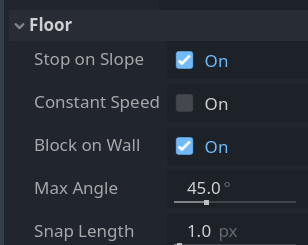
So I am trying to make my first very basic game, where I’ve made a small tileset, and I can run and jump, just to see how everything works when making a game. I made some ~45 degree slopes. My question is how do I make the player stick to the slopes? When walking towards the slope, the player just goes flying straight ahead and then gravity kicks in pulling the player down, effectively skipping the slope entirely, might as well just have had a straight drop and there wouldn’t be any difference.
When the player is standing on the slope and he tries to walk down along the slope, then what happens to the player is that instead of walking along the slope they kinda just fly off it and the same thing happens as I just explained before.
The code that I’ve used is just the template thing that you can use when making a CharacterBody2d
func _physics_process(delta: float) -> void:
	# Add the gravity.
	if not is_on_floor():
		velocity += get_gravity() * delta

	# Handle jump.
	if Input.is_action_just_pressed("jump") and is_on_floor():
		velocity.y = JUMP_VELOCITY

	# Get the input direction and handle the movement/deceleration.
	# As good practice, you should replace UI actions with custom gameplay actions.
	var direction := Input.get_axis("left", "right")
	if direction:
		velocity.x = direction * SPEED
	else:
		velocity.x = move_toward(velocity.x, 0, SPEED)

	move_and_slide()