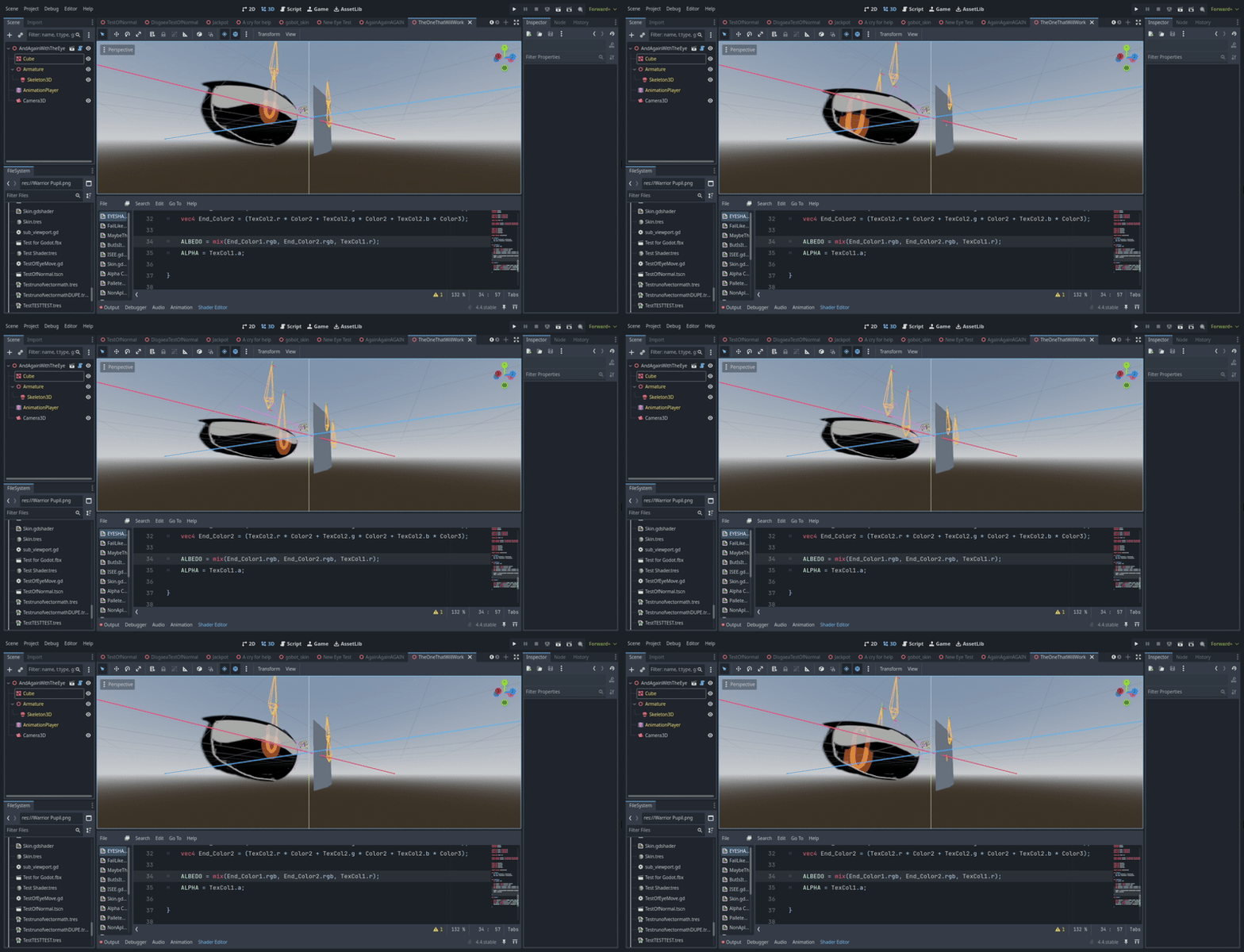
How do I recreate this 2D eye shader in Godot 3D?

Godot Version

4.4

Question

Recently in Blender I’ve created an approach to 2D eyes that suits my needs with the bare minimum of art assets required: simply the pupils, red channel for the eyes themselves, outline, and anything behind them are required in both an open and blinking state.

It would save a ton of time and effort for simple stylized game ideas if I could get this working in Godot, however, despite viewing many tutorials, none I’ve seen cover transferring a shader for this kind of subject to Godot, I don’t even know if it’s possible, I was hoping someone here knows how.

All value nodes you’ll be seeing are storing a 0 to 1 “empty” shapekey that I’ll be using to export a variable controlled by a driver to Godot, since bone transformation space seems to vary

To breakdown the Blender shader, the first major part is a vector math sequence of subtract, divide, and add, in that order to set the origin point of the given texture. Whenever you see that going forward, know that the bottom input for divide controls the scale. This allows me to scale the eye layer itself without the pupil or eyelids in a way that looks more natural instead of flattening itself into either the top or bottom edge of the plane

Next I setup something similar for the pupils with a different origin point, since those are mostly centered (specifically I set X 0.5, Y 0.5 Z 1) and with both the X and Y of my shapekey value controlling the scale

That leads into the vector input of my “X” and “Y” shapekey values for pupil movement (the X will be flipped on the other eye)

And finally, the color and overlays. I’m feeding the alpha channels into each other so that the eye pupil is multiplied in a mix color onto the eye texture, that way the black outline always displays on top of the pupil, and the eyelid just sits in the back of everything.
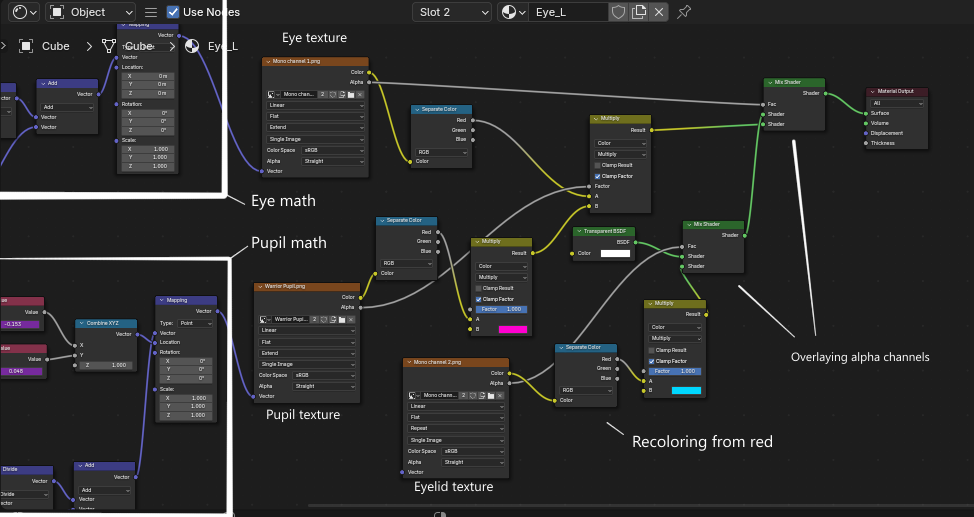
All assets are pure red and black since swapping colors for customization is a big deal for my projects. I already made a custom color change shader in Godot that allows me to recolor the RGB channels independently, it goes something like this:

shader_type spatial;
render_mode diffuse_toon,specular_toon;

uniform vec4 Color1 : source_color;
uniform vec4 Color2 : source_color;
uniform vec4 Color3 : source_color;

uniform float Alpha = 1;

uniform sampler2D texture_albedo : source_color, filter_linear_mipmap, repeat_disable;

uniform vec3 uv1_scale;
uniform vec3 uv1_offset;
uniform vec3 uv2_scale;
uniform vec3 uv2_offset;

void vertex() {
UV = UV * uv1_scale.xy + uv1_offset.xy;
}

void fragment() {
vec2 base_uv = UV;

vec4 Tex_Color = texture(texture_albedo, base_uv);

vec4 End_Color = (Tex_Color.r * Color1 + Tex_Color.g * Color2 + Tex_Color.b * Color3);

ALBEDO = End_Color.rgb;

}

If you have a better one, or if redoing the shader from the ground up is required to get the overlays working, please do tell.

As a TLDR: the shader in Godot needs to have 3 (or 2 if I put the eyelids on the face texture) layers, pupils above eyes above eyelids, the pupils need to be displayed bellow the black outlines of the eyes, the pupils need to be able to move and scale on their own, the eye needs to scalable on the Y axis, and both need to have custom origin points set.

if you need any more info or images, let me know and I’ll provide. I REALLY need to get this working, please share any info on the subject you can

P.S don’t worry about anything for transitioning to a blink texture, I’ve already accounted for that in the script outside of the shader

Totally doable in Godot with shaders but you’ll probably need to approach it in a bit different way than in Blender, because Godot uses realtime GPU shaders that have some limitations compared to CPU shader in Blender.

1 Like

At least I know it’s possible then. Now I just need to solve the puzzle of “how?”.

Well start doing it and ask a specific question if you get stuck on it. Asking “how” is to broad of a question and would require a whole tutorial-like response.

1 Like

My biggest concern is definitely going to be the vector math “origin point” thing for sure , since I’ve done color swaps and alpha channel stuff before, but I don’t think I’ve ever seen a custom origin point set for a texture in Godot. Not one that wasn’t a viewport texture that snapshots a different object with the texture on it, at least

I’ll update this post when I have something in Godot worth talking about.

I suggest doing it for one eye only, since another will be just a mirror image.

1 Like

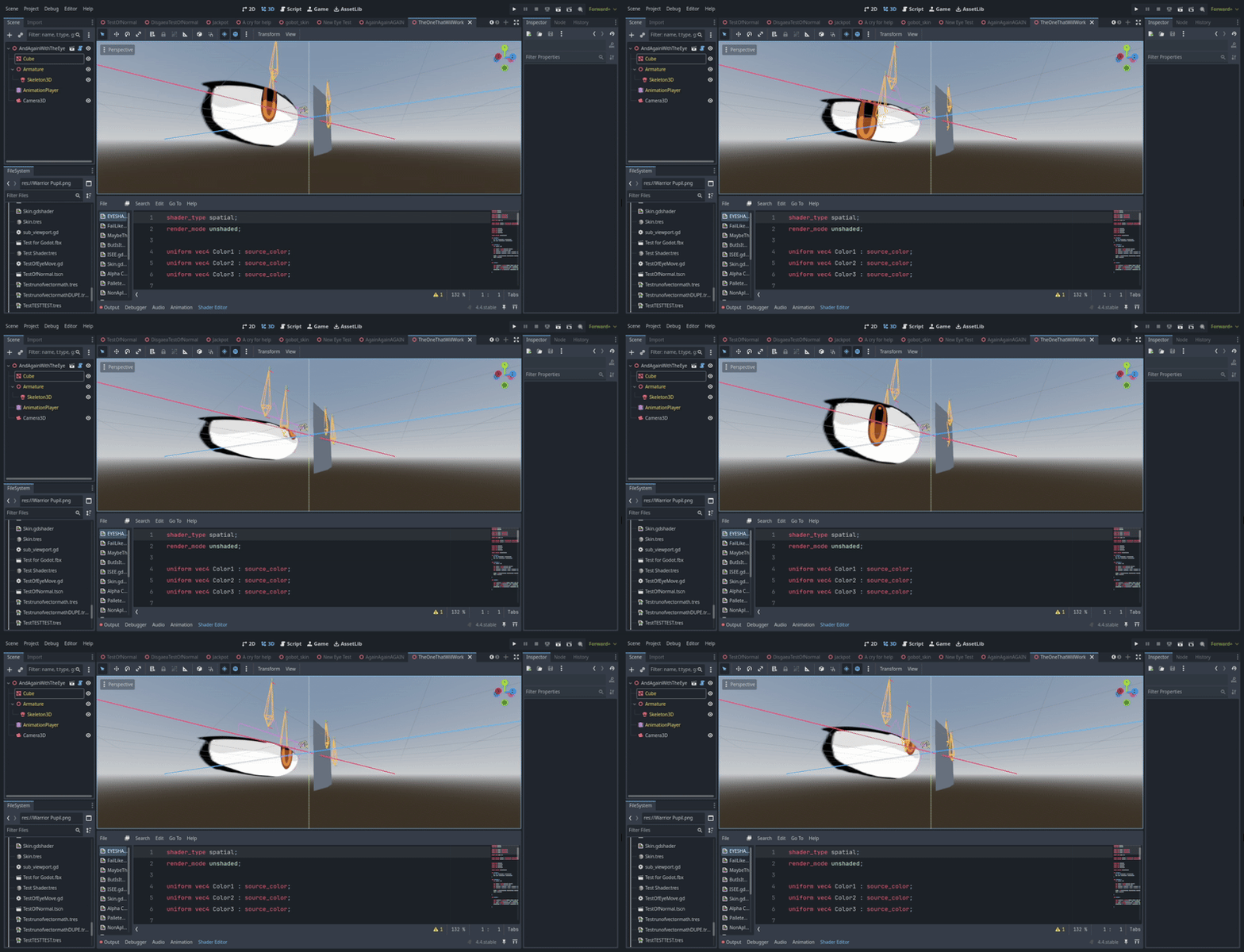
Update: I’ve found one of the old attempts at this type of thing, and I feel like this is better info on where the issue is. In my previous attempts, I used shapekeys to physically move the eyes into shape with a plane inset just behind them that has the pupils on them. Visually, this result is created on a character with no discernible eyelids:
The problem

However, WITH eyelids there would be noticeable squashing due to the shapekeys used literally compressing the whole texture, hence the need to get what I have in Blender working. As for the code of this current shader, I have 2 different eye material slots to control each pupil individually, which both have and eye texture assigned above them. The code that controls the shader parameters I’m running in the script looks like this:

@tool
extends Node3D
var Scale = 1
var Plus = 0
var Pupil_XR = 0
var Pupil_XL = 0
var Pupil_YR = 0
var Pupil_YL = 0

func _ready() → void:
$AnimationPlayer.play(“Head|K”)
Engine.max_fps = 60
func _process(delta: float) → void:
var Skeleton = $Armature/Skeleton3D
var Base_R = $Armature/Skeleton3D/Head.get_surface_override_material(3).next_pass
var Base_L = $Armature/Skeleton3D/Head.get_surface_override_material(4).next_pass
var Eye = $Armature/Skeleton3D/Head.get_surface_override_material(1)
var Eyelid_R = Skeleton.find_bone(“Eyelid_R”)
var Eyelid_R_Pose = Skeleton.get_bone_pose_position(Eyelid_R)
var Eye_R = Skeleton.find_bone(“Eye_R”)
var Eye_R_Pose = Skeleton.get_bone_pose_position(Eye_R)
Pupil_XR = 1-$Armature/Skeleton3D/Head.get(“blend_shapes/Eye Pupil X_R”)
Pupil_XL = 1-$Armature/Skeleton3D/Head.get(“blend_shapes/Eye Pupil X_L”)
Pupil_YR = 1-$Armature/Skeleton3D/Head.get(“blend_shapes/Eye Pupil Y_R”)
Pupil_YL = 1-$Armature/Skeleton3D/Head.get(“blend_shapes/Eye Pupil Y_L”)
Eye.set(“shader_parameter/uv1_scale”,Vector3(.25,1,1))
if $Armature/Skeleton3D/Head.get(“blend_shapes/Eye Close_R”) > 0.9:
Eye.set(“shader_parameter/uv1_offset”,Vector3(.75,0,0))
else:
Eye.set(“shader_parameter/uv1_offset”,Vector3(0,0,0))
Base_R.set(“shader_parameter/uv1_scale”,Vector3(1+Plus,1+Plus,1))
Base_R.set(“shader_parameter/uv1_offset”,Vector3(0.1-(Plus*.5)-(Pupil_XR*(1+Plus)),0-(Plus*.5)+(Pupil_YR*(1+Plus)),0))
Base_L.set(“shader_parameter/uv1_scale”,Vector3(1+Plus,1+Plus,1))
Base_L.set(“shader_parameter/uv1_offset”,Vector3(0-(Plus*.5)-(Pupil_XL*(1+Plus)),0-(Plus*.5)+(Pupil_YL*(1+Plus)),0))

(Note that the above shader was never finished, it was just enough to provide a visual)

The actual shader used is the one I included in the initial post. From here, how would I change this to be like the end result I’m looking for? Most importantly, what do I need to do to get the "custom origin point’ I’m looking for that I achieved in Blender with Vector Math nodes, and is there a way to get multiple textures displaying on top of each other in the same shader without Next Pass? Because my previous method is rather cluttered and a pain to go back and change

(P.S, sorry about the code not being in a box like it should be. I have no idea how to make it work)

Do you really need armatures/blendshapes for eyes. It could be done solely by texture compositing.

Textures only is the end result I’m looking for, only using shapekeys as a variable to export what I see in Blender one to one when animating. The keys themselves will be “empty” without deformation on the end result. This example is just really, really old, back before I realized eyelids would be an issue.

Then why not re-create the whole thing entirely in godot using just textures/shaders.

That’s what this post is about: I don’t know how to achieve the Vector Math’s shader displacement in Godot. I need that to set the offset, because from everything I’ve seen there’s no way to set custom origin points for textures (specifically I need it to scale down onto the lower 3/4ths of the texture space instead of the top or bottom pixel).

If there were, that’d only leave the question of if it’s possible to multiply more than one texture onto one-another within the same shader, as I’ve only seen tutorials show one at a time, or use next-pass, as the color changing and eye-positioning I’ve already covered (probably not well, but I’ve done it)

Also if you have an alternative that allows for setting the origin point of a texture I’m all-ears. Needing to subtract, divide, and add a 3 vector equation for both eyes just sounds off, like there’s an easier way to do it

Every texture manipulation in shader is done via transforming the sampling domain. More simply put - you change the UV coords when sampling the texture. This’ll let you translate/rotate/scale the texture appearance in any way you want.

I manipulate UV coords all the time (even in the above script), the issue is their origin point, which in Godot is I believe in the top left as opposed to Blender’s bottom left (might’ve gotten those backwards). Even so, I need it to be in the lower 3/4ths (on the y axis) instead of the top or bottom, that way the scaling on the eyes looks like blinking instead of… Shrinking into the void, I guess?

It really feels like there should just be a shader parameter for that instead of needing insane math to multiply the end number by just for an offset pivot point

Unless sampling domain is something entirely different from the UV1 and UV2 scale and offset scale and rotation parameters, in which case I’ve never accessed the sampler domain, as I haven’t seen it talked about until now