How do I use tiles as icons for my buttons?

Godot Version

4.6.1.stable

Question

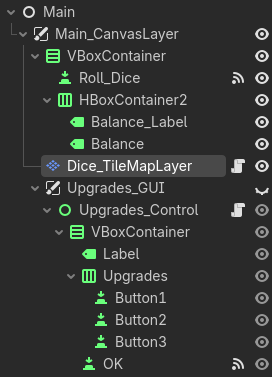
I would like to use random tiles in my tilemaps as icons for Button1, Button2, and Button3. My nodes are organized below:

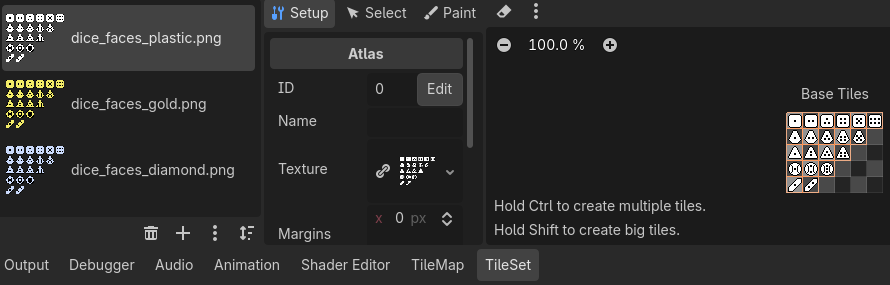
This is how I have my tiles organized:

I plan to have the gdscript typed in the script assigned to the “Upgrades_Control” node.

I don’t think that TileMapLayer is a correct choice. Try using a TextureRect node (or any other Control-type node that has a texture property will work) with an AtlasTexture resource as a texture. Then you can define which region of the texture to show.

The elaborate solution would be to subclass Button, give it a SpriteFrame like so. I’ll leave the randomisation part to you.

extends Button
class_name ButtonWithSpriteFrames

@export var sprite: SpriteFrames;
@export var sprite_name := "default";
@export var sprite_index := 0;

func _ready():
  set_icon()

func _pressed() -> void:
  sprite_index = (sprite_index + 1) % sprite.get_frame_count(sprite_name)
  set_icon()

func set_icon():
    icon = sprite.get_frame_texture(sprite_name, sprite_index)

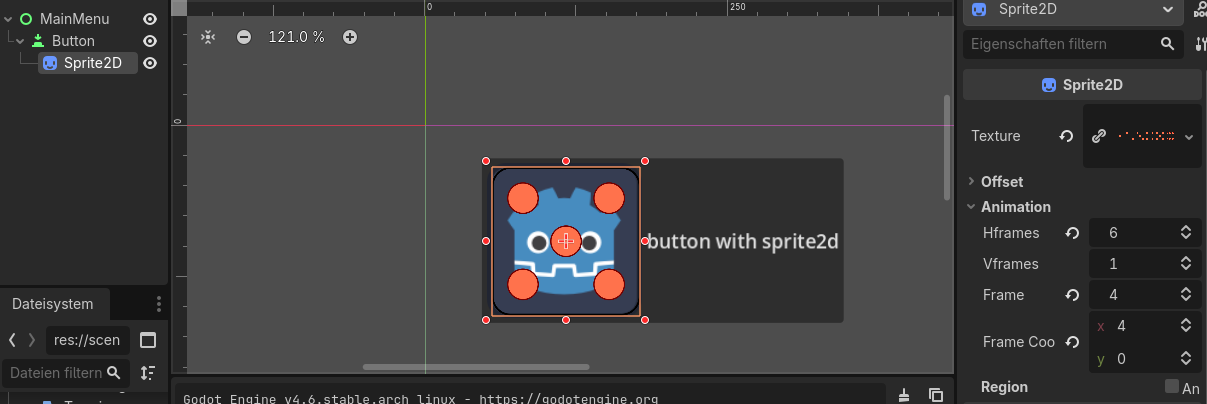
As an alternative: the quick hack would be putting a Sprite2D under the Button and abuse the animation functionality (see the Frame value 4 corresponding to the five on the dice).
1 Like

Thank you. Your suggestion helped, but I had to do some more tinkering. Below is what I found worked for me:

extends Button
class_name ButtonWithSpriteFrames

@export var sprite: SpriteFrames;
@export var sprite_name := “default”;
@export var sprite_index := 0;

func _ready():
   set_icon()

func set_icon():
   icon = sprite.get_frame_texture(sprite_name, randi_range(0, 14))
2 Likes