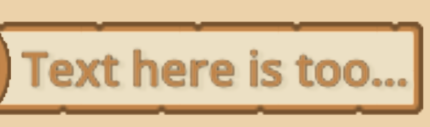
I have a label that can have long texts sometimes. I use Text overrun behaviour - Ellipsis (6+ characters) so it can look like this when the text is long.
Is there a way to animate the text to the left to see the rest of the text as if it’s sliding? (Not sure how to describe it better)
So I can play that animation when cursor is on the label.
There are a couple of ways to do this. It depends.
One way is to have a Control node as its parent with Control.clip_contents enabled and the Label anchor preset set as Full Rect and then animate the LabelControl.offset_left property to a negative value so it scrolls to the right.
Example:
extends Control

@onready var control: Control = $Control
@onready var label: Label = $Control/Label

func _ready() -> void:
	# Enable the control's clip contents
	control.clip_contents = true
	# Don't trim to get the full line size
	label.text_overrun_behavior = TextServer.OVERRUN_NO_TRIMMING
	# Wait for a frame to update sizes
	await get_tree().process_frame
	# Calculate the final offset
	var final_offset = -(label.get_combined_minimum_size().x - control.size.x)
	# Create the tween
	var tween = create_tween()
	# and tween the offset left to a negative value so it scrolls to the right
	tween.tween_property(label, "offset_left", final_offset, 3).set_delay(2)
	# Set the overrun to ellipsis back
	label.text_overrun_behavior = TextServer.OVERRUN_TRIM_ELLIPSIS
Result:
If you don’t want the ellipsis to move then use an HBoxContainer adding both the Control&Label and an extra Label for the ellipsis only and set the overrun behavior of the main Label to only characters instead of ellipsis. You can hide the Label with the ellipsis at the end of the tween by adding a Tween.tween_callback() for example.
I needed the same thing and ended up making a RichTextLabel subclass! This way I can just switch any nodes to my new ScrollingLabel and have it all handled automatically. It’ll even recalc the tween if the text is changed during runtime. This also bounces between two offset tweens as I wanted my label to scroll back and forth, rather than just stopping after scrolling to the end.
extends RichTextLabel
class_name ScrollingLabel

var final_offset: float
var scroll_offset: float
var return_offset: float
var tween: Tween
var tween_duration: float

var current_text: String

func _ready() -> void:
	scroll_active = false
	autowrap_mode = TextServer.AUTOWRAP_OFF
	check_tween()

func _process(_delta: float) -> void:
	if current_text != text:
		await get_tree().process_frame
		check_tween()
		current_text = text


## Checks if the current text overflows the bounds and needs to be tweened
func check_tween() -> void:
	if tween:
		tween.kill()
		offset_left = 0
	if get_content_width() > custom_minimum_size.x:
		# Calculate the final offset
		scroll_offset = -(get_content_width() - custom_minimum_size.x)
		return_offset = offset_left
		# we do a little math to make the scroll speed variable based on text length
		tween_duration = absf(scroll_offset) / 100 * 3

		_tween(scroll_offset)

## Creates the text scroll tween
func _tween(offset: float) -> void:
	# Create the tween
	tween = create_tween()
	tween.finished.connect(_repeat_tween)
	final_offset = offset
	# and tween the offset to a neg value so that it moves right
	tween.tween_property(self, "offset_left", final_offset, tween_duration).set_delay(1)

## Switches the scroll direction
func _repeat_tween() -> void:
	# returns to the OG offset (aka moves left)
	if final_offset < 0:
		_tween(return_offset)
	# scrolls back to the right
	else:
		_tween(scroll_offset)
I’m new to godot and gdscript, so apologies if this isn’t as clean as it could be!
I’d add a function to change the label.text and change the text from that function, and calling the check_tween() part from that. So that the code won’t be running if current_text != text: every frame.
Something like this maybe (didn’t try it, just typing here)
#call this function to change the text of the label, instead of assigning to label.text directly
func change_text(new_text : String) -> void:
	text = new_text #assign the new_text as the label.text
	#add your tween logic here afterwards...
	....
You mean slide as in the text to the right slides left into view and the text to the right slides out of view?
I don’t know how you enter the characters. A lot of people add them one by one. If you do so too, you could have an array with a maximum index size. Just append each character if the size is not greater than max. Then when the array reaches max, you could start clearing the first index before appending the next index.
Then your text would after some scrolling look something like:
… here is too long!
instead of
Text here is too…