How to get 'Forward' to follow Rotation..?

Godot Version

v4.8.dev2.official [7220d456d]

Question

A really simple issue that I should be able to solve, but all I’ve tried has been to no avail. I have a MeshInstance3D moving across a GridMap. I can’t get the Object to move in a new Forward direction after being rotated 90°. It retains the ‘-Z’ for forward, however I rotate it. It is surely simple, but I’ve tried Local, Global, Basis, transform… and am now totally confused, as the movement remains the same. Either my movement is flawed, or I’m not rotating correctly. What have I missed, please..? Here’s the (simple…) GDScript, and illustrative screenshots. Thanks in advance for shedding light on my problem…

~~~

class_name Barb extends Character

var move_dir : Vector2

func _process(_dt):
pass
if not can_move:
return
handle_movement()
if not move_dir:
return
print(move_dir)
move_command(move_dir)
move_dir = Vector2(0.0,0.0)

func handle_movement():
if Input.is_action_just_pressed(“Move_Forward”):
move_dir = Vector2(0.0,1.0)
return

if Input.is_action_just_pressed("Move_Back"):
	move_dir = Vector2(0.0,-1.0)
	return
if Input.is_action_just_pressed("Step_Left"):
	move_dir = Vector2(1.0,0.0)
	return
if Input.is_action_just_pressed("Step_Right"):
	move_dir = Vector2(-1.0,0.0)
	return
if Input.is_action_just_pressed("Rotate_Right"):
	#rotate_object_local(Vector3.UP,deg_to_rad(int(-90)))
	transform.basis = transform.basis.rotated(Vector3.UP,deg_to_rad(int(-90)))
if Input.is_action_just_pressed("Rotate_Left"):
	#rotate_object_local(Vector3.UP,deg_to_rad(int(90)))
	transform.basis = transform.basis.rotated(Vector3.UP,deg_to_rad(int(90)))

~~~

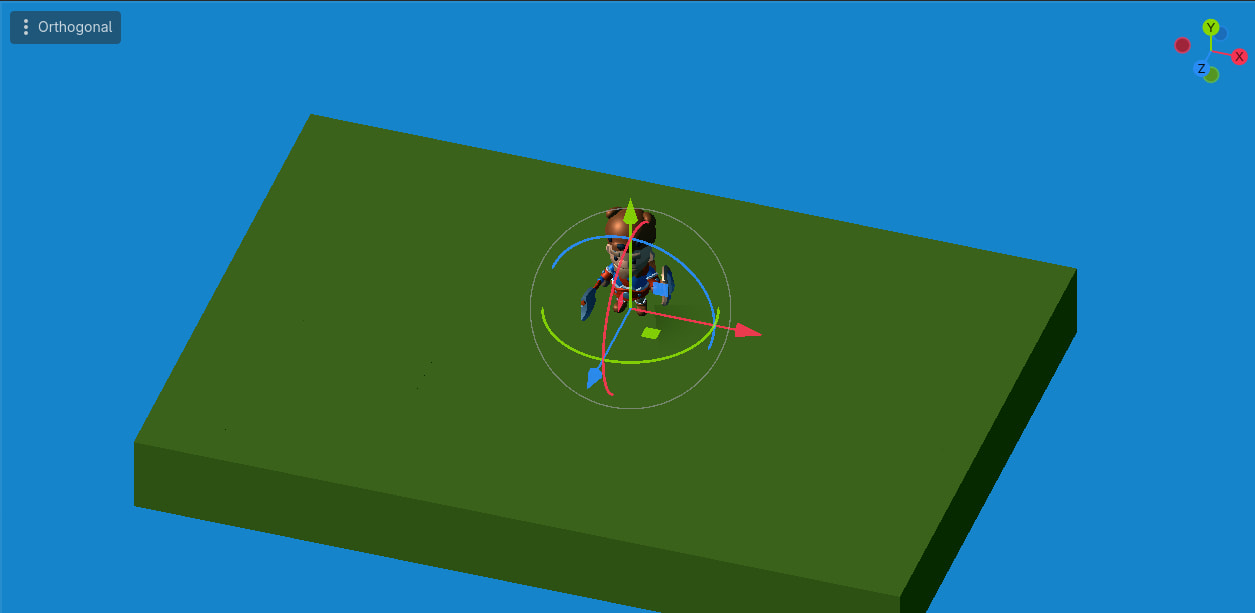
This is the non-rotated position…
… and this is rotated through 90°…
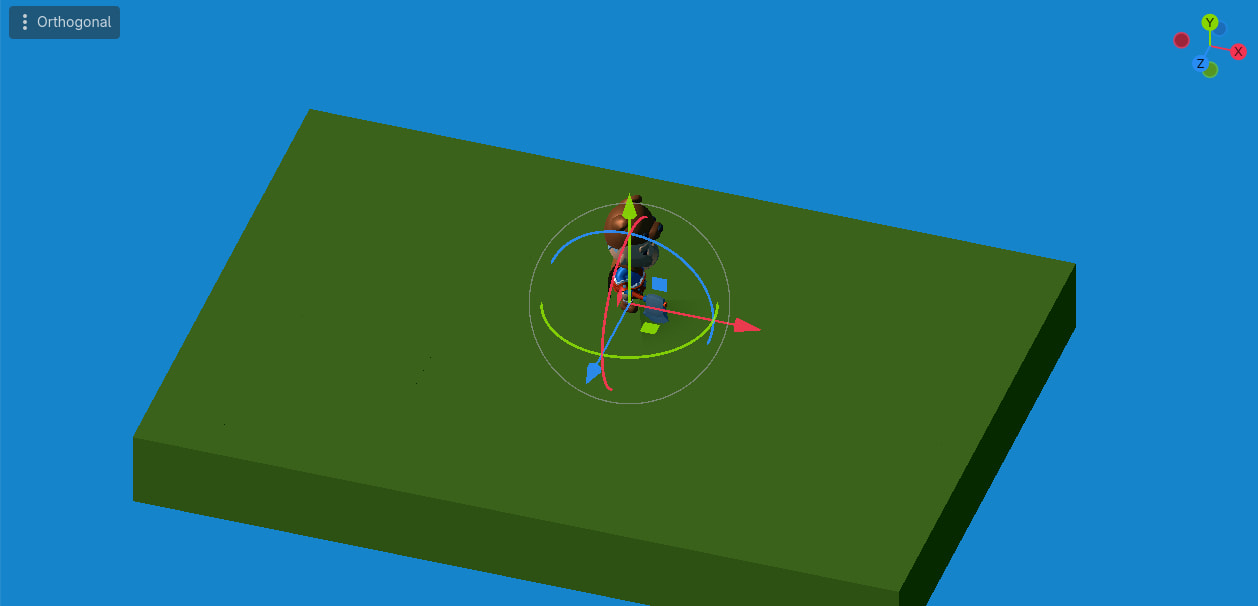
The character always responds to a ‘Forward’ command in the direction of the Blue, ‘-Z’ arrow.

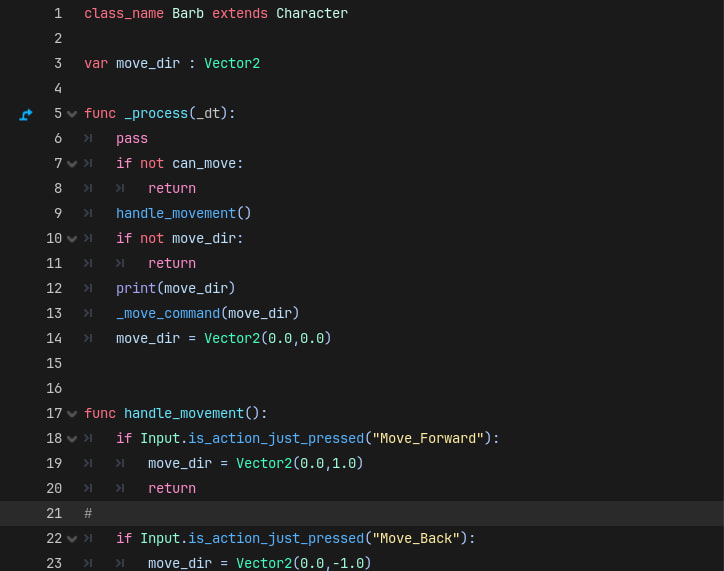
Again, apologies for the formatting; it’s a French keyboard and nothing works better than this. Sorry. The indentations are correct in the editor…
How do you move it?

func handle_movement():
if Input.is_action_just_pressed(“Move_Forward”):
move_dir = Vector2(0.0,1.0)
return

if Input.is_action_just_pressed("Move_Back"):
	move_dir = Vector2(0.0,-1.0)
	return

if Input.is_action_just_pressed("Step_Left"):
	move_dir = Vector2(1.0,0.0)
	return

if Input.is_action_just_pressed("Step_Right"):
	move_dir = Vector2(-1.0,0.0)
	return

(Formatting as per screenshot…)

Well that’s only assignment to move_dir. How do you actually move the node?

Apologies; I misconstrued. Here’s the code…

~~~

func _ready():
pos_on_map = gridmap.local_to_map(global_position.snapped(Vector3(0.0, 0.0, 0.0)))
#pos_on_map.y = gridmap.map_data[Vector2i(pos_on_map.x, pos_on_map.z)][-1].elevation
global_position = gridmap.to_world(pos_on_map)

func _move_command(move_dir: Vector2i):
var new_position = _try_move(pos_on_map, move_dir)
if new_position == pos_on_map:
return
if _is_position_occupied(new_position):
return
pos_on_map = new_position
var global_pos_wanted = gridmap.to_world(pos_on_map)
var t = create_tween()
if smooth_movement:
t.tween_property(self, “global_position”, global_pos_wanted, move_duration)
else:
global_position = global_pos_wanted
t.tween_interval(move_duration)
t.tween_callback(func(): can_move = true)
can_move = false

func _try_move(from: Vector3i, direction: Vector2i) → Vector3i:
var from_2d = Vector2i(from.x, from.z)
var to_2d = from_2d + direction
var to = Vector3i(from.x + direction.x, 0, from.z + direction.y)
if not gridmap.map_data.has(to_2d):
return from
for c in gridmap.map_data[to_2d]:
var delta_elevation = from.y - c.elevation
if abs(delta_elevation) <= 1:
to.y = c.elevation
return to
return from

func _is_position_occupied(pos: Vector3i) → bool:
for c in get_tree().get_nodes_in_group(“characters”):
if c.pos_on_map == pos:
return true
return false

~~~

… and to get a better idea of the formatting, here’s the script seen by Notepad++…

… and here’s the GridMap code …


extends GridMap

class CellData:
	var elevation: float = 0
	func _init(ielevation: float):
		elevation = ielevation
	
var map_data: Dictionary

func _ready():
	for coord in get_used_cells():
		if get_cell_item(coord + Vector3i(0, 1, 0)) == -1:
			var coord_2d = Vector2i(coord.x, coord.z)
			if not map_data.has(coord_2d):
				map_data[coord_2d] = []
			map_data[coord_2d].push_back(CellData.new(float(coord.y + 1)))

func to_world(coord: Vector3i) -> Vector3:
	return Vector3(coord.x, coord.y, coord.z) + Vector3(0.5, 0.0, 0.5)

You could try rotating the move direction before sending it to your move_command function

move_command(move_dir.rotated(rotation.y))

Thank you for the suggestion; I’ll try that this afternoon and report back the result.
Please note again (as I’ve already explained this a few times…) :
I’m in France, using an AZERTY keyboard for a Windows 11 PC. This means that the formatting codes recommended for this Forum do not behave as is required. I have experimented with all the methods shown to me, such as pasting the GDScript, selecting it and clicking the ‘Format’ button (‘</>’…), or surrounding the GDScript with groups of ‘tildes (’~~~‘…) or accent gràves (’```‘…), or apostrophes (’‘’‘’…), none of these format the whole GDScript completely, correctly. I have tried adding the relevant ‘tabs’ manually; this doesn’t not behave as with a standard text editor either. The only way I have found to show what the indentations should look like, after posting GDScript, is to follow the post with a screenshot of the editor, where the Godot vision is visible.
If there is a definitive way of formatting the text that I’m not yet aware of, I’ll gladly use it, if the result conforms to that required by the Forum etiquette. Until then, I can only offer apologies. I expect that I’m not alone in this, and that other non-QWERTY users have also failed to get the formatting commands to work as required. I hope that this explains why there is badly-formatted code posted here often enough, and that a solution may be found, for the benefit of all. Meanwhile, back to resolving my programming issue, and…

Have a splendid day.

Keyboard shouldn’t affect the method of formatting by pressing the preformat icon.

As for your problem, you’re currently moving by the same axes regardless of orientation. Instead you need to move along the basis axes. Rotating the input direction may do the trick, as already suggested above. Alternatively you can transform the direction vector using the character’s current basis or just multiply the direction components by x and z global basis axes of the character. All this boils down to the same thing - projecting the local movement vector to the actual orientation in global space.

Note the word ‘shouldn’t’. I’d agree, but it does, apparently. I’ve posted enough code snippets recently to know that I’ve yet to find the method that works.
Are there any French coders out there that have a solution to this, or maybe I’m just ‘out of the loop’ of some untold open secret, so obvious to all as to not be worth divulging..? Be assured, of course, that I’m not deliberately ignoring the formatting rules; I’m just not able to respect them, through ignorance, technique or material I don’t know.
I’ll get back to rotating now; thanks for the explanations and potential solutions. Have a wonderful day.

Bingo..! Resolved, with this one, easy line of code added just before invoking ‘move_command’…

move_dir = move_dir.rotated(-rotation.y)

I had to add the ‘-’ to make the rotation correspond to ‘forward’ instead of ‘back’. Many thanks for the advice, and to all for the explanations. On, now, to triggering the ‘walking’ animation; meanwhile…
Have a great day.