Hello. I am wracking my head on how to do a very simple thing: turn off the TileMapLayers in my levels, when I make a scene-transition.
For context, I want to do this via my GameManager, when I do a scene-transition / Change the level. I disable
So, my Levels are built from Node2D’s of course, and they have a script that extends Node2D.
I want to:
Search through my level-dictionary (level_dict) for all tile-maps
Disable all objects in the group “Tiles” in the Node2D’s inside of my level_dict.
Profit.
I can’t seem to figure out how to write these very simple functions to loop through my tiles and disable and then enable them selectively.
How do I solve this? I thought it would be just a three lines of code per function, but I don’t know enough of the syntax to understand how to do it.
Code:
class_name GameManager
extends Node
#This is our Singleton that remembers our score and other things, in-between scenes.

@export var level_2D : Node2D #We set up a variable for the levels.

var current_level2d : Node2D
var current_level_name : String :
	get():
		return level_dict.find_key(current_level2d)

var level_dict : Dictionary[String, Node2D] = {} #We make a dictionary for our level-scenes


func change_level2D(new_level : String,
	entry_point : int,
	transition: bool = true,
	seconds: float = 0.8) -> void:

	#Condition to run a scene-transition.
	if transition == true:
		print_debug("We shall run a transition")
		Player.instance.lock_movement() #If we're transitioning we lock the player.
		TransitionController.instance.transition_out(seconds) #Get the instance of the controller & run the transition_out function.
		await TransitionController.instance.animation_player.animation_finished #Wait until the animation is done.
	#End transition-condition.
	#OLD LEVEL TURN OFF
	disable_lvls() #Turn off all of the levels, so we can make sure we only enable the level we want.
	disable_tiles() #Turn off all tilesets, since they run on a separate process from everything else in the levels.

	current_level2d = level_dict[new_level] #We check the dictionary for the new level, which is based on what the LevelTransition says it should be.

	#NEW LEVEL TURN ON
	current_level2d.place_player(Player.instance, entry_point) #We run the place-player function from the Level-script, using the string that references an Entry-point.
	await get_tree().process_frame
	current_level2d.visible = true
	current_level2d.process_mode = Node.PROCESS_MODE_ALWAYS

enable_tileset() #We re-enable the tiles in the new level we're in.

	if transition == true:
		TransitionController.instance.transition_in(seconds) #Now we run the fade in transition as well.
		Player.instance.free_movement() #We unlock the player again once we've transitioned.

#BELOW ARE THE FUNCTIONS I'M TRYING TO WRITE FOR TILE-MANAGEMENT.
func disable_tiles():
	#var _tiles: TileMapLayer #Make a var for tilemaplayers (so we can turn them off)
	for _node2D in level_dict.values(): #We search through our Node2D levels in our dict.
		#We make a local var to make sure we can single out tilemaps.
		var tiles_to_disable : TileMapLayer = _node2D.get_nodes_in_group("Tiles")
		tiles_to_disable.enabled = false
		#tiles_to_disable = _levels.get_groups("Tiles") #We store all of the tiles from our dict.
		#tiles_to_disable.enabled = false #We turn the tiles off.
	print_debug("Disabled tiles... maybe.")

func enable_tileset():
	for tiles_to_enable in current_level2d.get_groups():
		if str(tiles_to_enable).contains("Tiles"):
			TileMapLayer.enabled = true
	print_debug("Enabled tiles. Maybe??")
Cheers for replying (with a bit of a sanity-check, heh heh).
The reason I do it like this, is because my GameManager keeps the levels disabled but in the tree, when I transition between levels. I turn off visibility and processing on those other levels (scenes), when I transition to the new level – which works great for everything but tiles, as they run on a different thread in GoDot.
So even though I can’t see the tiles… their physics is still running, even though they’re invisible, the player can still stand on the invisible tiles.
I just figured out that I can do this to turn OFF the tiles:
World (object that contains Player, Levels and HuD)
”World” has a function that can turn off tiles
GameManager runs this function
So now they turn off, but I can’t seem to individually turn them ON per-level yet.
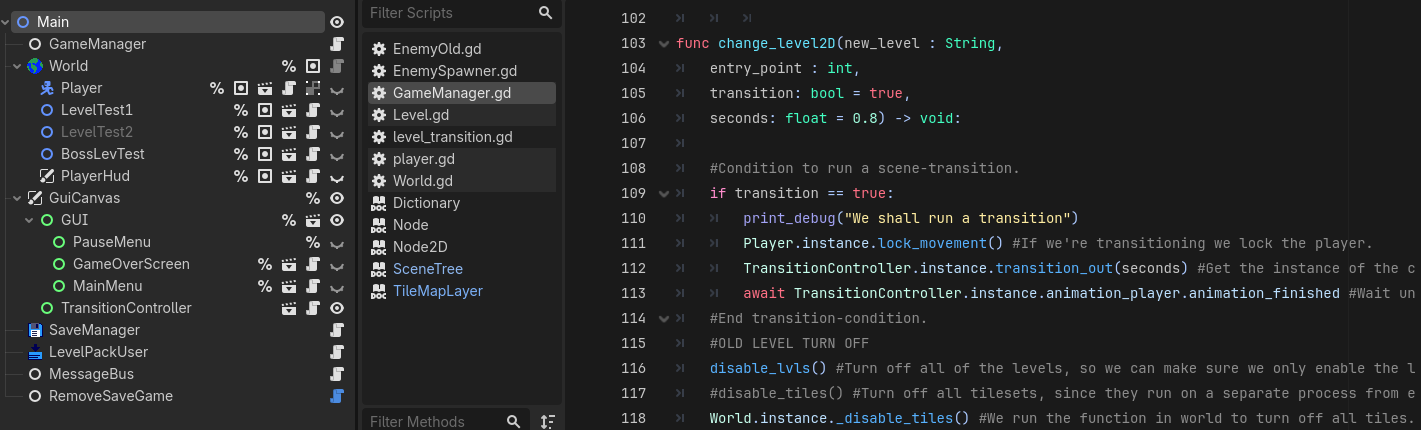
Below is my world-script, and a screen-shot showing when its run in the GameManager. (line 118)
#This class is just for sorting things that are inside of the game-world
@icon(“res://game_management/world_symbol.png”)
class_name World
extends Node

static var instance : World

func _init() → void:
instance = self

func _disable_tiles():
for tiles in get_tree().get_nodes_in_group(“Tiles”):
tiles.enabled = false
print_debug(“Turned off Tiles in World.”)
So from what is provided I can gather is that you don’t have an issue of visuals when transitioning between tile-map layers but a issue of physics(collisions) staying on and not having a way to disable them when transitioning.
One solution I was thinking about is that tileset could just be on another physics layer other level to be on different layer and just set your player mask to look at the other layer when in the transition to another level.
Another way I though up of is that you can disable the collision of the TileMapLayer with the collision_enabled property during the transistion.
Let me know if any of my thinking is off or wrong since I don’t have intimate knowledge of your codebase like you.
So from what is provided I can gather is that you don’t have an issue of visuals when transitioning between tile-map layers but a issue of physics(collisions) staying on and not having a way to disable them when transitioning.
That’s right! Everything else in the levels is turned off, but I get invisible platforms in the new level, from the previous levels physics-colliders on the TileMapLayers.
Another way I though up of is that you can disable the collision of the TileMapLayer with the collision_enabled property during the transistion.
Let me know if any of my thinking is off or wrong since I don’t have intimate knowledge of your codebase like you.
I think you’re getting it pretty well.
I’m currently trying to do more or less your second suggestion, which is to set a property on the TileMapLayer(s). (I have multiple per-scene)
I can’t quite figure out how to do this with a good clean for-loop.
A way to do it that’s less elegant and painful, is to make a function in my Level-script (every Level-scene has a script attached at the top, that for instance, sets the transition entry-points) which then sets the property of each TileMapLayer in an @export -array – but then I’d have to manually enter all of the tilemaps per-level, into it. I could then have my game-manager run the Level-function and set them all on.
But I don’t want to do it like that, because that seems round-about and inefficient - it should be doable via 3 lines of code in the GameManager, I feel.
Even if inefficient I think it is easier to do it manually. But it is doable, just need to look at it visually.
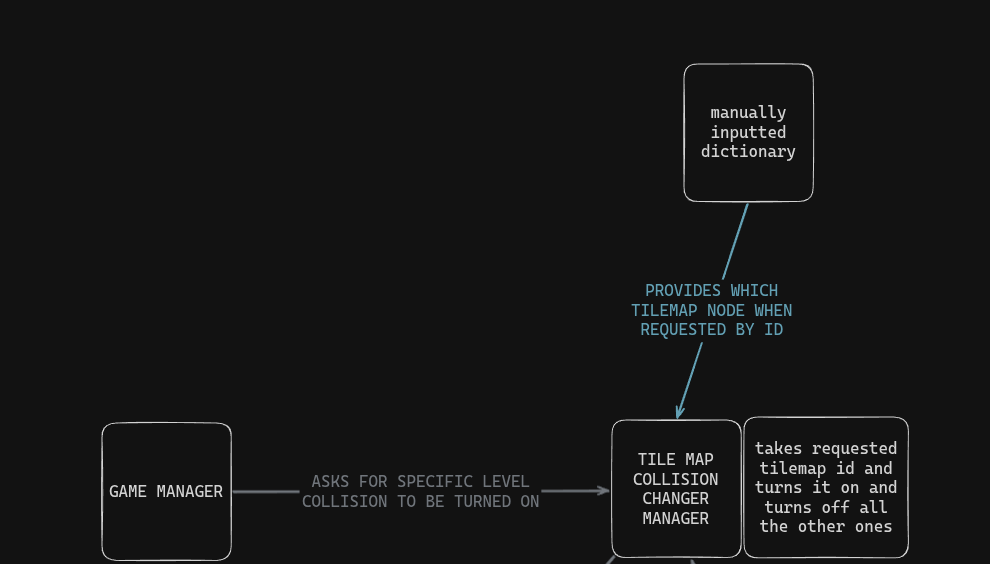
I feel you would have to build a system that takes any TilemapLayer in a scene tree automatically have assign it a ID. Then you could have a function call in your Game Manager that calls a TilemapLayer collision manager and have that manager call into a system that organizes TilemapLayers by ID (ID is the only thing that is coming to mind right now to keep it organized, I can’t seem to think of a way that would require less effort)
(this chart might be more complex than what you need to think about)
Since this is the only issue that is blocking progress and everything else works perfectly is it worth spending so much time on something that could be figured out later when your level bloat is too much.
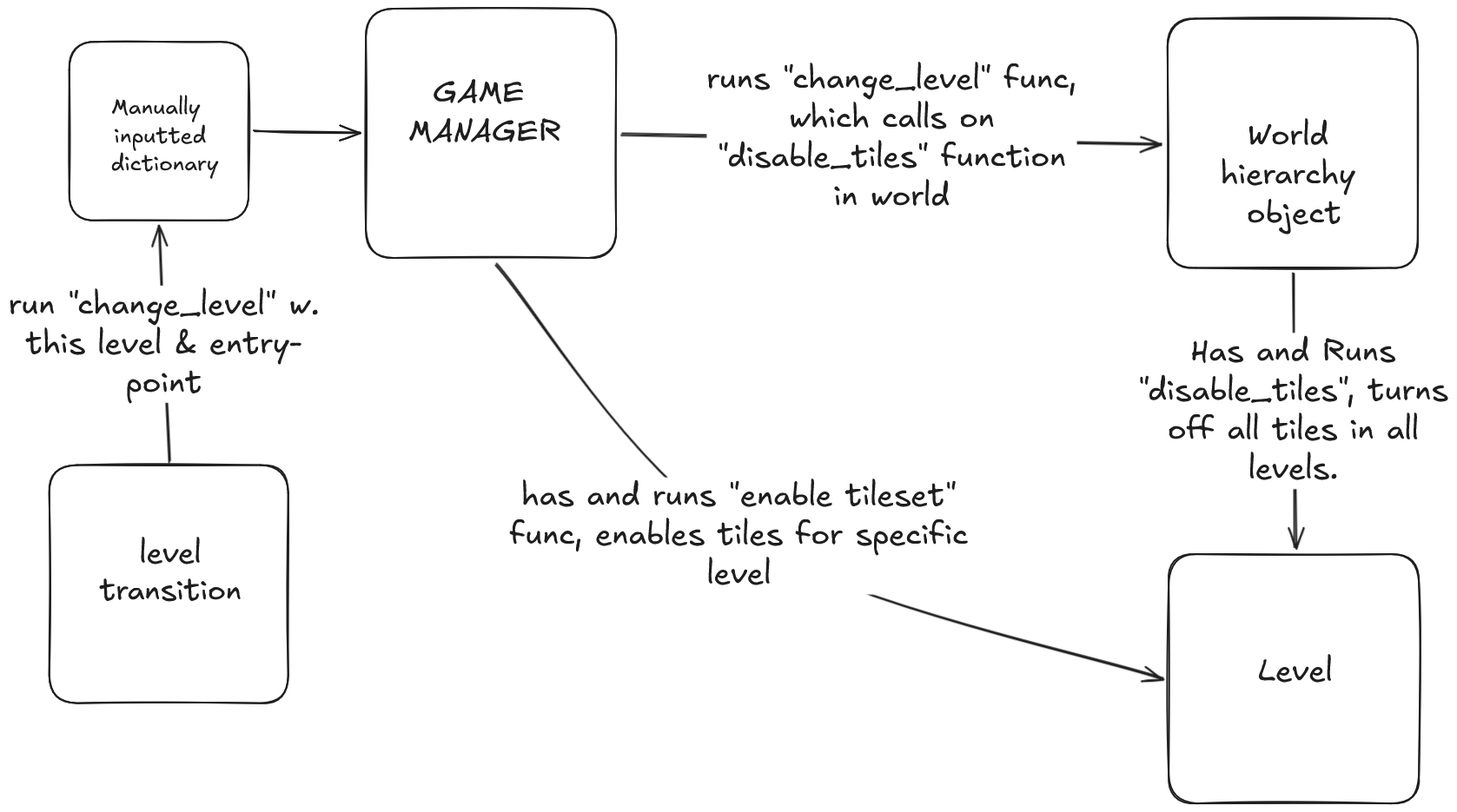
I’ve been crazy busy, but here’s finally how I chose to do this:
The World-object in the hierarchy has a script with a function that turns off all collision for all tiles, with a for-loop. (all that needed changing was from tiles.enabled to collision_enabled) The Game Manager then has a built-in function to enable tiles on the specific level wanted. (we know which level we want from the LevelTransition-script.)