How to make the first person camera in this minecraft script?

Godot Version

4.5.1

Question

This scripts only work with the camera in up-down rotation, but gets crazy when i implement left-right rotation and movement keys: “wasd” never work. Any help? Thanks anyway!

extends Camera3D

const SENSITIVITY = 0.002

func _input(event):
	# 1. GESTIÓN DEL BLOQUEO (Click para bloquear, Esc para liberar)
	if event is InputEventMouseButton and event.pressed:
		Input.mouse_mode = Input.MOUSE_MODE_CAPTURED
	
	if event is InputEventKey and event.pressed and event.keycode == KEY_ESCAPE:
		Input.mouse_mode = Input.MOUSE_MODE_VISIBLE

	# 2. MOVIMIENTO (Solo si el ratón está bloqueado/capturado)
	if event is InputEventMouseMotion and Input.mouse_mode == Input.MOUSE_MODE_CAPTURED:
		
		# Rotación Vertical (Arriba/Abajo) - Se aplica a la cámara
		rotation.x -= event.relative.y * SENSITIVITY
		rotation.x = clamp(rotation.x, deg_to_rad(-85), deg_to_rad(85))
		
		# Rotación Horizontal (Izquierda/Derecha) - Se aplica al cuerpo (Padre)
		# Esto hace que cuando camines, vayas hacia donde miras.
		get_parent().rotate_y(-event.relative.x * SENSITIVITY)

1 Like

In this line:

get_parent().rotate_y(-event.relative.x * SENSITIVITY)

if the parent is the CharacterBody3D it would also rotate everything below it and create a chain reaction of rotations that don’t make sense.

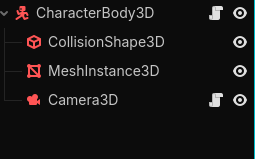
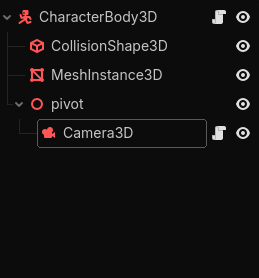
Your nodes tree looks like this:

→CharacterBody3D
||→Camera3D

But it should be like this:

→CharacterBody3D

|→CameraPivot
||→Camera3D

For wasd movement make sure to set the keybinds up under Project > Project Settings > Inputmap

That all that I can guess from the information given.

I tried nodes but it doesnt work. I need a script…

Does your node tree look like

Option A:

or

Option B:

the problems you are experiencing from your script may be coming from how this is structured

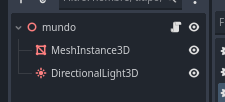
Its look like here:

If i change or delete the script in “mundo” the shadows and the realism will dissapear…

is that where your camera script you originally posted above attached to?

Yes… the camera is into this script…

The actual script is this:

extends Node3D

var velocidad = 10.0
var sensibilidad = 0.002
var camara : Camera3D # Definimos el tipo de variable claramente

func _ready():
setup_lighting_and_env()
generar_mundo()

# 1. CREAR CÁMARA CORRECTAMENTE
camara = Camera3D.new()
add_child(camara) # Primero se añade al mundo...
camara.make_current() # ...y luego se activa
camara.position = Vector3(50, 50, 50) # Posición inicial elevada

Input.mouse_mode = Input.MOUSE_MODE_CAPTURED

func _unhandled_input(event):
if event is InputEventMouseMotion and camara:

Girar el nodo principal (cuerpo) a los lados

rotate_y(-event.relative.x * sensibilidad)

Girar la cámara arriba y abajo

camara.rotate_x(-event.relative.y * sensibilidad)
camara.rotation.x = clamp(camara.rotation.x, -1.2, 1.2)

func _process(delta):
if not camara: return # Seguridad para evitar el error

var direccion = Vector3.ZERO
# Usamos transform.basis para que el movimiento dependa de hacia dónde miras
var bas = global_transform.basis

if Input.is_key_pressed(KEY_W): direccion -= bas.z
if Input.is_key_pressed(KEY_S): direccion += bas.z
if Input.is_key_pressed(KEY_A): direccion -= bas.x
if Input.is_key_pressed(KEY_D): direccion += bas.x

if direccion != Vector3.ZERO:
	direccion.y = 0 # No volar al caminar
	global_position += direccion.normalized() * velocidad * delta

func generar_mundo():
var tamaño = 80 # Un poco más pequeño para que vuele en tu Intel
var noise = FastNoiseLite.new()
noise.frequency = 0.02

var multi_mesh = MultiMeshInstance3D.new()
multi_mesh.cast_shadow = GeometryInstance3D.SHADOW_CASTING_SETTING_ON

multi_mesh.multimesh = MultiMesh.new()
multi_mesh.multimesh.transform_format = MultiMesh.TRANSFORM_3D
multi_mesh.multimesh.use_colors = true 

var cubo = BoxMesh.new()
var mat = StandardMaterial3D.new()
# Cargar textura
mat.albedo_texture = load("res://dirt.jpg")
mat.vertex_color_use_as_albedo = true 
mat.texture_filter = BaseMaterial3D.TEXTURE_FILTER_NEAREST
mat.shading_mode = BaseMaterial3D.SHADING_MODE_PER_PIXEL
mat.specular_mode = BaseMaterial3D.SPECULAR_DISABLED

cubo.material = mat
multi_mesh.multimesh.mesh = cubo
multi_mesh.multimesh.instance_count = tamaño * tamaño

var i = 0
for x in range(tamaño):
	for z in range(tamaño):
		var y = round(noise.get_noise_2d(x, z) * 10)
		var pos = Transform3D(Basis(), Vector3(x, y, z))
		multi_mesh.multimesh.set_instance_transform(i, pos)
		
		# Lógica de colores como en tus imágenes
		var color_bloque = Color("3e8948") # Verde
		if y < 1: color_bloque = Color("855e42") # Marrón
		
		multi_mesh.multimesh.set_instance_color(i, color_bloque)
		i += 1
add_child(multi_mesh)

func setup_lighting_and_env():
var luz = DirectionalLight3D.new()
luz.shadow_enabled = true
luz.rotation_degrees = Vector3(-45, 45, 0)
add_child(luz)

var env_node = WorldEnvironment.new()
var env_res = Environment.new()
env_res.background_mode = Environment.BG_COLOR
env_res.background_color = Color("0088ff") # Cielo azul
env_res.ambient_light_source = Environment.AMBIENT_SOURCE_COLOR
env_res.ambient_light_color = Color.WHITE
env_res.ambient_light_energy = 0.2
env_node.environment = env_res
add_child(env_node)

This is the actual script, i cant send correctly… in that is the camera…

Here is a TEMPORARY fix that will help with your current problem

var node = Node3D.new()

camara = Camera3D.new()

node.add_child(camara)

but as soon as you try to do any of your Input.is_key_pressed in the func _process(delta): you are moving the whole mundo not just the camera as the camera is attached to the mundo

another TEMPORARY fix

if Input.is_key_pressed(KEY_W): node.direccion -= bas.z
if Input.is_key_pressed(KEY_S): node.direccion += bas.z
if Input.is_key_pressed(KEY_A): node.direccion -= bas.x
if Input.is_key_pressed(KEY_D): node.direccion += bas.x

But I feel like your are approaching Godot wrong. I have a feeling you might have a misunderstanding on how Godot fundamentally works.

Doing something very simple like adding a camera or creating a box shouldn’t require gdscript. That is what the nodes provided are trying to achieve.

Also you should be trying to structure all your game objects into individual scenes and not have them all in your mundo scene.

I would recommend trying to follow a simple first person camera tutorial and move on from there because if I feel like if you keep on trying to add more to the mundo script it will create more and more problems.

Here are some videos I recommend:

Short:

Long:

Even though most say FPS(First person shooter) it teaches on how to make a first person camera which is important and how you should use godot to your advantage and not struggle through trying to create everything yourself through scripting.

1 Like

You could also use a plugin I made Camera 3D that implements a bunch of different cameras, including first-person and show you how to set them up. It also supports keyboard/mouse and controller.

1 Like

I dont know how to implement scripts… and the code with this:

if Input.is_key_pressed(KEY_W): node.direccion -= bas.z
if Input.is_key_pressed(KEY_S): node.direccion += bas.z
if Input.is_key_pressed(KEY_A): node.direccion -= bas.x
if Input.is_key_pressed(KEY_D): node.direccion += bas.x

doesnt work on my godot proyect…

My maximum reachment is this:

extends Node3D

var velocidad = 10.0
var sensibilidad = 0.002
var camara : Camera3D # Definimos el tipo de variable claramente

func _ready():
setup_lighting_and_env()
generar_mundo()

# 1. CREAR CÁMARA CORRECTAMENTE
camara = Camera3D.new()
add_child(camara) # Primero se añade al mundo...
camara.make_current() # ...y luego se activa
camara.position = Vector3(0, 100, 0) # Posición inicial elevada

Input.mouse_mode = Input.MOUSE_MODE_CAPTURED

func _unhandled_input(event):
# Cancelar o activar la captura del ratón con ESCAPE
if event is InputEventKey and event.pressed and event.keycode == KEY_ESCAPE:
if Input.mouse_mode == Input.MOUSE_MODE_CAPTURED:
Input.mouse_mode = Input.MOUSE_MODE_VISIBLE
else:
Input.mouse_mode = Input.MOUSE_MODE_CAPTURED

# Lógica de movimiento del ratón (solo si está capturado)
if event is InputEventMouseMotion and camara:
	if Input.mouse_mode == Input.MOUSE_MODE_CAPTURED:
		camara.rotate_x(-event.relative.y * sensibilidad)
		camara.rotation.x = clamp(camara.rotation.x, -1.2, 1.2)

func _process(delta):
if not camara: return

var direccion = Vector3.ZERO
# Obtenemos la orientación del nodo actual (el que rotamos con el mouse)
var bas = global_transform.basis

# Usamos la variable 'direccion' que definimos arriba
if Input.is_key_pressed(KEY_W): direccion -= bas.z
if Input.is_key_pressed(KEY_S): direccion += bas.z
if Input.is_key_pressed(KEY_A): direccion -= bas.x
if Input.is_key_pressed(KEY_D): direccion += bas.x

if direccion != Vector3.ZERO:
	direccion.y = 0 # Mantiene el movimiento en el plano XZ (suelo)
	# Normalizamos para que no camine más rápido en diagonal
	global_position += direccion.normalized() * velocidad * delta

func generar_mundo():
var tamaño = 50 # Un poco más pequeño para que vuele en tu Intel
var noise = FastNoiseLite.new()
noise.frequency = 0.02

var multi_mesh = MultiMeshInstance3D.new()
multi_mesh.cast_shadow = GeometryInstance3D.SHADOW_CASTING_SETTING_ON

multi_mesh.multimesh = MultiMesh.new()
multi_mesh.multimesh.transform_format = MultiMesh.TRANSFORM_3D
multi_mesh.multimesh.use_colors = true 

var cubo = BoxMesh.new()
cubo.size = Vector3(1.0, 1.0, 1.0) # Tamaño estándar
var mat = StandardMaterial3D.new()
# Cargar textura
mat.albedo_texture = load("res://dirt.jpg")
mat.vertex_color_use_as_albedo = true 
mat.texture_filter = BaseMaterial3D.TEXTURE_FILTER_NEAREST
mat.shading_mode = BaseMaterial3D.SHADING_MODE_PER_PIXEL
mat.specular_mode = BaseMaterial3D.SPECULAR_DISABLED

cubo.material = mat
multi_mesh.multimesh.mesh = cubo
multi_mesh.multimesh.instance_count = tamaño * tamaño * tamaño

var i = 0
for x in range(tamaño):
	for z in range(tamaño):
		for y in range(tamaño):
			var surface = round(noise.get_noise_2d(x, z) * 50)+30
			if y<surface:
				var pos = Transform3D(Basis(), Vector3(x, y, z))
				multi_mesh.multimesh.set_instance_transform(i, pos)
				
				# Lógica de colores como en tus imágenes
				var color_bloque = Color("00a200") # Marrón
				if y < surface - 2: color_bloque = Color("aa8866")
				if y < 25: color_bloque = Color("ff9900") # Amarillo
				
				multi_mesh.multimesh.set_instance_color(i, color_bloque)
				i += 1

add_child(multi_mesh)

func setup_lighting_and_env():
var luz = DirectionalLight3D.new()
luz.shadow_enabled = true
luz.rotation_degrees = Vector3(-45, 45, 0)
add_child(luz)

var env_node = WorldEnvironment.new()
var env_res = Environment.new()
env_res.background_mode = Environment.BG_COLOR
env_res.background_color = Color("0088ff") # Cielo azul
env_res.ambient_light_source = Environment.AMBIENT_SOURCE_COLOR
env_res.ambient_light_color = Color.WHITE
env_res.ambient_light_energy = 0.01
env_node.environment = env_res
add_child(env_node)

Edit 1: I reached spectator mode:

extends Node3D

var velocidad = 30.0
var sensibilidad = 0.002
var camara : Camera3D # Definimos el tipo de variable claramente

func _ready():
setup_lighting_and_env()
generar_mundo()

# 1. CREAR CÁMARA CORRECTAMENTE
camara = Camera3D.new()
add_child(camara) # Primero se añade al mundo...
camara.make_current() # ...y luego se activa
camara.position = Vector3(0, 0, 0) # Posición inicial elevada

Input.mouse_mode = Input.MOUSE_MODE_CAPTURED

var yaw = 0.0   # Rotación izquierda/derecha
var pitch = 0.0 # Rotación arriba/abajo

func _unhandled_input(event):
# Captura/Liberación de mouse
if event is InputEventKey and event.pressed and event.keycode == KEY_ESCAPE:
if Input.mouse_mode == Input.MOUSE_MODE_CAPTURED:
Input.mouse_mode = Input.MOUSE_MODE_VISIBLE
else:
Input.mouse_mode = Input.MOUSE_MODE_CAPTURED
if event is InputEventMouseMotion and Input.mouse_mode == Input.MOUSE_MODE_CAPTURED:
# Actualizamos los ángulos basados en el movimiento del ratón
# Invertimos el signo aquí para cambiar la dirección de rotación
yaw -= event.relative.x * sensibilidad
pitch -= event.relative.y * sensibilidad

	# Limitamos el ángulo vertical para no dar la vuelta
	pitch = clamp(pitch, deg_to_rad(-89), deg_to_rad(89))

func _process(delta):
if not camara: return

# 1. DIRECCIÓN DE LA MIRADA (Seno y Coseno)
var direccion_mirada = Vector3(
	sin(yaw) * cos(pitch),
	sin(pitch),
	cos(yaw) * cos(pitch)
)

# 2. APLICAR LOOK_AT
# Importante: Miramos hacia adelante (sumando la dirección a la posición actual)
camara.look_at(camara.global_position + direccion_mirada, Vector3.UP)

# 3. MOVIMIENTO
var movimiento = Vector3.ZERO

# Calculamos 'adelante' basado solo en el giro horizontal (yaw)
# Nota: En Godot -Z es hacia adelante, por eso usamos los signos así:
var adelante = Vector3(sin(yaw), 0, cos(yaw)) 
var derecha = Vector3(sin(yaw + PI/2), 0, cos(yaw + PI/2))


if Input.is_key_pressed(KEY_W): movimiento += adelante # Ir hacia adelante
if Input.is_key_pressed(KEY_S): movimiento -= adelante # Ir hacia atrás
if Input.is_key_pressed(KEY_A): movimiento += derecha  # Ir izquierda
if Input.is_key_pressed(KEY_D): movimiento -= derecha  # Ir derecha

# 4. APLICAR MOVIMIENTO AL NODO PRINCIPAL
if movimiento != Vector3.ZERO:
	camara.position += movimiento.normalized() * velocidad * delta
if Input.is_key_pressed(KEY_E): camara.position.y += velocidad * delta  # Ir arriba.
if Input.is_key_pressed(KEY_Q): camara.position.y -= velocidad * delta  # Ir abajo.

func generar_mundo():
var tamaño = 50 # Un poco más pequeño para que vuele en tu Intel
var noise = FastNoiseLite.new()
noise.frequency = 0.005

var multi_mesh = MultiMeshInstance3D.new()
multi_mesh.cast_shadow = GeometryInstance3D.SHADOW_CASTING_SETTING_ON

multi_mesh.multimesh = MultiMesh.new()
multi_mesh.multimesh.transform_format = MultiMesh.TRANSFORM_3D
multi_mesh.multimesh.use_colors = true 

var cubo = BoxMesh.new()
cubo.size = Vector3(1.0, 1.0, 1.0) # Tamaño estándar
var mat = StandardMaterial3D.new()
# Cargar textura
mat.albedo_texture = load("res://dirt.jpg")
mat.vertex_color_use_as_albedo = true 
mat.texture_filter = BaseMaterial3D.TEXTURE_FILTER_NEAREST
mat.shading_mode = BaseMaterial3D.SHADING_MODE_PER_PIXEL
mat.specular_mode = BaseMaterial3D.SPECULAR_DISABLED

cubo.material = mat
multi_mesh.multimesh.mesh = cubo
multi_mesh.multimesh.instance_count = tamaño * tamaño * tamaño

var i = 0
for x in range(tamaño):
	for z in range(tamaño):
		for y in range(tamaño):
			var surface = round(noise.get_noise_2d(x, z) * 50)+30
			if y<surface:
				var pos = Transform3D(Basis(), Vector3(x, y, z))
				multi_mesh.multimesh.set_instance_transform(i, pos)
				
				# Lógica de colores como en tus imágenes
				var color_bloque = Color("00a200") # Marrón
				if y < surface - 2: color_bloque = Color("aa8866")
				if y < 25: color_bloque = Color("ff9900") # Amarillo
				
				multi_mesh.multimesh.set_instance_color(i, color_bloque)
				i += 1

add_child(multi_mesh)

func setup_lighting_and_env():
var luz = DirectionalLight3D.new()
luz.shadow_enabled = true
luz.rotation_degrees = Vector3(-45, 45, 0)
add_child(luz)

var env_node = WorldEnvironment.new()
var env_res = Environment.new()
env_res.background_mode = Environment.BG_COLOR
env_res.background_color = Color("0088ff") # Cielo azul
env_res.ambient_light_source = Environment.AMBIENT_SOURCE_COLOR
env_res.ambient_light_color = Color.WHITE
env_res.ambient_light_energy = 0.01
env_node.environment = env_res
add_child(env_node)

If you cannot implement scripts, I’m not sure how to help you. It is difficult for me to read your code as all your comments and variable names appear to be in Spanish.

I recommend you follow the Godot 3D tutorial in Spanish. It will teach you a lot about the engine and help you to fix a number of mistakes I’m seeing in your code.

I would also recommend you look for a Godot Community that speaks your native language. It seems like you are speaking (writing) Spanish. There are groups in Argentina and Spain.

I can implement godot scripts or .gd files, but no plugins or another thing…

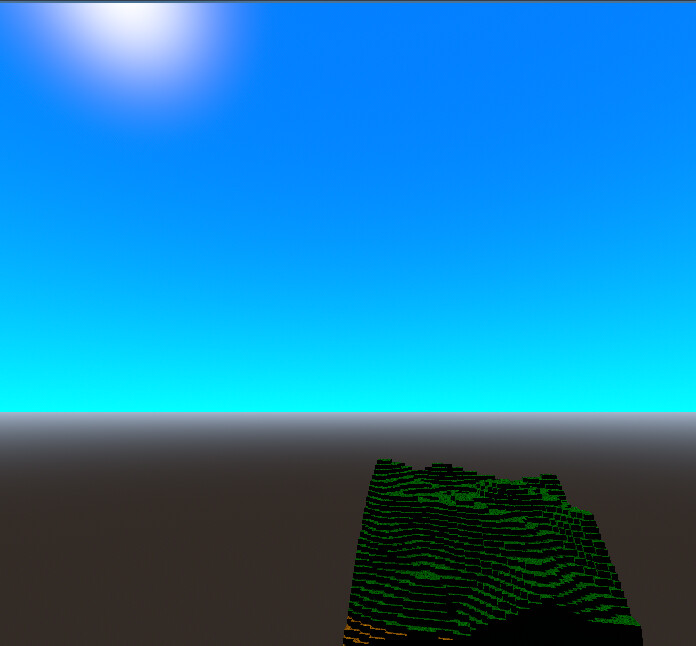
EDIT 1: I made the sky aproachment:

extends Node3D

var velocidad = 30.0
var sensibilidad = 0.002
var camara : Camera3D # Definimos el tipo de variable claramente

func _ready():
setup_lighting_and_env()
generar_mundo()

# 1. CREAR CÁMARA CORRECTAMENTE
camara = Camera3D.new()
add_child(camara) # Primero se añade al mundo...
camara.make_current() # ...y luego se activa
camara.position = Vector3(0, 0, 0) # Posición inicial elevada

Input.mouse_mode = Input.MOUSE_MODE_CAPTURED

var yaw = 0.0   # Rotación izquierda/derecha
var pitch = 0.0 # Rotación arriba/abajo

func _unhandled_input(event):
# Captura/Liberación de mouse
if event is InputEventKey and event.pressed and event.keycode == KEY_ESCAPE:
if Input.mouse_mode == Input.MOUSE_MODE_CAPTURED:
Input.mouse_mode = Input.MOUSE_MODE_VISIBLE
else:
Input.mouse_mode = Input.MOUSE_MODE_CAPTURED
if event is InputEventMouseMotion and Input.mouse_mode == Input.MOUSE_MODE_CAPTURED:
# Actualizamos los ángulos basados en el movimiento del ratón
# Invertimos el signo aquí para cambiar la dirección de rotación
yaw -= event.relative.x * sensibilidad
pitch -= event.relative.y * sensibilidad

	# Limitamos el ángulo vertical para no dar la vuelta
	pitch = clamp(pitch, deg_to_rad(-89), deg_to_rad(89))

func _process(delta):
if not camara: return

# 1. DIRECCIÓN DE LA MIRADA (Seno y Coseno)
var direccion_mirada = Vector3(
	sin(yaw) * cos(pitch),
	sin(pitch),
	cos(yaw) * cos(pitch)
)

# 2. APLICAR LOOK_AT
# Importante: Miramos hacia adelante (sumando la dirección a la posición actual)
camara.look_at(camara.global_position + direccion_mirada, Vector3.UP)

# 3. MOVIMIENTO
var movimiento = Vector3.ZERO

# Calculamos 'adelante' basado solo en el giro horizontal (yaw)
# Nota: En Godot -Z es hacia adelante, por eso usamos los signos así:
var adelante = Vector3(sin(yaw), 0, cos(yaw)) 
var derecha = Vector3(sin(yaw + PI/2), 0, cos(yaw + PI/2))


if Input.is_key_pressed(KEY_W): movimiento += adelante # Ir hacia adelante
if Input.is_key_pressed(KEY_S): movimiento -= adelante # Ir hacia atrás
if Input.is_key_pressed(KEY_A): movimiento += derecha  # Ir izquierda
if Input.is_key_pressed(KEY_D): movimiento -= derecha  # Ir derecha

# 4. APLICAR MOVIMIENTO AL NODO PRINCIPAL
if movimiento != Vector3.ZERO:
	camara.position += movimiento.normalized() * velocidad * delta
if Input.is_key_pressed(KEY_E): camara.position.y += velocidad * delta  # Ir arriba.
if Input.is_key_pressed(KEY_Q): camara.position.y -= velocidad * delta  # Ir abajo.

func generar_mundo():
var tamaño = 50 # Un poco más pequeño para que vuele en tu Intel
var noise = FastNoiseLite.new()
noise.frequency = 0.005

var multi_mesh = MultiMeshInstance3D.new()
multi_mesh.cast_shadow = GeometryInstance3D.SHADOW_CASTING_SETTING_ON

multi_mesh.multimesh = MultiMesh.new()
multi_mesh.multimesh.transform_format = MultiMesh.TRANSFORM_3D
multi_mesh.multimesh.use_colors = true 

var cubo = BoxMesh.new()
cubo.size = Vector3(1.0, 1.0, 1.0) # Tamaño estándar
var mat = StandardMaterial3D.new()
# Cargar textura
mat.albedo_texture = load("res://dirt.jpg")
mat.vertex_color_use_as_albedo = true 
mat.texture_filter = BaseMaterial3D.TEXTURE_FILTER_NEAREST
mat.shading_mode = BaseMaterial3D.SHADING_MODE_PER_PIXEL
mat.specular_mode = BaseMaterial3D.SPECULAR_DISABLED

cubo.material = mat
multi_mesh.multimesh.mesh = cubo
multi_mesh.multimesh.instance_count = tamaño * tamaño * tamaño

var i = 0
for x in range(tamaño):
	for z in range(tamaño):
		for y in range(tamaño):
			var surface = round(noise.get_noise_2d(x, z) * 50)+30
			if y<surface:
				var pos = Transform3D(Basis(), Vector3(x, y, z))
				multi_mesh.multimesh.set_instance_transform(i, pos)
				
				# Lógica de colores como en tus imágenes
				var color_bloque = Color("00a200") # Marrón
				if y < surface - 2: color_bloque = Color("aa8866")
				if y < 25: color_bloque = Color("ff9900") # Amarillo
				
				multi_mesh.multimesh.set_instance_color(i, color_bloque)
				i += 1

add_child(multi_mesh)

func setup_lighting_and_env():
# 1. LUZ (Sol)
var luz = DirectionalLight3D.new()
luz.shadow_enabled = true
luz.rotation_degrees = Vector3(-45, 45, 0)
add_child(luz)

# 2. MATERIAL DEL CIELO (Procedural)
var sky_material = ProceduralSkyMaterial.new()
# Colores exactos para el degradado horizontal
sky_material.sky_top_color = Color(0.0, 0.498, 1.0, 1.0) 
sky_material.sky_horizon_color = Color(0.0, 1.0, 1.0, 1.0)
sky_material.ground_bottom_color = Color(0.2, 0.17, 0.15)
sky_material.ground_horizon_color = Color(0.65, 0.72, 0.81) # Igual al horizonte del cielo

# 3. CONFIGURACIÓN DEL ENTORNO
var sky_res = Sky.new()
sky_res.sky_material = sky_material

var env_res = Environment.new()
env_res.background_mode = Environment.BG_SKY
env_res.sky = sky_res

# Iluminación indirecta para que las sombras no sean negras
env_res.ambient_light_source = Environment.AMBIENT_SOURCE_SKY
env_res.ambient_light_sky_contribution = 0.01

var env_node = WorldEnvironment.new()
env_node.environment = env_res
add_child(env_node)
EDIT 2:
I made daylight cycle:


extends Node3D

var velocidad = 30.0
var sensibilidad = 0.002
var camara : Camera3D # Definimos el tipo de variable claramente

func _ready():
setup_lighting_and_env()
generar_mundo()

# 1. CREAR CÁMARA CORRECTAMENTE
camara = Camera3D.new()
add_child(camara) # Primero se añade al mundo...
camara.make_current() # ...y luego se activa
camara.position = Vector3(0, 0, 0) # Posición inicial elevada

Input.mouse_mode = Input.MOUSE_MODE_CAPTURED

var yaw = 0.0   # Rotación izquierda/derecha
var pitch = 0.0 # Rotación arriba/abajo

func _unhandled_input(event):
# Captura/Liberación de mouse
if event is InputEventKey and event.pressed and event.keycode == KEY_ESCAPE:
if Input.mouse_mode == Input.MOUSE_MODE_CAPTURED:
Input.mouse_mode = Input.MOUSE_MODE_VISIBLE
else:
Input.mouse_mode = Input.MOUSE_MODE_CAPTURED
if event is InputEventMouseMotion and Input.mouse_mode == Input.MOUSE_MODE_CAPTURED:
# Actualizamos los ángulos basados en el movimiento del ratón
# Invertimos el signo aquí para cambiar la dirección de rotación
yaw -= event.relative.x * sensibilidad
pitch -= event.relative.y * sensibilidad

	# Limitamos el ángulo vertical para no dar la vuelta
	pitch = clamp(pitch, deg_to_rad(-89), deg_to_rad(89))

func _process(delta):
if not camara: return

# 1. DIRECCIÓN DE LA MIRADA (Seno y Coseno)
var direccion_mirada = Vector3(
	sin(yaw) * cos(pitch),
	sin(pitch),
	cos(yaw) * cos(pitch)
)

# 2. APLICAR LOOK_AT
# Importante: Miramos hacia adelante (sumando la dirección a la posición actual)
camara.look_at(camara.global_position + direccion_mirada, Vector3.UP)

# 3. MOVIMIENTO
var movimiento = Vector3.ZERO

# Calculamos 'adelante' basado solo en el giro horizontal (yaw)
# Nota: En Godot -Z es hacia adelante, por eso usamos los signos así:
var adelante = Vector3(sin(yaw), 0, cos(yaw)) 
var derecha = Vector3(sin(yaw + PI/2), 0, cos(yaw + PI/2))


if Input.is_key_pressed(KEY_W): movimiento += adelante # Ir hacia adelante
if Input.is_key_pressed(KEY_S): movimiento -= adelante # Ir hacia atrás
if Input.is_key_pressed(KEY_A): movimiento += derecha  # Ir izquierda
if Input.is_key_pressed(KEY_D): movimiento -= derecha  # Ir derecha

# 4. APLICAR MOVIMIENTO AL NODO PRINCIPAL
if movimiento != Vector3.ZERO:
	camara.position += movimiento.normalized() * velocidad * delta
if Input.is_key_pressed(KEY_E): camara.position.y += velocidad * delta  # Ir arriba.
if Input.is_key_pressed(KEY_Q): camara.position.y -= velocidad * delta  # Ir abajo.

func generar_mundo():
var tamaño = 50 # Un poco más pequeño para que vuele en tu Intel
var noise = FastNoiseLite.new()
noise.frequency = 0.005
noise.seed=randf_range(0,10**10)

var multi_mesh = MultiMeshInstance3D.new()
multi_mesh.cast_shadow = GeometryInstance3D.SHADOW_CASTING_SETTING_ON

multi_mesh.multimesh = MultiMesh.new()
multi_mesh.multimesh.transform_format = MultiMesh.TRANSFORM_3D
multi_mesh.multimesh.use_colors = true 

var cubo = BoxMesh.new()
cubo.size = Vector3(1.0, 1.0, 1.0) # Tamaño estándar
var mat = StandardMaterial3D.new()
# Cargar textura
mat.albedo_texture = load("res://dirt.jpg")
mat.vertex_color_use_as_albedo = true 
mat.texture_filter = BaseMaterial3D.TEXTURE_FILTER_NEAREST
mat.shading_mode = BaseMaterial3D.SHADING_MODE_PER_PIXEL
mat.specular_mode = BaseMaterial3D.SPECULAR_DISABLED

cubo.material = mat
multi_mesh.multimesh.mesh = cubo
multi_mesh.multimesh.instance_count = tamaño * tamaño * tamaño

var i = 0
for x in range(tamaño):
	for z in range(tamaño):
		for y in range(tamaño):
			var surface = round(noise.get_noise_2d(x, z) * 50)+30
			if y<surface:
				var pos = Transform3D(Basis(), Vector3(x, y, z))
				multi_mesh.multimesh.set_instance_transform(i, pos)
				
				# Lógica de colores como en tus imágenes
				var color_bloque = Color("00ff00ff") # Marrón
				if y < surface - 2: color_bloque = Color("aa8866")
				if y < 25: color_bloque = Color("ff9900") # Amarillo
				
				multi_mesh.multimesh.set_instance_color(i, color_bloque)
				i += 1

add_child(multi_mesh)

func setup_lighting_and_env():
# 1. LUZ (Sol)
var sol = DirectionalLight3D.new()
sol.shadow_enabled = true
sol.rotation_degrees = Vector3(-90, 0, -90)
add_child(sol)

# 2. MATERIAL DEL CIELO (Procedural)
var sky_material = ProceduralSkyMaterial.new()
# Colores exactos para el degradado horizontal
sky_material.sky_top_color = Color(0.0, 0.498, 1.0, 1.0) 
sky_material.sky_horizon_color = Color(0.0, 1.0, 1.0, 1.0)
sky_material.ground_bottom_color = Color(0.2, 0.17, 0.15)
sky_material.ground_horizon_color = Color(0.65, 0.72, 0.81) # Igual al horizonte del cielo

# Creamos el temporizador
var timer_sol = Timer.new()
add_child(timer_sol)
timer_sol.wait_time = 0.1  # Se ejecuta cada 0.1 segundos
timer_sol.autostart = true
# Conectamos el timer a la rotación
timer_sol.timeout.connect(func():
	if sol:
		# Rotamos 0.5 grados en cada intervalo
		sol.rotate_x(deg_to_rad(0.01))
		sol.rotate_z(deg_to_rad(0.01))
		# ESTO TE DIRÁ EN LA CONSOLA SI ESTÁ ROTANDO O NO
		print("SOL ROTANDO: ", sol.rotation_degrees.x)

2. Calcular “Factor de Luz” (0.0 es noche total, 1.0 es mediodía)

		# Usamos el seno de la rotación para saber qué tan arriba está el sol
		var angulo_rad = sol.rotation.x
		var factor_luz = clamp(-sin(angulo_rad), 0.0, 1.0)
		
		# 3. Aplicar oscuridad a los colores originales
		# Multiplicamos el color por el factor_luz para que se apague en la noche
		var color_top_base = Color(0.0, 0.498, 1.0)
		var color_hor_base = Color(0.0, 1.0, 1.0)
		
		sky_material.sky_top_color = color_top_base * factor_luz
		sky_material.sky_horizon_color = color_hor_base * factor_luz
		
		# Opcional: El suelo también debe oscurecerse
		sky_material.ground_horizon_color = sky_material.sky_horizon_color
		
		# 4. Ajustar la energía de la luz para que no haya sombras de noche
		sol.light_energy = factor_luz
)

timer_sol.start()

# 3. CONFIGURACIÓN DEL ENTORNO
var sky_res = Sky.new()
sky_res.sky_material = sky_material

var env_res = Environment.new()
env_res.background_mode = Environment.BG_SKY
env_res.sky = sky_res

# Iluminación indirecta para que las sombras no sean negras
env_res.ambient_light_source = Environment.AMBIENT_SOURCE_SKY
env_res.ambient_light_sky_contribution = 0.01

var env_node = WorldEnvironment.new()
env_node.environment = env_res
add_child(env_node)
This function is the solution:

extends Node3D

— AJUSTES —

const AREA = 500 # 150x150 = 22,500 columnas (Equivale a millones de bloques de tu script anterior)
var velocidad = 10.0
var sensibilidad = 0.001
var camara : Camera3D

var yaw = 0.0
var pitch = 0.0

var amplitud = 200.0   # Ajusta esto para la altura máxima
var frecuencia = 0.005 # Menor valor = terreno más estirado horizontalmente
var noise = FastNoiseLite.new()

func _ready():
# 1. ESTO EVITA QUE EL NARANJA SEA MARRÓN:
# Forzamos al motor a usar el espacio de color sRGB (Colores vivos)
# y no el Lineal (Colores realistas/apagados).
ProjectSettings.set_setting(“rendering/textures/canvas_textures/default_texture_filter”, 0)

# 2. EL TRUCO "FULL BRIGHT" EN EL READY:
# Esto hace que la luz ambiental no tenga dirección y no cree sombras sucias.
var scenario = get_world_3d().scenario
RenderingServer.scenario_set_fallback_environment(scenario, get_viewport().world_3d.fallback_environment)

# 3. LO QUE BUSCAS DE LOS COLORES:
# Si usas colores hexadecimales o Color.ORANGE, Godot los oscurece.
# Esta línea le dice al renderizador que no aplique corrección gamma.
OS.set_environment("GODOT_SRGB_COLORSPACE_CHECK", "0") 

# Cámara y captura
camara = Camera3D.new()
add_child(camara)
camara.make_current()
Input.mouse_mode = Input.MOUSE_MODE_CAPTURED
# 1. Seguridad: Esperar un frame para que el motor inicialice
await get_tree().process_frame

setup_lighting_and_env()
generar_mundo_seguro()

# Cámara
camara = Camera3D.new()
add_child(camara)
camara.make_current()
camara.position = Vector3(AREA/2, 100, AREA/2)
Input.mouse_mode = Input.MOUSE_MODE_CAPTURED

func _unhandled_input(event):
# Captura/Liberación de mouse
if event is InputEventKey and event.pressed and event.keycode == KEY_ESCAPE:
if Input.mouse_mode == Input.MOUSE_MODE_CAPTURED:
Input.mouse_mode = Input.MOUSE_MODE_VISIBLE
else:
Input.mouse_mode = Input.MOUSE_MODE_CAPTURED
if event is InputEventMouseMotion and Input.mouse_mode == Input.MOUSE_MODE_CAPTURED:
# Actualizamos los ángulos basados en el movimiento del ratón
# Invertimos el signo aquí para cambiar la dirección de rotación
yaw -= event.relative.x * sensibilidad
pitch -= event.relative.y * sensibilidad

	# Limitamos el ángulo vertical para no dar la vuelta
	pitch = clamp(pitch, deg_to_rad(-89), deg_to_rad(89))

func _process(delta):
if not camara: return
# Así es como debe ir dentro del _process:
camara.position.y = 2+int((noise.get_noise_2d(camara.position.x, camara.position.z) + 1.0) * 0.5 * amplitud)

# 1. DIRECCIÓN DE LA MIRADA (Seno y Coseno)
var direccion_mirada = Vector3(
	sin(yaw) * cos(pitch),
	sin(pitch),
	cos(yaw) * cos(pitch)
)

# 2. APLICAR LOOK_AT
# Importante: Miramos hacia adelante (sumando la dirección a la posición actual)
camara.look_at(camara.global_position + direccion_mirada, Vector3.UP)

# 3. MOVIMIENTO
var movimiento = Vector3.ZERO

# Calculamos 'adelante' basado solo en el giro horizontal (yaw)
# Nota: En Godot -Z es hacia adelante, por eso usamos los signos así:
var adelante = Vector3(sin(yaw), 0, cos(yaw)) 
var derecha = Vector3(sin(yaw + PI/2), 0, cos(yaw + PI/2))


if Input.is_key_pressed(KEY_W): movimiento += adelante # Ir hacia adelante
if Input.is_key_pressed(KEY_S): movimiento -= adelante # Ir hacia atrás
if Input.is_key_pressed(KEY_A): movimiento += derecha  # Ir izquierda
if Input.is_key_pressed(KEY_D): movimiento -= derecha  # Ir derecha
# 4. APLICAR MOVIMIENTO AL NODO PRINCIPAL
if movimiento != Vector3.ZERO:
	camara.position += movimiento.normalized() * velocidad * delta

— GENERACIÓN ROBUSTA —

func generar_mundo_seguro():
noise.seed = randi()
noise.frequency = 0.01

var mm_instance = MultiMeshInstance3D.new()
var mm = MultiMesh.new()

# Configuración obligatoria antes de asignar el count
mm.transform_format = MultiMesh.TRANSFORM_3D
mm.use_colors = true 
mm.mesh = BoxMesh.new()

# Importante: El count debe ser exacto
mm.instance_count = AREA * AREA

# Material con protección por si no tienes la textura "dirt.jpg"
var mat = StandardMaterial3D.new()
if FileAccess.file_exists("res://dirt.jpg"):
	mat.albedo_texture = load("res://dirt.jpg")
else:
	# Color base si falla la textura para evitar el crash de carga
	mat.albedo_color = Color(0.4, 0.3, 0.2)
	
mat.vertex_color_use_as_albedo = true
mat.uv1_triplanar = true
mat.uv1_world_triplanar = true
mat.texture_filter = BaseMaterial3D.TEXTURE_FILTER_NEAREST
mm.mesh.material = mat

mm_instance.multimesh = mm
add_child(mm_instance)

var i = 0
for x in range(AREA):
	for z in range(AREA):
		noise.frequency = frecuencia 
		# Esta es la función optimizada:
		var h = int((noise.get_noise_2d(x, z) + 1.0) * 0.5 * amplitud)
		
		# Creamos la transformación: Escala en Y = Altura, Posición Y = Altura/2
		var t = Transform3D()
		t = t.scaled(Vector3(1, h, 1))
		t.origin = Vector3(float(x), h / 2.0, float(z))
		
		mm.set_instance_transform(i, t)
		mm.set_instance_color(i, _get_color(h))
		i += 1

func _get_color(y):
if y > 75: return Color(0.4, 0.3, 0.2) # Piedra
return Color(0.9, 0.5, 0.0) # Arena.

— ILUMINACIÓN —

func setup_lighting_and_env():
# 1. LUZ (Sol)
var sol = DirectionalLight3D.new()
sol.shadow_enabled = true
sol.rotation_degrees = Vector3(-45, 0, -45)
add_child(sol)

# 2. MATERIAL DEL CIELO (Procedural)
var sky_material = ProceduralSkyMaterial.new()
# Colores exactos para el degradado horizontal
sky_material.sky_top_color = Color(0.0, 0.498, 1.0, 1.0) 
sky_material.sky_horizon_color = Color(0.0, 1.0, 1.0, 1.0)
sky_material.ground_bottom_color = Color(0.2, 0.17, 0.15)
sky_material.ground_horizon_color = Color(0.65, 0.72, 0.81) # Igual al horizonte del cielo

# Creamos el temporizador
var timer_sol = Timer.new()
add_child(timer_sol)
timer_sol.wait_time = 0.1  # Se ejecuta cada 0.1 segundos
timer_sol.autostart = true
# Conectamos el timer a la rotación
timer_sol.timeout.connect(func():
	if sol:
		sol.light_color = Color(2.0, 2.0, 2.0)
		# Rotamos 0.5 grados en cada intervalo
		sol.rotate_x(deg_to_rad(0.01))
		sol.rotate_z(deg_to_rad(0.01))
		# ESTO TE DIRÁ EN LA CONSOLA SI ESTÁ ROTANDO O NO
		print("SOL ROTANDO: ", sol.rotation_degrees.x)
		# 2. Calcular "Factor de Luz" (0.0 es noche total, 1.0 es mediodía)
		# Usamos el seno de la rotación para saber qué tan arriba está el sol
		var angulo_rad = sol.rotation.x
		var factor_luz = clamp(-sin(angulo_rad), 0.0, 1.0)
		
		# 3. Aplicar oscuridad a los colores originales
		# Multiplicamos el color por el factor_luz para que se apague en la noche
		var color_top_base = Color(0.0, 0.498, 1.0)
		var color_hor_base = Color(0.0, 1.0, 1.0)
		
		sky_material.sky_top_color = color_top_base * factor_luz
		sky_material.sky_horizon_color = color_hor_base * factor_luz
		
		# Opcional: El suelo también debe oscurecerse
		sky_material.ground_horizon_color = sky_material.sky_horizon_color
		
		# 4. Ajustar la energía de la luz para que no haya sombras de noche
		sol.light_energy = factor_luz
)

timer_sol.start()

# 3. CONFIGURACIÓN DEL ENTORNO
var sky_res = Sky.new()
sky_res.sky_material = sky_material

var env_res = Environment.new()
env_res.background_mode = Environment.BG_SKY
env_res.sky = sky_res

# Iluminación indirecta para que las sombras no sean negras
env_res.ambient_light_source = Environment.AMBIENT_SOURCE_SKY
env_res.ambient_light_sky_contribution = 0.5

var env_node = WorldEnvironment.new()
env_node.environment = env_res
add_child(env_node)
No one better than this😎

1 Like

This topic was automatically closed 30 days after the last reply. New replies are no longer allowed.