Godot Version
4.4
Question
Hello there! I am quite new to shaders but I'm trying to match the ALBEDO of my multimeshinstance3d instances to the surface they are populating (including the shadows). Is there any way to acces that info and pass it to the shader attached to the multimesh?
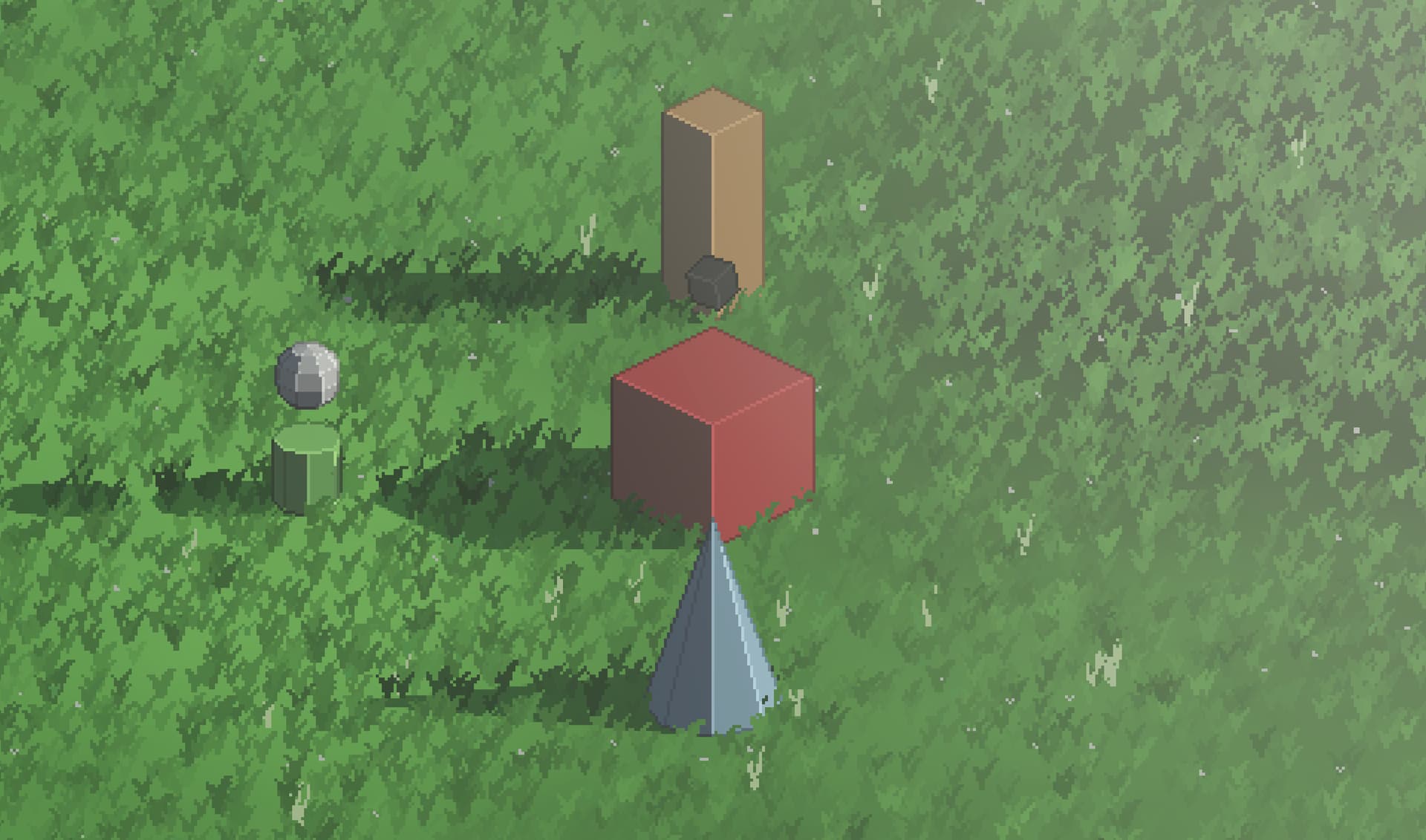
For reference: I am trying to make grass sprites that blend in with the floor (t3ssel8r style):
Multimeshes do not know which surface they are “attached” to, as they only know where to be drawn based on the buffer array of Transform3Ds.
You can give your shader a uniform vec3 albedo: source_color; and select a green that matches in the Inspector.
1 Like
You are absolutely right and I tried that but that just makes all the instances the same color which doesn’t account for the darkening when they are inside a shadow.
They should recieve shadows, are you baking lighting? Did you change the render_mode to be unshaded?
Yes I had unshaded on sorry im quite new to all this. But thank you so much man it looks so good. I can’t thank you enough 
The only thing now is that the higher they are in my game window the more the color differs from the floor. Is there any way to prevent that?
I fixed it by adding a diffuse_burley to the render mode! Thank you for helping again you’ve made my day im well on my way now.
1 Like
I tried updating a lot of code and got to a point where the instance color varies based on the noise map i use for the floor. However it seems that the variations in color get picked at random from the noise texture instead of picking the color from the point on floor directly below it.
I’m guessing its because the noise texture is so to speak not ‘baked’ perfectly onto the map but just applied over it. I already tried to use a subviewport texture that rendered the floor from above as an image but that always returned a black screen as texture no matter what I did. If anyone has any suggestions I would be really helped!!
Meshinstance3D Script:
@tool
extends MultiMeshInstance3D

@export var main_lightsource : DirectionalLight3D
@export var terrain: MeshInstance3D
@export var placement_area_size: Vector2 = Vector2(150.0, 150.0)
@export var instance_count : int = 1000
@export var grass_mesh : Mesh
@export var grass_base_color: Color = Color(1.0, 0.0, 1.0, 1.0)
@export var use_floor_color : bool = false
@export var terrain_texture_scale : Vector2 = Vector2(150.0, 150.0)

func _ready():
	if terrain == null:
		push_error("No terrain assigned to MeshInstance3D")
		return

	var mm = MultiMesh.new()
	mm.transform_format = MultiMesh.TRANSFORM_3D
	mm.use_custom_data = true
	mm.instance_count = instance_count
	mm.visible_instance_count = instance_count
	mm.mesh = grass_mesh
	multimesh = mm

	var noise : FastNoiseLite = null
	if use_floor_color and terrain.material_override is StandardMaterial3D:
		var tex = terrain.material_override.albedo_texture
		if tex is NoiseTexture2D and tex.noise is FastNoiseLite:
			noise = tex.noise
		else:
			push_warning("No valid FastNoiseLite found in terrain's albedo texture.")

	var space_state = get_world_3d().direct_space_state

	for i in range(instance_count):
		var x = randf() * placement_area_size.x - placement_area_size.x / 2
		var z = randf() * placement_area_size.y - placement_area_size.y / 2

		var from_pos = Vector3(x, 1000, z)
		var to_pos = Vector3(x, -1000, z)

		var ray_params = PhysicsRayQueryParameters3D.new()
		ray_params.from = from_pos
		ray_params.to = to_pos
		ray_params.exclude = []
		ray_params.collision_mask = 0x7FFFFFFF
		ray_params.collide_with_bodies = true
		ray_params.collide_with_areas = false

		var result = space_state.intersect_ray(ray_params)

		if result:
			var hit_pos = result.position

			var _transform = Transform3D()
			_transform.origin = hit_pos
			mm.set_instance_transform(i, _transform)

			var color = grass_base_color
			if use_floor_color:
				var sample_pos = Vector2(hit_pos.x, hit_pos.z) * terrain_texture_scale
				var value = (noise.get_noise_2dv(sample_pos) + 1.0) * 0.5
				color = Color(value, value, value)
			mm.set_instance_custom_data(i, color)
		else:
			push_error("ERROR: var 'result' is empty")
			var fallback_transform = Transform3D().translated(Vector3(x, 0, z))
			mm.set_instance_transform(i, fallback_transform)
Reference image (random color variations instead of floor color directly below it):
1 Like