Godot Version
4.6.1
Question
In my peggle clone I am trying to make a reload system in it and I have seen a lot of tutorials, all of them kind of work but teleports the rigid body to the position and back to its previous position at every frame and I am not sure why?
this is the code for setting its position:
func _on_area_2d_area_entered(_area: Area2D) -> void:
	set_physics_process(false)
	self.set_global_position(Vector2(0, -200))
Grateful for any advice.
What you have not shown us is the code that’s resetting its position every frame. You need to find it, or show us more code so that we can help you find it.
Here is the rest of the code for the ball:
extends RigidBody2D

func _ready() -> void:
	freeze = true

func _input(_event: InputEvent) -> void:
	if Input.is_action_pressed("Aim"):
		linear_velocity = (self.position - -get_global_mouse_position()) * 2.5

func _on_area_2d_area_entered(_area: Area2D) -> void:
	set_physics_process(false)
	self.set_global_position(Vector2(0, -200))
And what’s the code look like for when the ball is created?
I have a video if that helps it might explain it better.
Ah, try this:
extends RigidBody2D

func _ready() -> void:
	freeze = true

func _input(_event: InputEvent) -> void:
	if Input.is_action_pressed("Aim"):
		freeze = false
		linear_velocity = (self.position - -get_global_mouse_position()) * 2.5

func _on_area_2d_area_entered(_area: Area2D) -> void:
	freeze = true
	self.set_global_position(Vector2(0, -200))
Thanks for suggestion. But I don’ t know why but it is doing the same thing again.
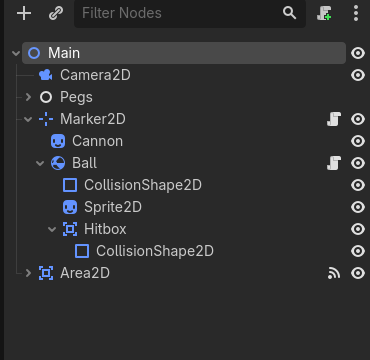
What’s the scene tree look like? Take a screen shot.
Yeah the problem is likely that its a child of the Marker2D. Its position is confused.
I still don’t know why but it is doing a similar thing and the shooting is now kinda wierd.
Need mor info. What’d you change? What happened?
I reparented the rigid body 2D to the node 2D instead.
Here is what it looks like now.
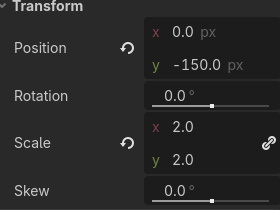
Ok, the problem is that your Sprite2D has a Transformation of its Position. So it is not representing where the RigidBody2D is in space. Reset it to (0,0).
Yeah. position.y needs to be 0.0.
I changed the sprite2D to 0,0 but now the code does nothing, this also might explain it better.
i do think the area2D should be set to collision mask 1 and no collision layer. That way you cand use the on_body_entered signal from that Area2D, could you try that ?
That looks like the ball is working. Are you saying the respawn code is doing nothing?
@dragonforge-dev Yes, the respawn code is doing nothing.