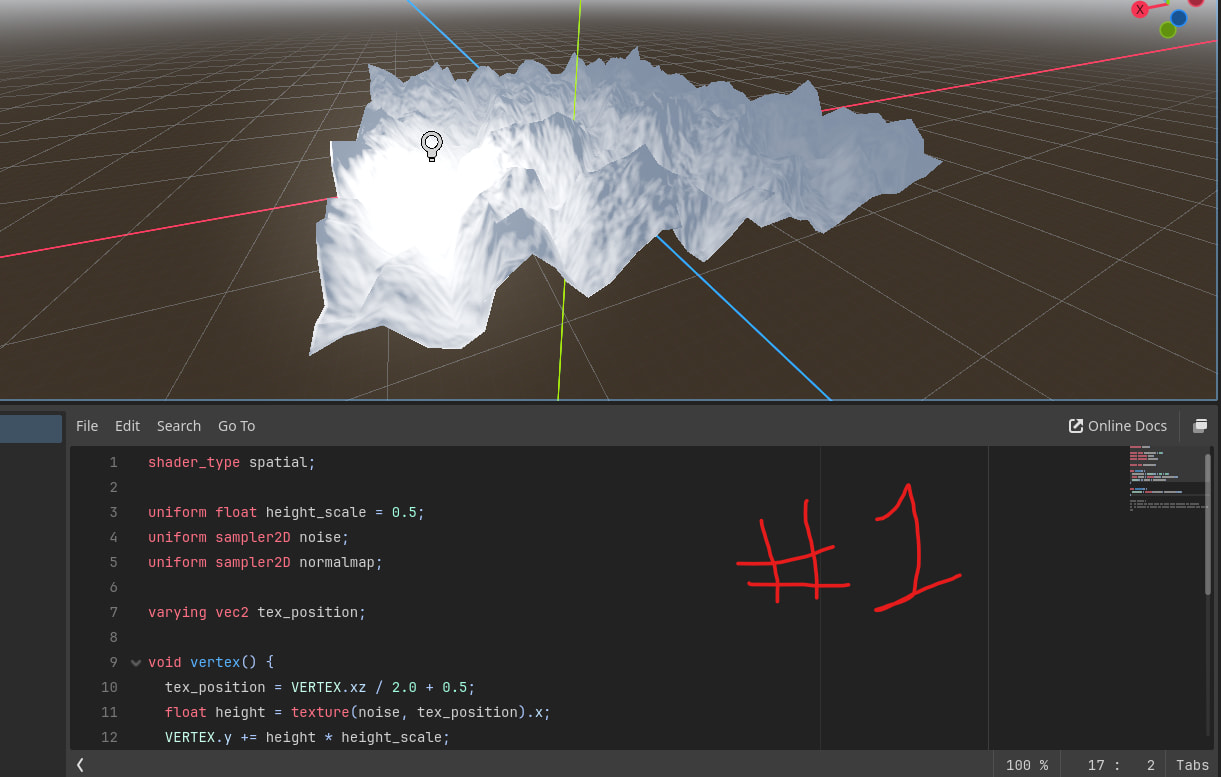
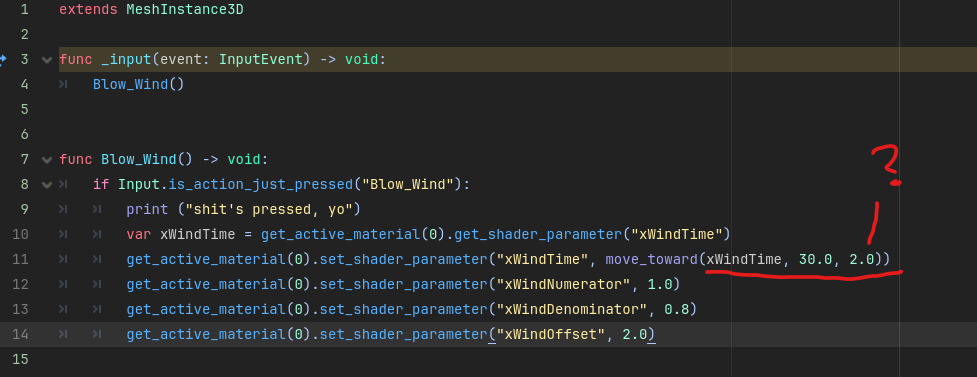
So, I planned for today to sit down and take this advice. Unfortunately, though, it seems like the second tutorial that’s all about water is actually busted; they mention in the comments section at the bottom “large portions of this tutorial seem to be missing,” and if anyone sits down to try to follow that tutorial from the start of the page they’ll quickly notice that’s also true. So that’s tragic.
In the mean time I went back to the old grass shader to try to figure out how I can manipulate the math to get the effects I want.
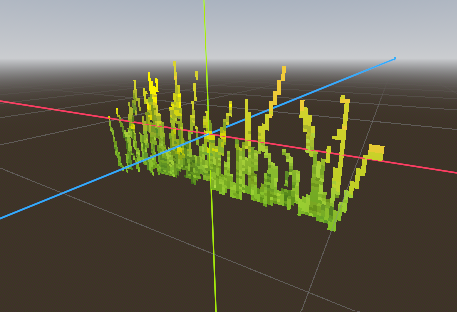
I’m more or less getting there; I’ve figured out the small changes I need to do to make the grass way more aggressively, and how to make it lean in a certain direction, as seen here.
The trouble is, I now need to figure this out for openGSL. If I were doing this in GDscript, I’d already have an idea of what functions I’d use in order to make the wind effect believable. Some way of “on button press, do this:” and then a function to have the number I’m seen altering be approached over a certain period of time, and then after another certain period of time, have the number (and all the other numbers I changed) revert to their previous position. The goal is for the shader to have a gentle breeze blowing, and with the press of a key, have every plant suddenly blow in the same direction for a moment, before returning to the same gentle breeze.
But really, this is just a sign for me to go looking for a quality shaders tutorial for me to study the basics from. I want to go ahead and ask here since I know at least two people read this thread: Any quality shader tutorials anyone here recommends? For complete beginners? So far I only know of The book of shaders.
While GLSL does not accept inputs, you can change uniform values from scripts and AnimationPlayers, which I’d recommend trying. You could have your breezy-sway amount as a uniform, make an animation to sharply increase it to 3-5, then slow reduce down to a normal amount. On the press of a button, play the animation.
Holy cow that was an IMMEDIATE response! Thank you!
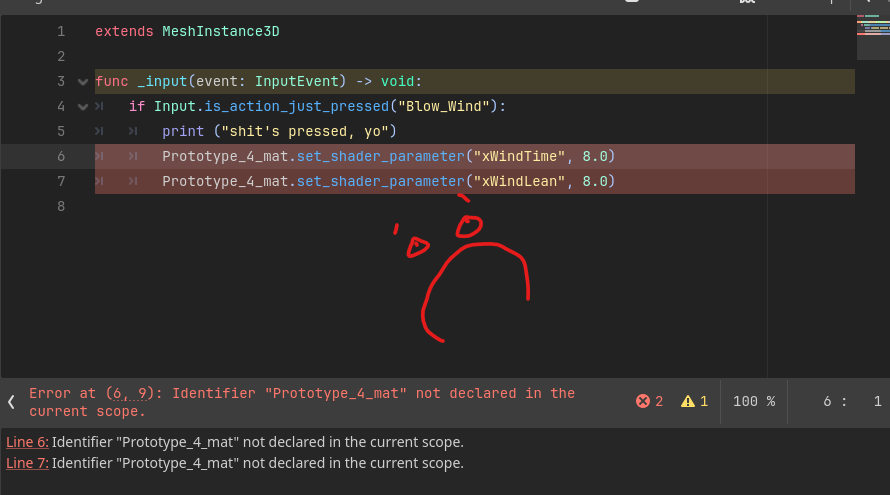
Alright, I think I have an idea of what you mean… Though I also think I’d like to try this, let me know what you think: Take the various numbers present in the script you see and make them uniform variables; that “-3.0” you see me editing becomes “wind strength,” or something. Something that dictates the strength of the lean for the plants. Then, make a simple script to attach to the main scene all the plants are in. Add some kind of script like this:
And then I can actually take that “0.5” right there and replace it with whatever math/number functions I want. And, I THINK, instead of calling from the singular MeshInstance3D, I could have every mesh belong to a group, and have a signal emitted from that collective group? I think?
I’m still really new to GDscript so I only have the most basic idea of how I would go about doing this. I would have to go over my 200+ pages of notes just to find where I’d start approaching this solution. But if I do it, I could have a bunch of numbers easy for me to alter whenever I wanted to for this.
Yes! you could script it to replace the 0.5; as for the group thing, if you use the same material resource for all of your plant meshes, you only have to change one uniform for it to affect all meshes since the resource is shared (unless you use instance uniform, then it will have to be per-MeshInstance3D).
The AnimationPlayer approach might be a little funny because of the shared resources, so you don’t need to include an AnimationPlayer with every flower/mesh.
Hmmm… Having everything use the same material is still something of a challenge for me for some reason. That was more or less why I wanted to do that single material with the atlas textures; I would truly have one single material for every single plant. But, this is really only like 8 or 9 materials that are all still being perfectly copied between each other, so. It’s not that big of a deal , is it?
Here’s a question for you though: One problem I already know I’m going to have is, I have my individual flower scenes set up so I can manipulate them as needed for the flush-with-the-landscape component.
The thing is, it’s just one single quad, perfectly on the X axis. I’m worried if I apply a material to this, it’s going to only rotate on the x and z axis based on its presence in this scene, not its presence in the main scene.
How do I get a material to let its xyz coordinates be based on the global presence in a totally difference scene? Would I have the main scene (Landscape3.tscn or something) have a signal or something that emits from itself to the script attached to this basic plant?
UV coordinates are based on the mesh data or shaders, not the node’s position in any scene anywhere. It should be fine, you should be very capable of tranforming the scene inside of any other scene.
AtlasTextures are pretty finicky, under the hood they manipulate the UV coordinates, so when another shader also manipulates UV coordinates they have a problem. You could replicate the effect with StandardMaterial3D’s UV offset and UV scale, or a shader, but it’s not as easy and fun as the AtlasTexture editor.
I went and reworked the formula for making plants blow, and by that I mean I just turned everything into variables/parameters that I can alter as needed from the inspector, and from code. Proud of myself for figuring that one out, even though it’s beginner level stuff haha.
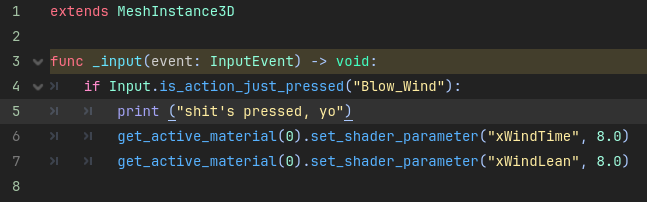
The challenge I’m currently having instead, is, how to target the shader to begin with. I’m currently talking in the existing Godot support discord to try to figure this one out because it seems like its just some kind of fancy problem with naming nodes and materials, and how to address them in the script.
Coding isn’t my strong suit, but I’m hoping I can figure this out in the next couple of days.
EDIT: AS PER USUAL, as soon as I post a “gosh I’m stuck on this” post, I immediately solve the damn problem!
Okay, well, I didn’t. Someone in the discord server explained one possible solution to me. Although, after talking a bit about other possible ways to solve this problem, I’m considering finding some kind of new way to name meshes and nodes, and materials, and so on, going forward. Plus, I want to go through this tutorial to make sure I understand resources a bit better than I currently.
Anyways, here’s a quick simple video showing the fruits of my labor:
I’m really close to having all the pieces set in place for this leg of the project to finally be done! I just have to play with these values a bit so it looks like the wind starts to blow, then stops. And then, Make a really simple sample scene of everything blowing together, on and off. Progress feels good.
Just posting in here again to say I’m still here! I’ve just been busy doing other things, so not as devoted to getting this done as I’d like to be.
I’ve reworked the formula a bit. It stays in place at the roots now, and uses the Y axis as well as X and Z. Also, I can make the sway distance much larger or smaller, and I can move the position of the swaying(as in, how far to one side or another in space the sin/cos waves are).
I’m about to sit down and review how to use methods like “tween property,” and whatever that one is that lets a number approach a float or value over the course of a predetermined set of time, instead of immediately swapping to it. I know its in my notes, so I should be able to find a way to say “on button press, have this value approach this other value.” and then, after a certain amount of time, “return to previous value” or whatever. I’d also like to randomize the values a bit; I know there’s a pretty simple float method that randomly picks a number between two floats, and I’d like to use something like that.
Lots of that focus on detail is just to make sure that when all the plants start blowing, they all blow ever so slightly differently, just like in real life. Lots of really simple and finnicky math to create a fun shader in here. I’m kind of aware of the fact that, if I didn’t enjoy doing this, I absolutely would not be going to these lengths haha.
Alright, so I’m working on this script tonight. Not beating my head against a rock, nowhere near that point, but I know that solving this problem requires some basic gdscript knowledge that I am not quite packing.
So, I want the float value stored by “xWindTime” in the uniform shader to increase at a given rate. My plan to get there is to use the “move_toward” function. The three arguments are “starting value, final value, and the rate at which you move to that value.” The goal is to make something gradually increase over the course of maybe 5 seconds. Don’t worry about the “2.0” listed above, that’s just something I was staring at when I took the screenshot.
Here’s a demonstration of what’s going on instead:
The final value is arrived at, immediately.
I’m not sure what I’m doing wrong, but I think it’s because I’m calling the xWindTime float in both places at the same time. I imagine somehow they both update each other between each frame and somehow must, I don’t know, feed off each other until they immediately reach 30.0. Or something.
What I need is some way to call the float from the shader material and store it as a float value, but only once, at the very start of the scene’s instantiation. However, whatever number I change it to is totally fluid, and always being changed. At least, whenever I want it to change.
I know this is some day 1 beginner stuff to review, so I’m about to go back through that wonderful learn GDscript from zero course that explains the basics of variables and updating/storing information. But yeah that’s where I’m stuck at right now.
Again you could use an AnimationPlayer node to alter the shader parameters as needed, but it won’t help for random values you’d like. Otherwise to animate something over time it’s best to use a Tween, when programmed it will start and the animation will be handled as the game runs. The final value, start value, and elapsed time can all be assigned dynamically/randomly unlike with animations.
var shader: ShaderMaterial = get_active_material(0)

const WIND_TIME = 2.0

var tween := create_tween()
tween.tween_property(shader, "shader_parameter/xWindTime", 30.0, WIND_TIME).from(0.0)
The .from will help to increase from 0.0 to the final value of 30.0, over the course of 2.0 seconds
Tweens may not be “day 1 beginner stuff”, using _input kind of is but takes practice, it can be difficult to recognize when to use what Input function.
I was just reading this and I thought the work looks promising …
The wind control button reminded me that wind isnt really best modelled with a sin/cos function, although it is an easy vector field … perhaps you could compute a vector field of wind intensity based on noise.
The grass actually has resistance to the wind, it bends in the wind, like a cantilever beam under uniformly distributed load - and usually springs back to the original position when the wind strength is reduced.
Tweens! As soon as I saw you mentioned tweens I thought “man, how did I forget those??” So. okay. I’m not sure what I’m doing wrong here but I’m getting a funny result from this bit of code:
var WindShader: ShaderMaterial = get_active_material(0)
@onready var xWindTime = get_active_material(0).get_shader_parameter("xWindTime")

func _input(event: InputEvent) -> void:
	if Input.is_action_just_pressed("Blow_Wind"):
		print ("shit's pressed, yo")
		var tween := create_tween()
		tween.tween_property(WindShader, "shader_parameter/xWindTime", 15.0, 2.0).from(1.25)
See, I plugged in 15.0 for the speed at which the x value moves, and 2.0 for the time, just so it would be easy enough to watch the difference on testing. Here’s what’s happening, for some reason:
For one, the speed increases from 1.25 to 15.0 over the course of 2 seconds. So that’s appropriate. But, it seems to revert to some kind of in-between speed after reaching 15.0? And, on subsequent button presses, the speed just keeps increasing more and more drastically? And then reverts to that same speed?
This is what that script looks like, “xWindTime” is whats being increased to 15.0 right now. We’re not actually touching “TIME” in GLSL here, but I think we must be increasingly multiplying TIME by 15.0 with each button press. That would explain the ever increasing speed of the x plant, but why does it revert to the same middle speed each time after that?
Both options I’ve considered, and wouldn’t mind doing! I’m just a bit more interested in solving this problem first before I go looking for solutions in other things. One thing I’d like to do, for example, is find some way to simulate clouds passing overhead, with the vertex colors becoming darker and lighter in some spaces.
I could work on trying to make the flowers bend in the middle if I wanted to, and I bet there’s a way to do it by twisting the top part of the quad and telling the shader to treat the two no longer parallel lines as if there’s an invisible curve between their centers, and to tell the texture to render itself along that curve. I’ll bet anything its been done before! But I also just don’t need to keep tinkering with this plant thing. A small push in one direction should do fine.
Next step after solving this problem, for example, is to make it so the wind picks up to a certain speed, maintains that speed for a certain time, and dies down to another given speed, all without interrupting itself. Once I can do that, I can start applying the exact same logic to the other 11 variables controlling the plant sway and direction. I might be done finagling this shader after that. For a while, at least.
so if you think sin(x) + sin(2 x) is sometimes at the maximum value of both sin’s, then the amplitude increases, then goes back down, then spikes again, its wave superposition.
[quote=“local_dingus, post:32, topic:141416”]
I could work on trying to make the flowers bend in the middle if I wanted to
[/quote]
You can use subdivided quads close up and normal quads at a distance.
It’s not increasing xWindTime over and over again, the multiplication of TIME affects where along the sine wave it’s reading
Check out this graph, hit play on ‘t’ for time, and slide ‘w’ back and forth for the wind effect. The sine wave goes wild as ‘w’ moves because the entire thing is scaled, and as ‘t’ increases the amount being scaled and offset is made more severe.
It’s probably better to tween the xWindDenominator, not sure how best to solve this; the two time factors at play do make it tricky.
I… think I understand your answer, but I’m not sure. And I don’t think I agree with you, because I don’t think this one’s about amplitude. Amplitude is being controlled by numerator and denominator, and offset controls where on the relative axis the center of the wave is.
“xWindTime” should be decreasing the space between waves, right? Making them thinner and thinner over the same two seconds? Why would that make the time reset to some kind of speed halfway between 1.25 and 15.0? And, from there, why would the 15.0 keep getting faster and faster every time, but always reset to the first speed determined after the first button press?
So, I’m thinking part of the problem is just that this is being treated by the engine as a “one and done” kind of function. Check the value, change the value, reassign the value, done. Rather than stress too much about how time is being multiplied, I think if we just make sure the code is always being checked for a given number, and always maintaining at a certain speed. Or something.
What I’d really like to do is write a code that just doesn’t stop fluctuating. Lots of using timers, with values for the timers based on randomly generated floats within a certain range. Something like this I suppose:
	var windfaster = randf_range(1.25, 5.5)

	tween.tween_property(WindShader, "shader_parameter/xWindTime", 15.0, windfaster).from(1.25)
	get_tree().create_timer(windfaster)
this way I could create a global for “windfaster” and have every plant call it, so every plant in the scene would be affected by the wind for the same amount of time. Maybe a global offset, too, so they all lean in the same direction.
On scene start, I guess it would go something like:
Wind at rest speed for randomly generated range of time.
timer runs out
bool “wind up” = True
All the variables get their tween properties altered pending scene’s needs.
This happens over a randomly generated range of time, too; faster means stronger, more sudden gust of wind.
Timer starts for randomly generated global time, “wind lasts” or something idk.
“await timer.timeout” or whatever immediate next line in code.
When created timer is timed out, “wind up” = False
all variables have their properties reset pending scene’s needs, again over a randomly generated amount of time.
Wind returns to rest speed.
The timer could start again from there. Or, pending the needs of the scene, I could set “wind up” to true, so the wind could blow at a dramatic moment, or something.
But my main goal with that is to make the number constantly be in check, and constantly be fluctuating, so we don’t get this weird affect where the speed increases so fast and then suddenly cuts itself in half at the end, or whatever is going on.
In either case, what I’m trying to do doesn’t seem to be working with this sample code I tried to write:
It successfully increases speed, but it doesn’t maintain speed at 15.0; it instead just resets to that speed again, of course. It successfully holds itself at that speed for 2 seconds, but then, instead of decreasing in speed, it gives me this error message:
In either case, this is going to require me fiddling with the shader formula for a while. The solution to capturing and holding a certain speed for the time value in this shader is going to be in screwing around with that “TIME” value. I’m just not sure how to do it yet.
I guess I’ll let that numbered list up there be my new “to do” list for a while.
First, I realized something pretty simple: Seems like the “.from” at the end of the tween script is redundant, and is actually causing that weird skipping motion when the wind starts to blow. But that also seems to go away entirely when I also add an “await.timer.timeout” function immediately after this line of code. I have no idea why that is.
Second, I can guarantee this is something to do with the way the tween transitions; I was reading the Tweener part of the godot manual and I found the “Set_Trans” property thing. When “Set_Trans” isn’t set at the end of the tween, the transition just automatically goes linearly; what we’re seeing with the wild increase in speed and decrease to a different speed is part of that linear transition behavior.
That “SINE” bit at the end is the most important part. It creates the smooth transition from the value we start at to the value we want in the end. Here’s what that looks like in practice:
It’s much harder to spot the exact moment the wind picks up, and when it slows itself now, isn’t it?
Though, I also added a few other lines of code to do the same tween for the other values. Part of why it was snapping at the end of the code was, the other values were being set after the “await” timer ran out. Here’s what the code actually looks like now, for anyone’s reference:
I know there’s other ways to use signals and tweens that revolve around that same thing the await timer function is doing, but for now I’m just trying to make something that functions.
In all honesty, I could probably just leave it here and finally be done with it. But I’m convinced there’s a way to get better control over the initial gust of wind than just the TRANS_SINE bit! Like, I know there’s also EASE_IN and EASE_OUT and EASE_IN_OUT and EASE_OUT_IN. If I can find some way to combine TRANS_SINE with those, or something, I could probably get the much smoother transition I want!
Anyways, I’m glad to get about as far as this, because I’m going to be really really busy with work for a straight week. After that I’m going to have a whole awful lot of time to just work on this art project for a while, so, hopefully you’ll all bear with me.
Ha! Still here, still enjoying myself. One last post before I stop for the evening, and for the week or so.
This website explained how simple it was to combine trans and ease, and how that’s literally what they’re for. I couldn’t find it in the manual, but this was clearly written by somebody who understood exactly what my problem was and what I was trying to solve. My hero. Now the script looks like this:
I’m going to spend the evening playing with this a bit, thanks to this website. Next week I’m going to try to make the transitions smoother using tweens and tween awaiting, instead of timers and things.
The sine problem is caused by scaling the period from origin. So even a slight change in scale will cause an apparent abrupt change far from the origin, i.e. at your current phase. When scaling the sine period you need to scale it from the current phase as the scaling origin. This will require storing some persistent state. Since shaders don’t store persistent state, you’ll have to store it on the script side.
The simplest way is to just keep the phase on the cpu side as a persistent state, update the phase frame by frame depending on the frequency and pass it every frame to the shader. Now there will be no jumps when you animate the frequency. The frequency can be animated by whatever means you want: dragging in the inspector, animation player, tweens or manual per frame calculation.
@export var frequency := 1.0
var phase := 0.0

func _process(delta) -> void:
	phase += frequency * delta
	material_override.set_shader_parameter("phase", phase)