Godot Version
Godot version 4.6.1
Question
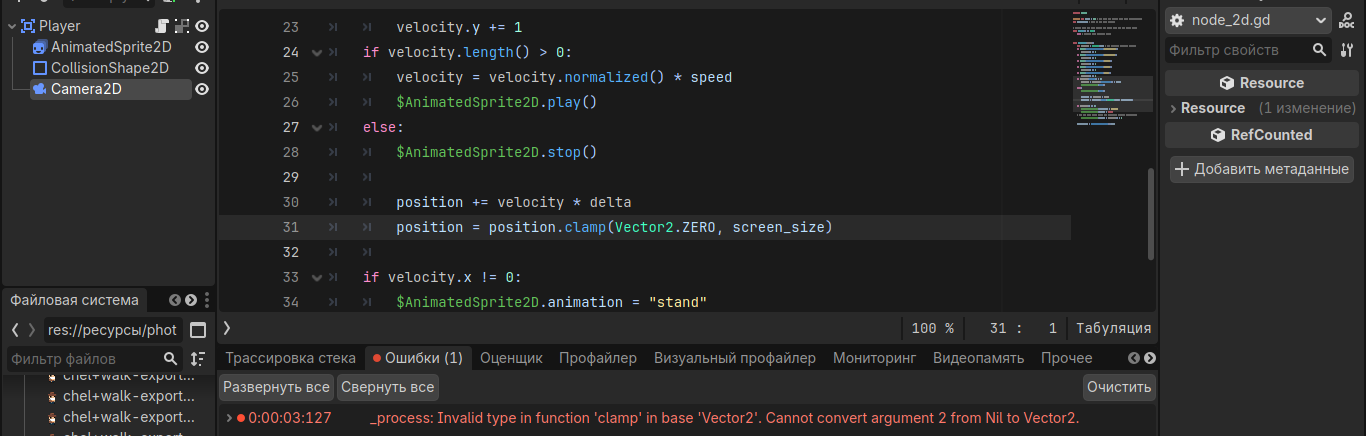
When I start the game, I get this error, I have no experience in programming, therefore, I ask you to answer in a clearer way.
Godot version 4.6.1
When I start the game, I get this error, I have no experience in programming, therefore, I ask you to answer in a clearer way.
It looks like screen_size is null, which means you didn’t assign anything to it. Make sure you set that variable before you try to access it.
In your case, this can probably be achieved with the following line:
var screen_size = DisplayServer.screen_get_size()
Or simply:
screen_size = DisplayServer.screen_get_size()
if you already had the variable screen_size declared above.
I recommend starting out with some basic tutorials so you can get used to the absolute basics and see a project being made from start to finish.
but i use it
And by the way, even though I use it, I still can’t do anything.
I’m not sure what you mean unfortunately. Could you show your entire script? Since the error message tells you that screen_size is null.
extends Area2D
@export var speed = 400 # How fast the player will move (pixels/sec).
var screen_size # Size of the game window.
func _ready() → void:
screen_size = get_viewport_rect().size
pass # Replace with function body.
func _process(delta):
var velocity = Vector2.ZERO # The player’s movement vector.
if Input.is_action_pressed(“move_right”):
velocity.x += 1
if Input.is_action_pressed(“move_left”):
velocity.x += 1
if Input.is_action_pressed(“jump”):
velocity.y += 1
if Input.is_action_pressed(“push”):
velocity.x += 1
if Input.is_action_pressed(“run”):
velocity.y += 1
if velocity.length() > 0:
velocity = velocity.normalized() * speed
$AnimatedSprite2D.play()
else:
$AnimatedSprite2D.stop()
	position = velocity * delta
	position = position.clamp(Vector2.ZERO, screen_size)
	delta=16
	screen_size=1
	screen_size = DisplayServer.screen_get_size(1)

if velocity.x != 0:
	$AnimatedSprite2D.animation = "stand"
	$AnimatedSprite2D.flip_v = false
# See the note below about the following boolean assignment.
	$AnimatedSprite2D.flip_h = velocity.x < 0
Please try to format your code properly so it’s easier to read for others.
extends Area2D
@exportexport var speed = 400 # How fast the player will move (pixels/sec).
var screen_size # Size of the game window.
func _ready() → void:
>screen_size = get_viewport_rect().size
pass # Replace with function body.
> func _process(delta):
var velocity = Vector2.ZERO # The player’s movement vector.
if Input.is_action_pressed(“move_right”):velocity.x += 1
if Input.is_action_pressed(“move_left”):
velocity.x += 1
if Input.is_action_pressed(“jump”):
velocity.y += 1
if Input.is_action_pressed(“push”):
velocity.x += 1
if Input.is_action_pressed(“run”):
velocity.y += 1
if velocity.length() > 0:
velocity = velocity.normalized() * speed
$AnimatedSprite2D.play()
else:
$AnimatedSprite2D.stop()> > position = velocity * delta
> > position = position.clamp(Vector2.ZERO, screen_size)
delta=16
screen_size=1
screen_size = DisplayServer.screen_get_size(1)if velocity.x != 0:
$AnimatedSprite2D.animation = “stand”
$AnimatedSprite2D.flip_v = falseSee the note below about the following boolean assignment.
$AnimatedSprite2D.flip_h = velocity.x < 0
Is it clearer now?
the two vertical bars mean “> >”
No this is even worse. You misinterpreted the instruction given.
Please just select your code, and in the forum’s own editor, click on the “Preformatted text” buttom.
that’s what i did
extends Area2D

@export var speed = 400 # How fast the player will move (pixels/sec).
var screen_size # Size of the game window.

#Called when the node enters the scene tree for the first time.

func _ready() → void:
> screen_size = get_viewport_rect().size
> pass # Replace with function body.

func _process(delta):
> var velocity = Vector2.ZERO # The player’s movement vector.
> if Input.is_action_pressed(“move_right”):
> > velocity.x += 1
> if Input.is_action_pressed(“move_left”):
> > velocity.x += 1
> if Input.is_action_pressed(“jump”):
> > velocity.y += 1
> if Input.is_action_pressed(“push”):
> > velocity.x += 1
> if Input.is_action_pressed(“run”):
> > velocity.y += 1
> if velocity.length() > 0:
> > velocity = velocity.normalized() * speed
> > $AnimatedSprite2D.play()
> else:
> > $AnimatedSprite2D.stop()
> >	position = velocity * delta
> >	position = position.clamp(Vector2.ZERO, screen_size)
> >	delta=16
> >	screen_size=1
> >	screen_size = DisplayServer.screen_get_size(1)

> if velocity.x != 0:
> >	$AnimatedSprite2D.animation = "stand"
> >	$AnimatedSprite2D.flip_v = false
# See the note below about the following boolean assignment.
> >	$AnimatedSprite2D.flip_h = velocity.x < 0
like this?
Please remove all the > > symbols you added. Simply copy your code from your editor, paste it in, and use the preformatted text button.
extends Area2D

@export var speed = 400 # How fast the player will move (pixels/sec).
var screen_size # Size of the game window.

Called when the node enters the scene tree for the first time.

func _ready() → void:
screen_size = get_viewport_rect().size
pass # Replace with function body.

func _process(delta):
var velocity = Vector2.ZERO # The player’s movement vector.
if Input.is_action_pressed(“move_right”):
velocity.x += 1
if Input.is_action_pressed(“move_left”):
velocity.x += 1
if Input.is_action_pressed(“jump”):
velocity.y += 1
if Input.is_action_pressed(“push”):
velocity.x += 1
if Input.is_action_pressed(“run”):
velocity.y += 1
if velocity.length() > 0:
velocity = velocity.normalized() * speed
$AnimatedSprite2D.play()
else:
$AnimatedSprite2D.stop()
	position = velocity * delta
	position = position.clamp(Vector2.ZERO, screen_size)
	delta=16
	screen_size=1
	screen_size = DisplayServer.screen_get_size(1)

if velocity.x != 0:
	$AnimatedSprite2D.animation = "stand"
	$AnimatedSprite2D.flip_v = false
# See the note below about the following boolean assignment.
	$AnimatedSprite2D.flip_h = velocity.x < 0
and yet, when I start the game, my character cannot move, although I have assigned keys, I have written a script, but it does not move. (you don’t need to send me links to training, I’m already using them to make a game)
This line sets the position based on velocity, it doesn’t add to the position, try using
position += velocity * delta
To write code blocks use three back ticks ``` by pressing the tilde key ~ without holding shift. Then paste your code.
```
func _ready() -> void:
    print("This is my code")
```
converts to
func _ready() -> void:
print("This is my code")
You have not given screen_size a type so when it gets to screen_size = 1 it is of type variant/int.
You should probably get rid of that line.
Then when it gets to the next line you give DisplayServer.screen_get_size(1). The parameter 1 is probably invalid.
The documentation notes some constants you can use for a parameter and for most cases it should be -1
SCREEN_OF_MAIN_WINDOW = -1
Since the 1 as the screen parameter is likely invalid screen_get_size() will return Vector2i.ZERO (0,0)
position will then be clamped to Vector2i(0,0)
That is going to contribute to the problem.