Invalid assignment of property or key 'text' with value of type 'String' on a base object of type 'Label'.

Godot Version

4.71 stable

Question

Hi! I'm trying to make a simple speed display for debugging and I'm running into this error when I try to set the label.text to the speed variable.

Invalid assignment of property or key ‘text’ with value of type ‘String’ on a base object of type ‘Label’.

I’ve looked around at solutions online and haven’t found any that have worked for me so far.

These are the bits of code that seem to be involved with the issue

func _ready():
     speedometer = get_tree().get_first_node_in_group(“Speedometer”)


func _handle_ground_physics(delta) → void:

     speedometer.text = str("Speed: ", display_airspeed)

Not enough information. How is speedometer declared? Who and when calls _hadnle_ground_physcis(). Post the whole script and your scene tree structure.

kk! Sorry abt that, I’m very new to this. Here’s the full code so far

extends CharacterBody3D

@export var look_sensitivity : float = 0.0009
@export var jump_velocity : = 6.0

var speedometer := 0

@export var walk_speed := 10
@export var ground_accel := 14.0
@export var ground_decel := 10.0
@export var ground_friction := 6
@export var display_groundspeed := 0

@export var air_cap := 5
@export var air_accel := 30
@export var air_move_speed := 20.0
@export var display_airspeed := 0

var wish_dir := Vector3.ZERO

func get_move_speed() → float:
return walk_speed

#This used to check if you’re running or walking, then return the run or walk speed depending on which. Update this to just return the walk speed instead of using the get move speed

func _ready():
speedometer = get_tree().get_first_node_in_group(“Speedometer”)

func _handle_air_physics(delta) → void:
self.velocity.y -= ProjectSettings.get_setting(“physics/3d/default_gravity”) * delta

var cur_speed_in_wish_dir = self.velocity.dot(wish_dir)
var capped_speed = min((air_move_speed * wish_dir).length(), air_cap)
var add_speed_till_cap = capped_speed - cur_speed_in_wish_dir
if add_speed_till_cap > 0:

		var accel_speed = air_accel * air_move_speed * delta
		accel_speed = min(accel_speed, add_speed_till_cap)
		self.velocity += accel_speed * wish_dir / 2
		var display_airspeed = snapped(accel_speed, 0.01)
		print(display_airspeed * 100)

		speedometer.text = str("Speed: ", display_airspeed)

func _handle_ground_physics(delta) → void:
var cur_speed_in_wish_dir = self.velocity.dot(wish_dir)
var add_speed_till_cap = get_move_speed() - cur_speed_in_wish_dir
if add_speed_till_cap > 0:
var accel_speed = ground_accel * delta * get_move_speed()
accel_speed = min(accel_speed, add_speed_till_cap)
self.velocity += accel_speed * wish_dir

var control = max(self.velocity.length(), ground_decel)
var drop = control * ground_friction * delta
var new_speed = max(self.velocity.length() - drop, 0.0)
if self.velocity.length() > 0:
	new_speed /= self.velocity.length()
self.velocity *= new_speed

var display_groundspeed = snapped(new_speed, 0.01)

print(display_groundspeed * 100)

func _unhandled_input(event):
if event is InputEventMouseButton:
Input.set_mouse_mode(Input.MOUSE_MODE_CAPTURED)
elif event.is_action_pressed(“ui_concel”):
Input.set_mouse_mode(Input.MOUSE_MODE_VISIBLE)

if Input.get_mouse_mode() == Input.MOUSE_MODE_CAPTURED:
	if event is InputEventMouseMotion:
		rotate_y(-event.relative.x * look_sensitivity)
		$Head.rotate_x(-event.relative.y * look_sensitivity)
		$Head.rotation.x = clamp($Head.rotation.x, deg_to_rad(-90), deg_to_rad(90))

func _physics_process(delta):
var input_dir = Input.get_vector(“right”, “left”, “down”, “up”).normalized()
wish_dir = self.global_transform.basis * Vector3(-input_dir.x, 0., -input_dir.y)

if Input.is_action_just_pressed("Escape"):
	Input.set_mouse_mode(Input.MOUSE_MODE_VISIBLE)


if is_on_floor():
	if Input.is_action_just_pressed("jump"):
		self.velocity.y = jump_velocity
	_handle_ground_physics(delta)
else:
	_handle_air_physics(delta)

move_and_slide()

func _process(delta):
pass
You should already be seeing an error.

Error at (n, n): Value of type “Node” cannot be assigned to a variable of type “int”.

This line:
var speedometer := 0

creates an integer variable.

This line:
speedometer = get_tree().get_first_node_in_group(“Speedometer”)

tries to assign a node to that integer variable.
In my testing this produces an error message and the script doesn’t even run.

Are you showing any errors before running the script?

OH! Apologies, I must have messed up while copying that over somehow.

Then who knows what else have you messed.

Post the properly formatted code in its entirety. Make sure it’s the exact version that caused the error. Check that you don’t have multiple versions of the same scripts and that a “wrong/old” version is not attached to the node.
Post the screenshot of your scene tree.
Post the screenshot of your whole editor window showing the error.
Post the exact error message and specify the exact line that caused it.

Okay, there are some slight changes after following a friends suggestions, but the issue is still present, though slightly different. This code should be accurate to what I have right now

extends CharacterBody3D

@export var look_sensitivity : float = 0.0009
@export var jump_velocity : = 6.0

@export var walk_speed := 10
@export var ground_accel := 14.0
@export var ground_decel := 10.0
@export var ground_friction := 6
@export var display_groundspeed := 0

@export var air_cap := 5
@export var air_accel := 30
@export var air_move_speed := 20.0
@export var display_airspeed := 0

var wish_dir := Vector3.ZERO

func get_move_speed() → float:
return walk_speed

func _ready():
pass

func _handle_air_physics(delta) → void:
self.velocity.y -= ProjectSettings.get_setting(“physics/3d/default_gravity”) * delta

var cur_speed_in_wish_dir = self.velocity.dot(wish_dir)
var capped_speed = min((air_move_speed * wish_dir).length(), air_cap)
var add_speed_till_cap = capped_speed - cur_speed_in_wish_dir
if add_speed_till_cap > 0:
		var accel_speed = air_accel * air_move_speed * delta
		accel_speed = min(accel_speed, add_speed_till_cap)
		self.velocity += accel_speed * wish_dir / 2
		var display_airspeed = snapped(accel_speed *100, 0.01 )
		print(display_airspeed)
		$Speedometer.text = str("Speed: ", display_airspeed)

func _handle_ground_physics(delta) → void:
var cur_speed_in_wish_dir = self.velocity.dot(wish_dir)
var add_speed_till_cap = get_move_speed() - cur_speed_in_wish_dir
if add_speed_till_cap > 0:
var accel_speed = ground_accel * delta * get_move_speed()
accel_speed = min(accel_speed, add_speed_till_cap)
self.velocity += accel_speed * wish_dir

var control = max(self.velocity.length(), ground_decel)
var drop = control * ground_friction * delta
var new_speed = max(self.velocity.length() - drop, 0.0)
if self.velocity.length() > 0:
	new_speed /= self.velocity.length()
self.velocity *= new_speed
var display_groundspeed = snapped(new_speed *100, 0.01)
print(display_groundspeed)
#add speedometer update here once you figure it out

func _unhandled_input(event):
if event is InputEventMouseButton:
Input.set_mouse_mode(Input.MOUSE_MODE_CAPTURED)
elif event.is_action_pressed(“ui_concel”):
Input.set_mouse_mode(Input.MOUSE_MODE_VISIBLE)

if Input.get_mouse_mode() == Input.MOUSE_MODE_CAPTURED:
	if event is InputEventMouseMotion:
		rotate_y(-event.relative.x * look_sensitivity)
		$Head.rotate_x(-event.relative.y * look_sensitivity)
		$Head.rotation.x = clamp($Head.rotation.x, deg_to_rad(-90), deg_to_rad(90))

func _physics_process(delta):
var input_dir = Input.get_vector(“right”, “left”, “down”, “up”).normalized()
wish_dir = self.global_transform.basis * Vector3(-input_dir.x, 0., -input_dir.y)

if Input.is_action_just_pressed("Escape"):
	Input.set_mouse_mode(Input.MOUSE_MODE_VISIBLE)


if is_on_floor():
	if Input.is_action_just_pressed("jump"):
		self.velocity.y = jump_velocity
	_handle_ground_physics(delta)
else:
	_handle_air_physics(delta)

move_and_slide()

func _process(delta):
pass

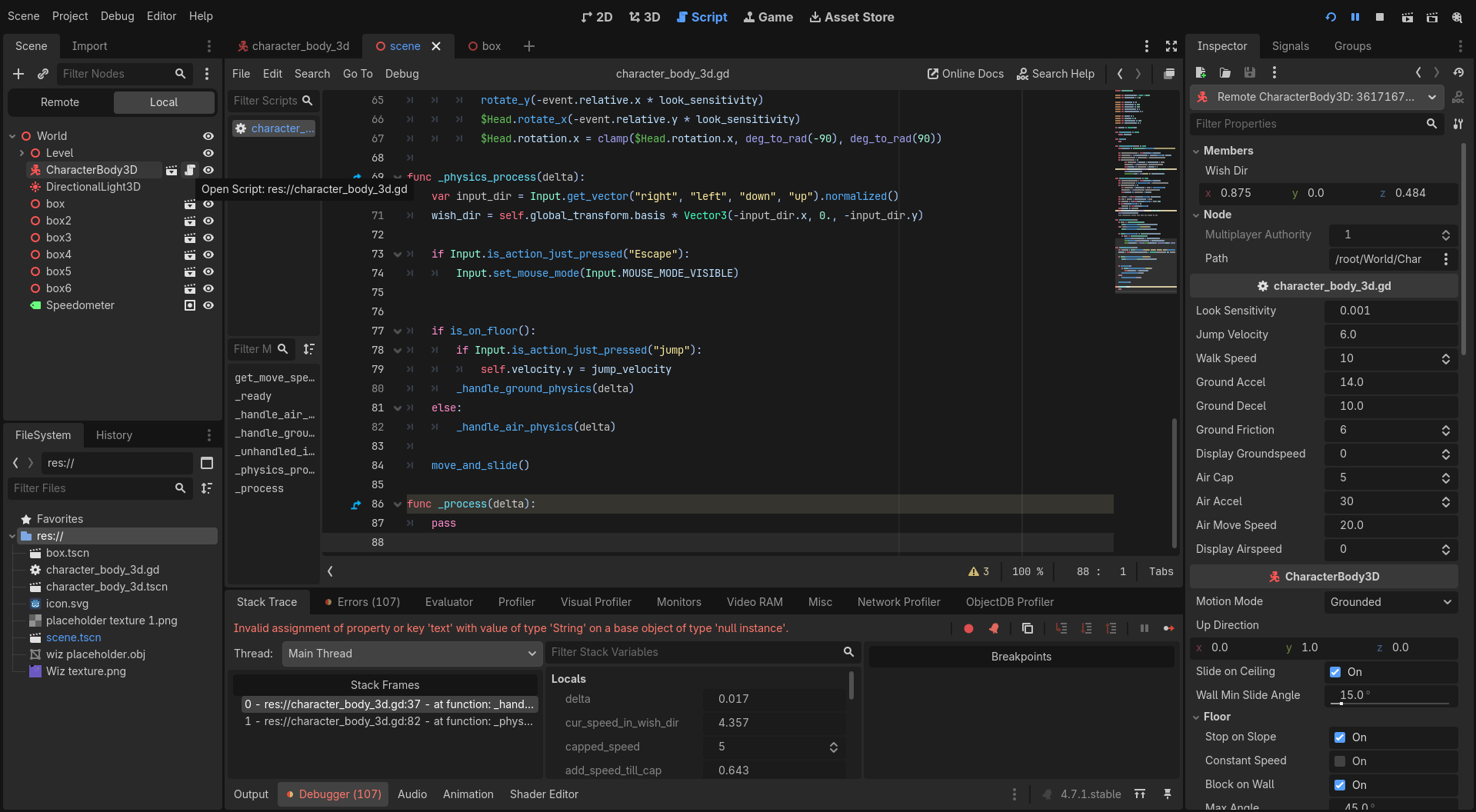
Here’s the editor window with the scene tree

This is the error code

Invalid assignment of property or key ‘text’ with value of type ‘String’ on a base object of type ‘null instance’.

And it’s on line 37

This should all be up to date. Sorry for the confusion.

This line assumes that a node named Speedometer is a direct child of the node that runs the script. This is not the case. Speedometer is node’s sibling. So the node path $Speedometer is incorrect and evaluates to a null reference instead of the wanted Label node.

oH HHH my goodness, I might be stupid. That was it, thank you so much, normalized!