Hello everyone!
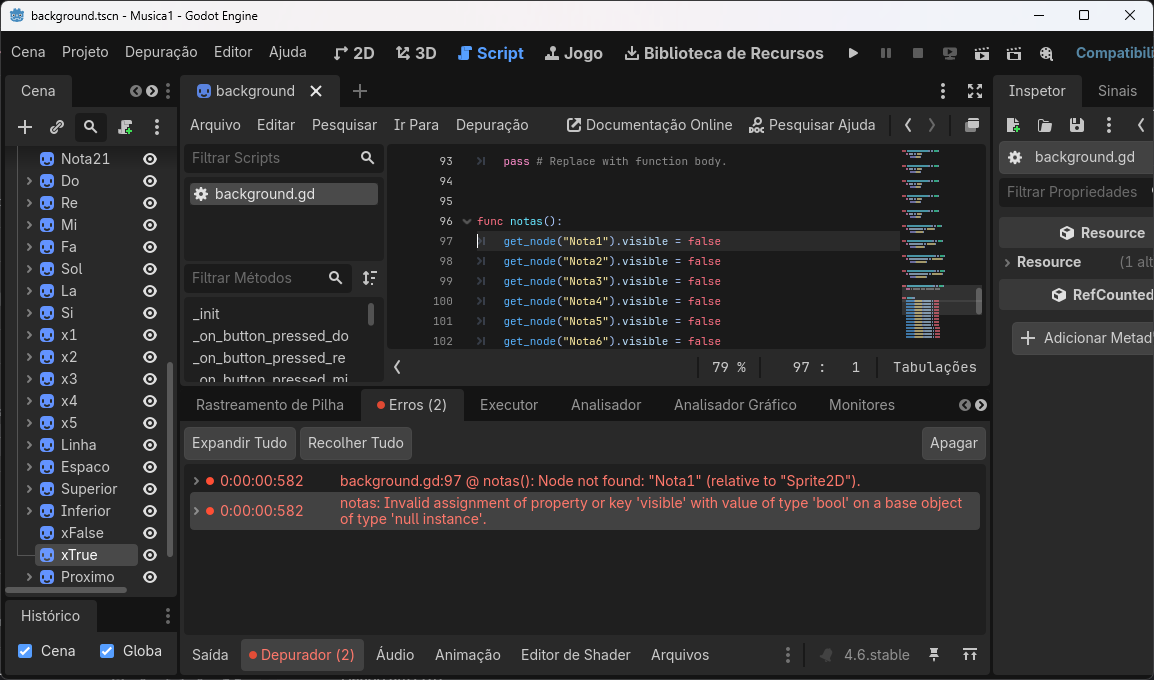
I’m having trouble setting visible and hidden objects for musical notes! See the code below!
In the notas function, the command
get_node("Nota1").visible = false
is not executing.
This is giving an error as shown in the image below!
Where am I going wrong?
Note: The commands are in Portuguese.
https://ouka.com.br/notas-musicais.zip
get_node will get nodes that are direct children of the node that calls this function. It will not get a node recursively. Since we cannot really see your entire scene tree, check if your script called “background.gd” has these nodes as direct children, and not, for example, inside another sprite2d.
I highly recommend not using get_node. If you drag a node onto your script you will create a reference you can use directly.
You can also use those references inside of data structures, which looks like it might help your case.
var notas: Array = [%Nota1, %Nota2]

for nota in notas: nota.visible = false
It’s still generating errors.
func notas():
	var notas: Array = [%Nota1, %Nota2, %Nota3, %Nota4, %Nota5, %Nota6, %Nota7, %Nota8, %Nota9, %Nota10, %Nota11, %Nota12, %Nota13, %Nota14, %Nota15, %Nota16, %Nota17, %Nota18, %Nota19, %Nota20, %Nota21]
	for nota in notas: nota.visible = false
Invalid assignment of property or key ‘visible’ with value of type ‘bool’ on a base object of type ‘null instance’.
Did you give the nodes unique names?
If you drag a node without a unique name:
@onready var example: Type = $Node
With a unique name:
@onready var example: Type = %Node
Unique names are something else I can highly recommend. They stay the same no matter where you move the node in a scene.
Where is background.gd attached? What does it print if you run this code?
func _ready() -> void:
    print_tree_pretty()
Is there a chance you made this script a global? If so you probably don’t want it to be a global.
Right click on a node. Towards the bottom there is an option which says “% Access as unique name” (in English at least - don’t know what the Portuguese version says).
Click on that check box.
Open your script.
Click on the node you gave the unique name to. Drag it to your script. Before you release the button, press the Ctrl key. Release the button.
Your script should now have an @onready variable that uses a unique name to point to the node it is referencing.
The value after the equal sign (such as %Nota1) will have a % in front of it. That value is what you can put in the data structure. Or you can use the @onready variable name. Either one works.