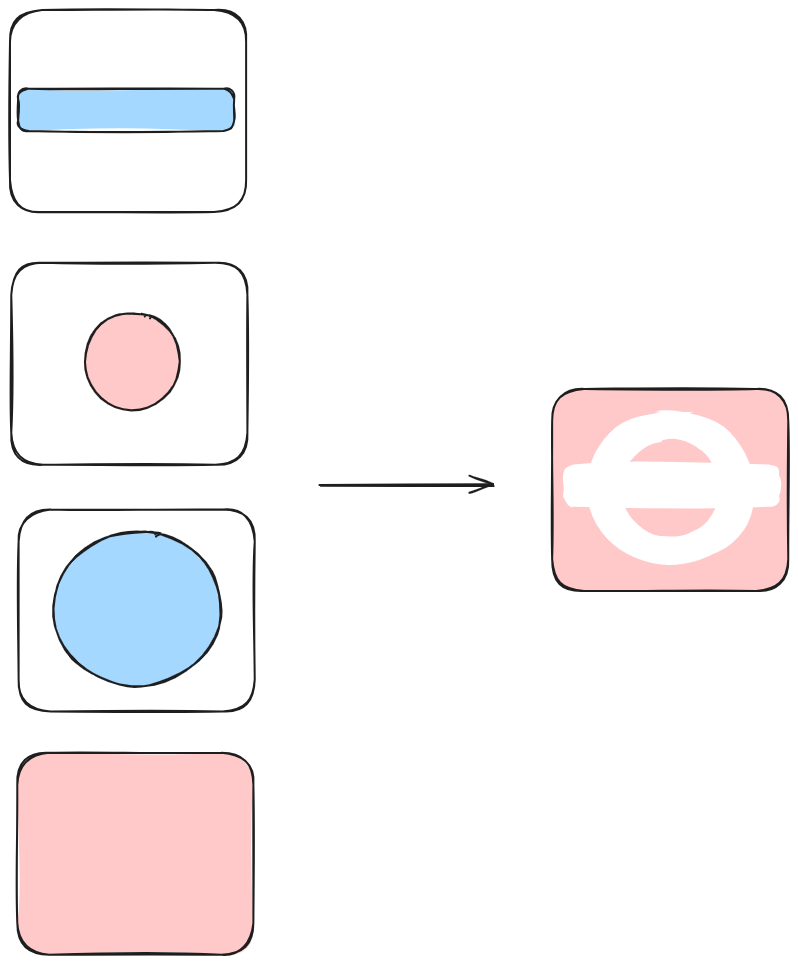
Godot Version
4.6.1
Question
its kinda like a upgraded and dynamic version of this problem
I need to make sure all the holes are able to change every tick (so will the method by split the origin shape into triangles be very lag or sth?)
and it’s also allowed to add more polygons at the top of the holes to cover them
and also allowed more holes at the top of them to erase everything all the way to the bg
and etc
the final shape will be used as a clipping mask to apply texture on it
sb told me that it’s like the layer mask effect in Ps (But I never knew that before..)
Is it necessary to use compute shader to achieve this? (and is it possible?)
Or I could just use the bg as a texture and apply it on those holes?
(sry for broken English hope sb can understand > <)
You don’t need a compute shader but you’ll need a simple regular shader.
Render your mask into a subviewport. You can put whatever objects you want there. Make sure you enable transparent background for the subviewport.
Put everything that needs to be masked under a CanvasGroup node and run a shader on that node that outputs rgb of the screen texture and alpha of the subviewport texture.
Uh I’m not sure did I say clearly
Shapes at the left are in different layers. Blue shapes dig holes.
The final mask should be like the pic at the right, which the white part shows the bg and the red part shows texture.
all shapes at the left may change every tick
I don’t get it..
I can’t even rend the mask in a subviewport cause there’s no blend mode which allows alpha rewriting.
They just blend the alpha values together. And the disabled mode just set the alpha to 1.
Is it possible to write a new blend mode or can I use shader to do the same thing?
Draw red shapes black and blue shapes white into a subviewport and use the final image as a transparency mask.