StimulusGlobal
I’m going to start with StimulusGlobal.
- Use
const instead of @onready variables for preloading files that won’t change. You can do this by dragging the file into your script, pressing and holding Ctrl after you drag but before you drop, and dropping the file into your code. It will also use a UID, which means if you move the file later your code won’t break.
- Follow the GDScript Style Guide for naming variables. The recommendation is to use
snake_case. You are currently using camelCase, which means you’re coming from another language that did that, or followed a tutorial from someone who taught you that. Either way, it’s going to increase the confusion in you reading code in the future, and other people reading your code.
- Make sure all your functions have a return value, even if it’s just
void. This habit will help you debug problems when you are returning values.
- Delete code you aren’t using. Especially the default
_ready() and _process() functions. Unused code clutters things up and makes problems harder to debug.
- You should type variables like Arrays. You do not need to initialize empty Arrays or Dictionaries however.
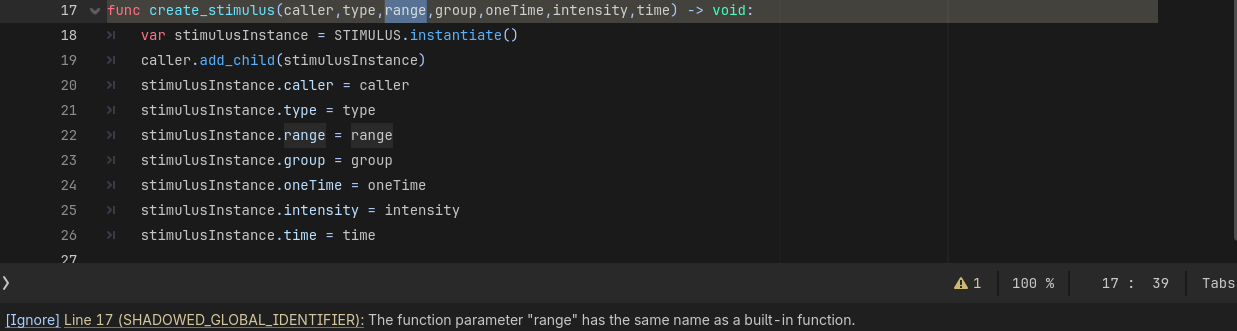
- Be careful not to use reserved words as variable names. In this case:
range. It can cause you really weird debugging problems later. The compiler is literally telling you not to do this. Pay attention to those warnings.
Ignoring them causes what’s known as Error Blindness, where you have so many warnings and errors popping up, you just ignore them.
- Spaces between function arguments make them easier to read.
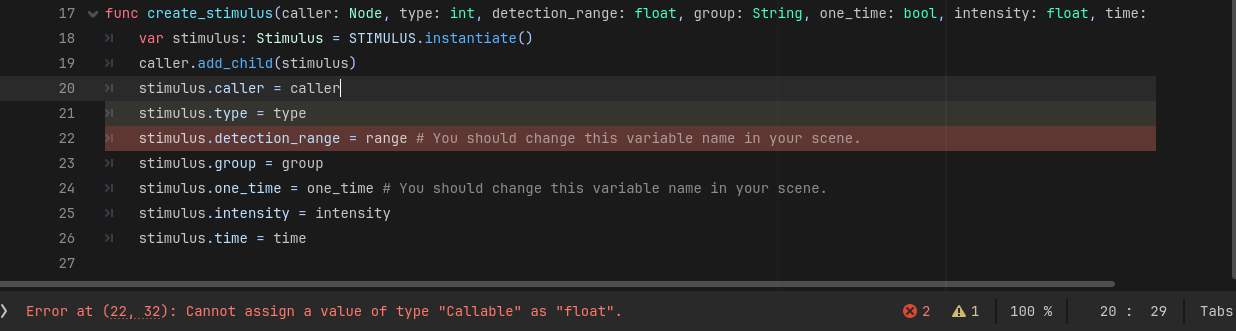
- Function arguments should be typed. This makes sure you aren’t assigning the wrong value to something. (I made my best guesses.)
- When you instantiate an object, typing it makes sure that the values assigned to it are the correct ones (in combination with the tip above). You will also get autocompletion in the editor. However to do this, your Scene needs an attached script with a
class_name. (I created a stand-in one with a dummy Type Enum.) Then you’ll know when you’re passing the wrong thing.
- I added in Enums for Stimulus.Type and Stimulus.Group to show you how you can use that anywhere in the code to pass the type instead of using
const values over and over in files. These will also still match your current const values when evaluated as ints. I change "SIGHT to “VISUAL” and “HEAR” to “AUDIO”. You can change them back if you like.
- Rename variables like
stimulusInstance to just stimulus. Yes, it’s an instance, but when you use a const it becomes clear that the uppercase STIMULUS is the scene, and stimulus is the instance. Which makes the rest of the code shorter and easier to read.
Example stimulus.gd
class_name Stimulus extends Node

enum Group {
	GUNSHOT,
	BODY,
	PLAYER,
}
enum Type {
	VISUAL,
	AUDIO,
}

var type: Type
var detection_range: float
var group: Group
var one_time: bool
var intensity: float
var time: float
New stimulus_global.gd
extends Node

#Stimulus Scene
const STIMULUS = preload("uid://cwh2l0p6n1bdn")

#Stimulus Array
@onready var stimulus_array: Array


func create_stimulus(caller: Node, type: Stimulus.Type, detection_range: float, group: Stimulus.Group, one_time: bool, intensity: float, time: float) -> void:
	var stimulus: Stimulus = STIMULUS.instantiate()
	caller.add_child(stimulus)
	stimulus.caller = caller
	stimulus.type = type
	stimulus.detection_range = detection_range # You should change this variable name in your scene.
	stimulus.group = group
	stimulus.one_time = one_time # You should change this variable name in your scene.
	stimulus.intensity = intensity
	stimulus.time = time
You’ll notice that the code is easier to read. Now we can take a look at your working CharacterBody3D.
Working CharacterBody3D
I did some cleanup like in the previous script, but I’m only calling out new things.
- Follow the GDScript Style Guide for variable order at the top of the file.
- You do not need to initialize variables as null. If they are not assigned, they will evaluate to null anyway. What is more important is giving them a Type.
- You do not need to initialize the RandomNumberGenerator, despite what a tutorial might have told you. Godot already does that for you. Seeding should only be done if you plan on tracking the seeds and giving the player some control over them to get deterministic results. (Like in Minecraft where if you give it the same seed you get the exact same terrain every time.)
- As above, when preloading a scene, preloading a sound can be done as a
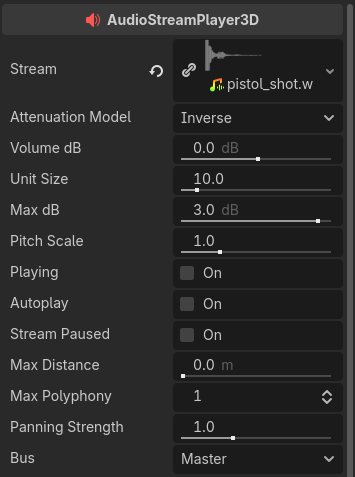
const. However in this case you only use your AudioStreamPlayer to play the one sound. So a better thing to do is put the sound in the player and name it appropriately. Since this is a stealth game, I put it in an AudioStreamPlayer3D. In this way it will sound farther away the farther the NPC is from the Player. But to hear it, you’ll need to put an AudioListenered3D on either the Player or the Camera3D.
state_machine is a common name in video games. Declaring it as type AnimationNodeStateMachinePlayback makes it clear what it is.- When making @onready variables, you can do it the same as a
const. Click and drag the nide you want to make a variable for. Click and hold the Ctrl key after dragging and before dropping. Drop the node in the Script Editor. This will add a Type declaration which will enable autocomplete when typing your code.
- You are using
randf_range(0, 50) and assigning it to an int. Just use randi_range(0, 50). Also, you don’t need to call it from rng anymore.
- Put only one line between sections of code in your functions. Put two between functions. It makes the code easier to read.
- When a function returns a
bool value, it is common to prepend the name with is. E.G. _is_target_in_range()
- When a function happens after something is completed or when a signal is sent, it is common to prepend the name with
on. E.G. _on_hit_finished()
- Don’t abbreviate variables just for the sake of abbreviation.
damage is much clearer, for example, than dam.
- If you don’t use an argument like
delta in physics_process(), prepend it with an underscore.
- I don’t knw what your project looks like, so I’m not sure why you’re exporting a NodePath to find the Player when you could just do
@export player: CharacterBody3D. So I left it. But you shouldn’t use a NodePath if you can export the actual object, because actually exporting the object creates a reference which is just a memory address and is smaller.
New CharacterBody3D
extends CharacterBody3D

const SPEED = 3.0
const ATTACK_RANGE = 6
const AGRO_RANGE = 15

@export var player_path: NodePath

var player: CharacterBody3D
var state_machine: AnimationNodeStateMachinePlayback
var health: int = 3
var dead: bool = false

@onready var navigation_agent_3d: NavigationAgent3D = $NavigationAgent3D
@onready var animation_tree: AnimationTree = $AnimationTree
@onready var pistol_shot: AudioStreamPlayer3D = $PistolShot


func _ready() -> void:
	player = get_node(player_path)
	state_machine = animation_tree.get("parameters/playback")


func _process(_delta: float) -> void:
	velocity = Vector3.ZERO
	#AI PROTOTYPE

	#Idle
	if global_position.distance_to(player.global_position) > AGRO_RANGE and health > 0:
		state_machine.travel("idle")
		velocity = Vector3.ZERO

	#Chase
	elif global_position.distance_to(player.global_position) <= AGRO_RANGE \
	and global_position.distance_to(player.global_position) > ATTACK_RANGE and health > 0:
		state_machine.travel("run")
		navigation_agent_3d.set_target_position(player.global_transform.origin)
		var next_nav_point: Vector3 = navigation_agent_3d.get_next_path_position()
		velocity = (next_nav_point - global_transform.origin).normalized() * SPEED
		look_at(Vector3(global_position.x + velocity.x, global_position.y, global_position.z + velocity.z), Vector3.UP)

	#Aim
	elif global_position.distance_to(player.global_position) <= ATTACK_RANGE and health > 0:
		if state_machine.get_current_node() != "aiming" and state_machine.get_current_node() != "shoot":
			state_machine.travel("aim")
		look_at(Vector3(player.global_position.x, global_position.y, player.global_position.z), Vector3.UP)
		var shootroll: int = randi_range(0, 50)
		if shootroll == 1 and state_machine.get_current_node() != "shoot":
			state_machine.travel("shoot")
			pistol_shot.play()
			player.damage(5)

	move_and_slide()


func _is_target_in_range() -> bool:
	return global_position.distance_to(player.global_position) < ATTACK_RANGE


func _on_hit_finished() -> void:
	player.hit()


func _on_area_3d_body_part_hit(damage: int) -> void:
	health -= damage
	if health <= 0 and dead == false:
		state_machine.travel("die")
		set_collision_layer_value(1, false)
		set_collision_mask_value(1, false)
		dead = true
None of the functionality is changed, but now the code is much clearer. Which makes it easier to debug. Which brings us to the problem file.
Broken CharacterBody3D
- Your core stats are just variables. They do not need to be @onready variables. Same with your behavior and passive variables. They don’t do anything in the ready phase.
- Change
suspiciousDistance to suspicion_threshold because it’s better grammar.
overlap_areas does not need to be a class variable.- You have declared
player using a hardcoded node path inside physics_process(). I moved it to an @export variable so you can assign it, but also so it doesn’t get lost. I’m assuming this is just for testing. Ultimately, you’ll want to detect the player and then go after it.
move_and_slide() was commented out in your code. This is likely your original problem.
Fixed New characterBody3D script
extends CharacterBody3D

enum AlertState {
	PASSIVE,
	SUSPICIOUS,
	ALERT,
	SEARCH,
	AGRO,
	HOLD,
	HOLD_AGRO,
	FLEE,
	COWER
}
#Set these as the specific values in case they have a reason to be that value.
enum PassiveBehaviour {
	IDLE = 1,
	WANDER = 3,
	PATROL = 4,
}
#Consider adding a NONE action state
enum Action {
	INVESTIGATE,
	RETURN,
	INTERACT,
	STAND,
	MOVE,
}

#Agression Caps
const AC_LOW = 3
const AC_MED = 7
const AC_HIGH = 10

@export var wanderArea: NodePath #Could this be a direct object export?
@export var player: CharacterBody3D

#Core Stats
var health: int = 10
var base_speed: float = 2.0

#Appearance

#Behaviour
var agression: int = 5
var alert: int = 0
var state: AlertState = AlertState.PASSIVE
var passive_behaviour: PassiveBehaviour = PassiveBehaviour.WANDER
#var faction: int # Guessed this was an int because you like ints.
#var alert_distance: float = 10.0
var suspicion_threshold: int = 100
var alert_threshold: int = 200
var agro_threshold: int = 300
var alertGroups: Array[Stimulus.Group]
#var current_alerts: Array
#var sight_target: CharacterBody3D

#Passive
var idle_target: Node3D
var idle_timer: float = 0.0
#var idle_anim: String
var action: Action

#@onready var animation_player: AnimationPlayer = $AnimationPlayer
@onready var sight_ray: RayCast3D = $SightRay
@onready var area_3d: Area3D = $Area3D
@onready var navigation_agent_3d: NavigationAgent3D = $NavigationAgent3D


func _ready() -> void:
	alertGroups.append(Stimulus.Group.GUNSHOT)
	alertGroups.append(Stimulus.Group.PLAYER)


func _physics_process(_delta: float) -> void:
	if state == AlertState.PASSIVE:
		if passive_behaviour == PassiveBehaviour.WANDER:
			wander_behaviour()
		if passive_behaviour == PassiveBehaviour.IDLE:
			idle_behaviour()

	if agression <= AC_LOW:
		if alert_check() == AlertState.SUSPICIOUS or alert_check() == AlertState.ALERT or alert_check() == AlertState.AGRO:
			set_state(AlertState.FLEE)
	elif agression > AC_LOW and agression <= AC_MED:
		if alert_check() == AlertState.SUSPICIOUS or alert_check() == AlertState.ALERT:
			set_state(AlertState.HOLD)
		elif alert_check() == AlertState.AGRO:
			set_state(AlertState.HOLD_AGRO)
	elif agression > AC_MED and agression <= AC_HIGH:
		if alert_check() == AlertState.SUSPICIOUS:
			set_state(AlertState.SUSPICIOUS)
		elif alert_check() == AlertState.ALERT:
			set_state(AlertState.AGRO)

	#Check Stimulus
	var overlap_areas: Array = area_3d.get_overlapping_areas()
	for i in overlap_areas.size():
		if overlap_areas[i].is_in_group("Stimulus"):
			var stimulus: Node3D = overlap_areas[i].get_parent()
			if stimulus_group_check(stimulus.group) == true and stimulus_sight_check(stimulus.type, stimulus) == true and stimulus_one_time_check(stimulus) == true:
				#print(overlap_areas[i])
				alert += stimulus.intensity

	navigation_agent_3d.set_target_position(player.global_position)
	var next_nav_point: Vector3 = navigation_agent_3d.get_next_path_position()
	velocity = global_position.direction_to(next_nav_point) * 0.0001
	look_at(Vector3(global_position.x + velocity.x, global_position.y, global_position.z + velocity.z), Vector3.UP)
	move_and_slide()


func execute_passive_behaviour() -> void:
	pass
	#var idle_target
	#var idle_time: floatr: int.0
	#var animTimer: int
	#var: String
	#var action: int
	#if action != ACT_MOVE and action != ACT_IDLE:
	#	action = ACT_IDLE
	#	print(action)
	#if idle_target == null:
	#	#print("YOOOOOOOO")
	#	idle_target = get_node(wanderArea).get_child(1)
	#	#print(idle_target)

	#if idle_timer <= 0 and action : float== ACT_IDLE:.0
	#	idle_target = get_node(wanderArea).get_child(randi_range(0,get_node(wanderArea).get_child_count(false)))
	#	action = ACT_MOVE
	#if idle_target != null and action == ACT_MOVE:
	#	if global_position.distance_to(idle_target.global_position) < 1:
	#		action = ACT_IDLE
	#		idle_timer: float = 3.0

	#if action == ACT_IDLE:
	#	idle_timer : float-= get_process_delta_time().0
	#	nav_agent.set_target_position(idle_target.global_transform.origin)
	#	var next_nav_point = nav_agent.get_next_path_position()
	#	velocity = (next_nav_point - global_transform.origin: float).normalized() * base_speed


func idle_behaviour() -> void:
	pass


func wander_behaviour() -> void:
	#print(action)
	if action == null:
		action = Action.STAND
		idle_timer = 5.0
	if action == Action.STAND:
		idle_timer -= get_process_delta_time()
		if idle_timer <= 0:
			idle_target = get_node(wanderArea).get_child(randi_range(0,get_node(wanderArea).get_child_count(false) - 1))
			print(idle_target)
			action = Action.MOVE
	#	nav_agent.set_target_position(idle_target.global_transform.origin)
	#	var next_nav_point = nav_agent.get_next_path_position()
	#	velocity = (next_nav_point - global_transform.origin: float).normalize() * base_speed
	#	move_and_slide()


func suspicious_behaviour() -> void:
	pass


func alert_behaviour() -> void:
	pass


func agro_behaviour() -> void:
	pass


func hold_behaviour() -> void:
	pass


func hold_agro_behaviour() -> void:
	pass


func flee_behaviour() -> void:
	pass


func cower_behaviour() -> void:
	pass


func set_state(new_state: AlertState) -> void:
	if new_state != state:
		state = new_state


func state_check(state_to_check: AlertState) -> bool:
	if state == state_to_check:
		return true
	else:
		return false


func alert_check() -> AlertState:
	if alert < suspicion_threshold:
		return AlertState.PASSIVE
	elif alert >= suspicion_threshold and alert < alert_threshold:
		return AlertState.SUSPICIOUS
	elif alert >= alert_threshold and alert < agro_threshold:
		return AlertState.ALERT
	elif alert >= agro_threshold:
		return AlertState.AGRO

	return AlertState.PASSIVE ##Added default return state


func stimulus_group_check(group: Stimulus.Group) -> bool:
	if alertGroups.has(group) == true:
		return true
	else:
		return false


func stimulus_sight_check(type: Stimulus.Type, target: Node3D) -> bool:
	if type == Stimulus.Type.AUDIO:
		return true
	elif type == Stimulus.Type.VISUAL:
		sight_ray.target_position = sight_ray.to_local(target.global_position)
		sight_ray.force_raycast_update()
		if sight_ray.is_colliding() and sight_ray.get_collider() == target.caller:
				return true

	return false #Default return value


func stimulus_one_time_check(target: Node3D) -> bool:
	#print("STIMONETIMECHECK")
	#print(target.seenTargets.size())
	#print(target.oneTime)
	if target.one_time == false:
		#print("NOT ONE TIME")
		return true
	elif target.oneTime == true:
		#print("IS ONE TIME")
		if target.seenTargets.has(self) == true:
			#print("ONE TIME FAIL")
			return false
		else:
			#print("ONE TIME PASS AND ADD")
			target.seenTargets.append(self)
			return true

	return false #Default return value
Conclusion
You had a lot going on in your scripts. Going line-by-line I was able to find what I think was the problem - which was you had move_and_slide() commented out. Hence, no movement.
I commented out a number of unused variables. This file is too big. It’s doing too many things - which means it’s hard to figure out what is going on. Simplifying your file through refactoring would help with debugging. It would also help to follow the GDScript Style Guide. Learning to follow it will help you find things in your own code.
Naming is also very important. When thinking about naming variables and functions, do what you can to make using them make grammatical sense. This will also make your coding easier. Finally, using Enums will make your life a lot easier because it will prevent typos, and it allows you to use the editor’s autocomplete functionality.
Hopefully this helps solve your problem and teaches you more about GDScript. If the solution doesn’t work, or you have questions, let me know.