Godot Version
Godot 4.6.2
Question
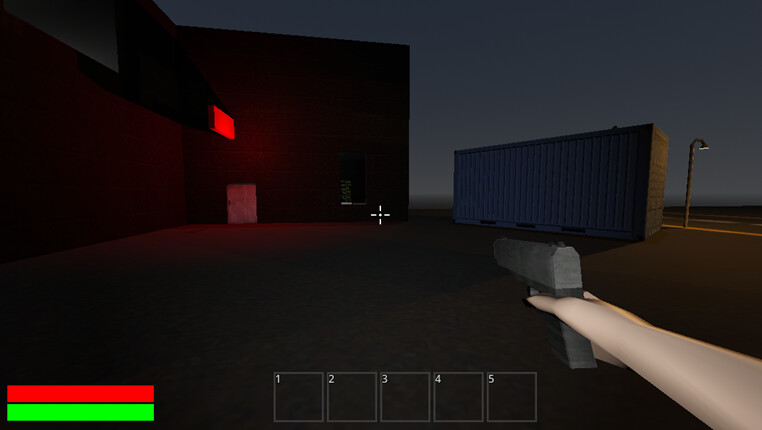
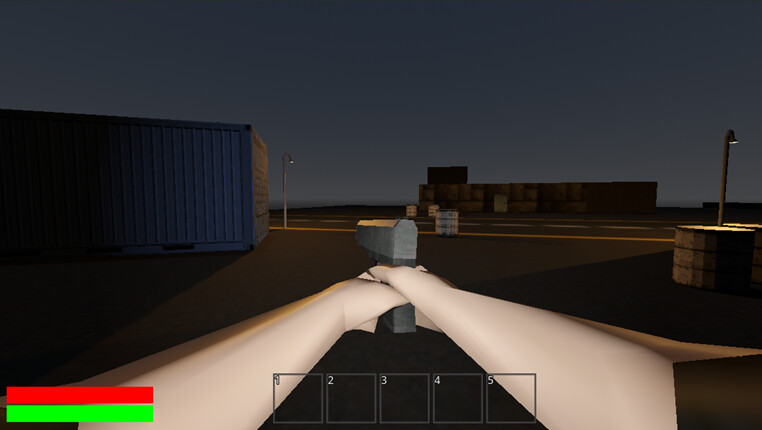
I am trying to make the player able to aim guns, but due to each gun being a different shape, certain guns don’t line up correctly. Here are pictures for examples.
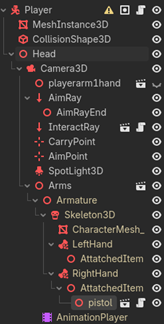
How would I get the gun to face towards the direction the player is facing when looking down sights. Here is the scene heirachy.
Thanks
You can project a 3D point from the camera to use for rotating the gun to the correct alignment.
Wrote an example script to give you some ideas.
@export var gun: Node3D ## Set this to the gun mesh.
## The distance of the point projected from camera.
## Experiment with this value to find the best look.
var aim_distance: float = 15
## Automatically set.
var resolution: Vector2i


func _ready() -> void:
	## Get the resolution in order to calculate the center of the screen.
	resolution = DisplayServer.window_get_size()
	## Update resolution if the screen size changes.
	get_viewport().size_changed.connect(_on_size_changed)

func _physics_process(delta: float) -> void:
	## Project a point from the center of the screen to use in the 3D world.
	var camera: Camera3D = get_viewport().get_camera_3d()
	var camera_origin: Vector3 = camera.project_ray_origin(resolution/2)
	var aim_location: Vector3 = camera_origin \
			+ camera.project_ray_normal(resolution/2) * aim_distance

	if gun:
		gun.look_at(aim_location)

func _on_size_changed() -> void:
	resolution = DisplayServer.window_get_size()
If the look_at() function behaves weirdly, you either need to modify the gun mesh in order for it to face the -Z axis, or set look_at() function’s third argument (use_model_front) to true. You can also write a custom script for rotating the gun’s basis.
If you need the gun to look at something else other than the center of the screen, you can further improve the script by casting a ray from the camera, or getting the mouse position instead of resolution/2 for the project_ray_origin() argument. Let me know if I can help you with anything else.