[Match the Pixel colour] - feedback and how to refactor a code

Godot Version

4.6

Question

I have joined to Godot WildJam out of curiosity.
Initially had plan for something smaller, but came across @Frozen_Fried and started do some art themed “game”.
All of the concepts are pretty new to me and trying to figure out from forum members post, responses, and documentations available in Godot itself.

Currently I’m trying to achieve two things -

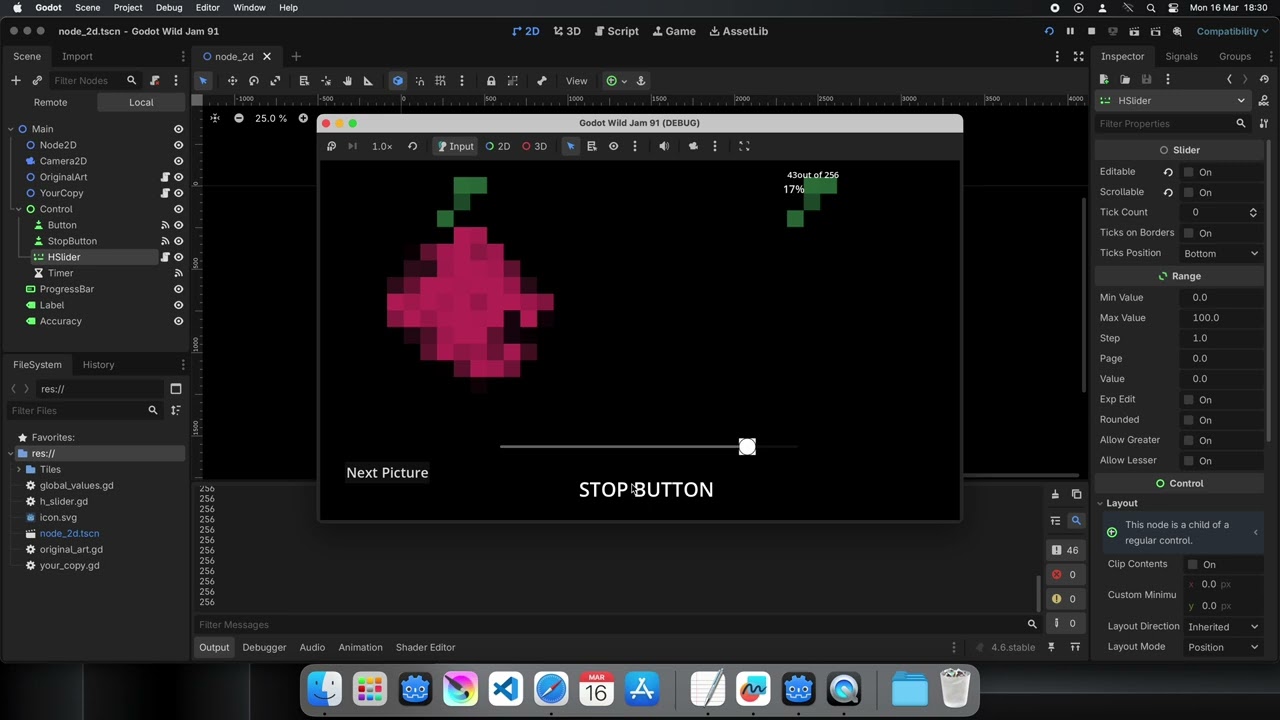
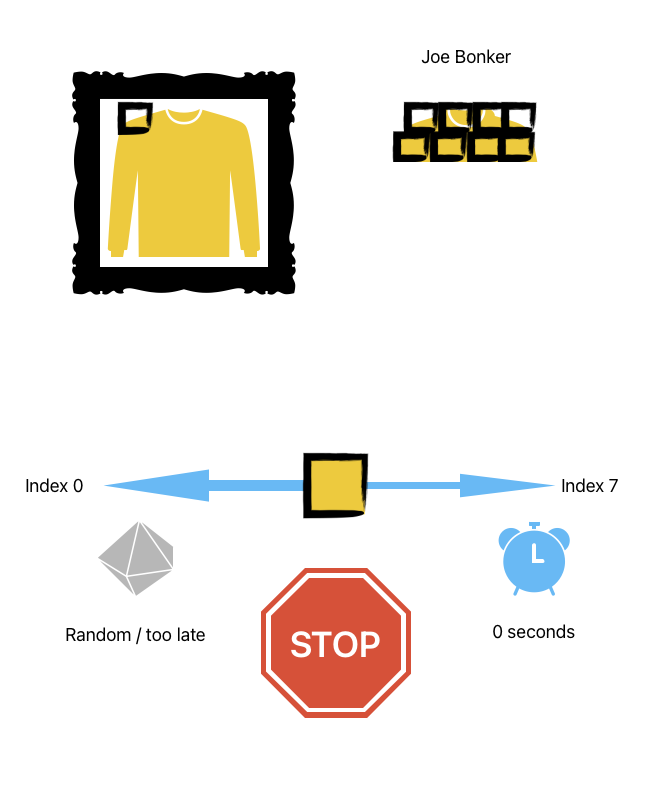
  1. Change colour of grabber while disabled ( it only controlled by code and player should not interact with it , only via stop button to get value of colour on slider )
  2. Store and compare overall score for player how well he did .

short demo

Initial idea for interface [Theme is Theft - and this is "stealing from original by matching it best to ability of player "]

1 Like

func next_picture():
	GlobalValues.current_index_asset = posmod(GlobalValues.current_index_asset +1 ,GlobalValues.image_library_path.size())
	GlobalValues.image_asset_path = GlobalValues.image_library_path[GlobalValues.current_index_asset]
	clear_pixels()
	GlobalValues.image_asset = load(GlobalValues.image_asset_path)
	GlobalValues.image_size = GlobalValues.image_asset.get_size()
	GlobalValues.grid_size = Vector2i(GlobalValues.image_size)
	get_pixels()
	queue_redraw()

This is most chaotic part of it where I start question if I shouldn’t just simple not move update logic to process function .

As from future player won’t have next picture button but instead only control is stop button .

And also amount of @onready variables is probably unnecessary .


@onready var image_library_path = ["res://Tiles/16x16.png", "res://Tiles/target.png","res://Tiles/flower.png"]
@onready var image_asset_path  = image_library_path[0]
@onready var image_asset : Image = load(image_asset_path)
@onready var image_size = image_asset.get_size()
@onready var grid_size : Vector2i = Vector2i(image_size)
@onready var color_dictionary_auto = []
@onready var current_index_asset: int  = 0
@onready var pixel_size = Vector2(50,50)
@onready var offset_image_position = Vector2(50,50)
@onready var array_pixel_art = []
@onready var unique_color_from_art 
@onready var your_accuracy : float
@onready var slider_value_stops = []

Some tips how to make clean it up ?

For #1 you could cheat it.
Put a ColorRect over it (after it in the scene tree) and make the ColorRect SelfModulate property to be transparent.
That will prevent the user from grabbing the grabber.
1 Like
#@onready var image_library_path = ["res://Tiles/16x16.png", "res://Tiles/target.png","res://Tiles/flower.png"]   # the paths will not change so a constant will work
const IMAGE_LIBRARY_PATHS:Array[String] = ["res://Tiles/16x16.png", "res://Tiles/target.png","res://Tiles/flower.png"]

#@onready var image_asset_path  = image_library_path[0]  # no need for @onready for a value that is not a node or derived from a node
var image_asset_path  = image_library_path[0]   

#@onready var image_asset : Image = load(image_asset_path)   # unnecessary @onready   
var image_asset : Image = load(image_asset_path)

#@onready var image_size = image_asset.get_size()  # unnecessary @onready   
var image_size = image_asset.get_size()  

#@onready var grid_size : Vector2i = Vector2i(image_size) # unnecessary @onready
var grid_size : Vector2i = Vector2i(image_size)

#@onready var color_dictionary_auto = []  # this is setting an empty array and doesn't need to wait for node to be ready   
var color_dictionary_auto = []   
   
#@onready var current_index_asset: int  = 0 # this is a class variable and doesn't need to wait for node to be ready   
var current_index_asset: int  = 0   
   
#@onready var pixel_size = Vector2(50,50)   #  unnecessary @onready
var pixel_size = Vector2(50,50)    # I don't know how you are using this but I suspect this could be a constant as well  

#@onready var offset_image_position = Vector2(50,50) # unnecessary @onready   
var offset_image_position = Vector2(50,50)  # again I suspect this could be a constant   

#@onready var array_pixel_art = [] # unnecessary @onready 
var array_pixel_art = []

#@onready var unique_color_from_art # unnecessary @onready 
var unique_color_from_art    

#@onready var your_accuracy : float  # unnecessary @onready 
var your_accuracy : float    

#@onready var slider_value_stops = []  # unnecessary @onready 
var slider_value_stops = []

It takes a little bit of understanding but @onready is used when a variable needs to wait for the node it is defined in to be ready before it can be assigned.
Any variable that is simply declared and not assigned a value will never need @onready like your empty arrays and a couple of other values.
If a variable is defined where it is declared and you will not be modifying that value, it can be defined as a constant.

1 Like

Or just set slider’s mouse mode to ignore.

2 Likes

Thank you .
Also it is worth mention , the HSlider has option to enable or disable Editable .
This allow the position to be controlled only by code .

Many thanks for response .

Unfortunately , I didn’t explained a fully the logic in the one .
Let me fix it :

The grabber is disabled by default .
as I have turned off option Editable .
The disabled referred to naming of grabbers texture by Godot

get_theme_icon("grabber_disabled")
	add_theme_icon_override("grabber_disabled", texture)

I hope this explained it better .

Thank you for explaining it in words and code .

You seem to be overcomplicating this. You should focus less on code and more on setting things up in the editor. A lot of code can be offloaded to the node setup. Here’s a complete example of the logic, if I understood it correctly. It’s all in one script. To run it just create tscn and script files and run the scene. Grabber and marker are made with built in gradient textures. Note that I didn’t implement the ending conditions so it will crash on the last pixel :slight_smile:

script:

extends HSlider

var time := 0.0
var speed := 0.0
@export var oscillation_speed := 5.0
var pixel := 0
var original: Image
var stolen: Image


func _ready():
	# create random original image - load instead
	original = Image.create_empty(8, 8, false, Image.FORMAT_RGB8)
	for i in 64:
			original.set_pixel(i % 8, i / 8, Color(randf(), randf(), randf()))
	%original.texture = ImageTexture.create_from_image(original)
	
	# create stolen image
	stolen = Image.create_empty(8, 8, false, Image.FORMAT_RGB8)
	%stolen.texture = ImageTexture.create_from_image(stolen)
	%button.text = "START"
	
	
func _process(delta):
	# animate grabber position
	ratio = sin(time) * 0.5 + 0.5 
	$grabber.position = size * Vector2(ratio, 0.5)
	time += speed * delta
	
	# sample gradient and assign color to grabber
	var g: Gradient = %slider_gradient.texture.gradient
	$grabber.modulate = g.sample(ratio)
	
	# position and animate current pixel marker
	%pixel_marker.global_position = %original.global_position + Vector2(pixel % 8, pixel / 8) * %original.size / 8 + Vector2.ONE * %original.size / 16
	%pixel_marker.scale = Vector2.ONE * (1.0 + sin(time * 5.0) * 0.3)


func _on_button_pressed():
	if is_zero_approx(speed):
		speed = 5.0
		%button.text = "STOP"
		set_colors_from_current_pixel()
	else:
		if %button.text != "START":
			set_stolen_color()
			pixel += 1
		%button.text = "NEXT"
		speed = 0.0
		
		
func set_colors_from_current_pixel():
	var original_color := original.get_pixel(pixel % 8, pixel / 8)
	%slider_gradient.texture.gradient.set_color(0, Color(randf(), randf(), randf())) 
	%slider_gradient.texture.gradient.set_color(1, original_color)
	%slider_gradient.texture.gradient.set_color(2, Color(randf(), randf(), randf()))
	
	
func set_stolen_color():
	stolen.set_pixel(pixel % 8, pixel / 8, $grabber.modulate)
	%stolen.texture = ImageTexture.create_from_image(stolen)
	

tscn:

[gd_scene format=3 uid="uid://b13af8kdshws3"]

[ext_resource type="Script" uid="uid://dprkadmmcv6fh" path="res://slider.gd" id="1_7dq2a"]

[sub_resource type="Gradient" id="Gradient_sw1by"]
interpolation_mode = 1
offsets = PackedFloat32Array(0, 0.71644294)
colors = PackedColorArray(1, 1, 1, 0, 0, 0, 0, 1)

[sub_resource type="GradientTexture2D" id="GradientTexture2D_70n7g"]
gradient = SubResource("Gradient_sw1by")
fill = 2
fill_from = Vector2(0.5, 0.5)

[sub_resource type="Gradient" id="Gradient_7dq2a"]
interpolation_color_space = 1
offsets = PackedFloat32Array(0, 0.5, 1)
colors = PackedColorArray(0, 0, 0, 1, 0, 0, 0, 1, 0, 0, 0, 1)

[sub_resource type="GradientTexture1D" id="GradientTexture1D_sw1by"]
gradient = SubResource("Gradient_7dq2a")

[sub_resource type="Gradient" id="Gradient_70n7g"]
interpolation_mode = 1
offsets = PackedFloat32Array(0, 0.51510066, 0.61577183)
colors = PackedColorArray(1, 1, 1, 1, 0, 0, 0, 1, 0, 0, 0, 0)

[sub_resource type="GradientTexture2D" id="GradientTexture2D_eheoe"]
gradient = SubResource("Gradient_70n7g")
width = 128
height = 128
fill = 1
fill_from = Vector2(0.5, 0.5)

[node name="slider_game" type="Control" unique_id=283951799]
layout_mode = 3
anchors_preset = 15
anchor_right = 1.0
anchor_bottom = 1.0
grow_horizontal = 2
grow_vertical = 2

[node name="original" type="TextureRect" parent="." unique_id=96910540]
unique_name_in_owner = true
texture_filter = 1
layout_mode = 1
offset_left = 32.0
offset_top = 32.0
offset_right = 332.0
offset_bottom = 332.0
expand_mode = 1

[node name="pixel_marker" type="Sprite2D" parent="original" unique_id=395273112]
unique_name_in_owner = true
texture = SubResource("GradientTexture2D_70n7g")

[node name="stolen" type="TextureRect" parent="." unique_id=203063546]
unique_name_in_owner = true
texture_filter = 1
layout_mode = 1
anchors_preset = 1
anchor_left = 1.0
anchor_right = 1.0
offset_left = -332.0
offset_top = 32.0
offset_right = -32.0
offset_bottom = 332.0
grow_horizontal = 0

[node name="slider" type="HSlider" parent="." unique_id=42760101]
layout_mode = 1
anchors_preset = 7
anchor_left = 0.5
anchor_top = 1.0
anchor_right = 0.5
anchor_bottom = 1.0
offset_left = -271.0
offset_top = -216.0
offset_right = 271.0
offset_bottom = -149.0
grow_horizontal = 2
grow_vertical = 0
mouse_filter = 2
script = ExtResource("1_7dq2a")

[node name="slider_gradient" type="TextureRect" parent="slider" unique_id=267634757]
unique_name_in_owner = true
layout_mode = 1
anchors_preset = 15
anchor_right = 1.0
anchor_bottom = 1.0
grow_horizontal = 2
grow_vertical = 2
texture = SubResource("GradientTexture1D_sw1by")

[node name="grabber" type="Sprite2D" parent="slider" unique_id=1318100658]
unique_name_in_owner = true
texture = SubResource("GradientTexture2D_eheoe")

[node name="button" type="Button" parent="." unique_id=861567750]
unique_name_in_owner = true
layout_mode = 1
anchors_preset = 7
anchor_left = 0.5
anchor_top = 1.0
anchor_right = 0.5
anchor_bottom = 1.0
offset_left = -50.58069
offset_top = -104.0
offset_right = 50.58069
offset_bottom = -40.0
grow_horizontal = 2
grow_vertical = 0
action_mode = 0
text = "STOP"

[connection signal="pressed" from="button" to="slider" method="_on_button_pressed"]

1 Like

Thank you so much for solution.

I have tried it today and came a cross a few question :

  1. How do I change speed of animation for grabber ?
	# animate grabber position
	ratio = sin(time) * 0.5 + 0.5 
	$grabber.position = size * Vector2(ratio, 0.5)
	time += speed * delta

I saw at the top unused variable

@export var oscillation_speed := 0.5

so decided to use it as :

	ratio = sin(time*oscillation_speed) * 0.5 + 0.5 

Is this correct usage or was this variable intended to use different way ?

2.GdScript: Reload :: Integer division. Decimal part will be discarded
This errors currently flags three lines of code:

	%pixel_marker.global_position = %original.global_position + Vector2(pixel % 8, pixel / 8) * %original.size / 8 + Vector2.ONE * %original.size / 16
	var original_color := original.get_pixel(pixel % 8, pixel / 8)
	stolen.set_pixel(pixel % 8, pixel / 8, $grabber.modulate)

Not entirely sure here as pixel be int , what is going on here with pixel variable itself inside those lines .
I have tried print for (pixel and pixel % 8, pixel / 8 but this prints - 0’s

  1. Replacing the random pixels for assets :

I’m breaking down process to just make sure I done it correct way :
1.changed asset in Import settings to Import as Image
2. use load directly to have less lines

original = Image.load_from_file("res://mona_lisa_8x8.png")

but this thrown error

W 0:00:00:268 slider.gd:16 @ _ready(): Loaded resource as image file, this will not work on export: ‘res://mona_lisa_8x8.png’. Instead, import the image file as an Image resource and load it normally as a resource.
<C++ Source> core/io/image.cpp:2766 @ load_from_file()
slider.gd:16 @ _ready()

so changed it to store path in variable and load it to original via load()

	var path_to_picture = "res://mona_lisa_8x8.png"
	original = load(path_to_picture)
	%original.texture = ImageTexture.create_from_image(original)

Is this correct approach ?

Many thanks again for all time taken with writing this code and commentary, it’s amazing to see it works .

  1. Oh I accidentally left speed hardcoded to 5.0. You’re supposed to just set oscilation_speed. So replace speed = 5.0 in _on_button_pressed() with speed = oscillation_speed. Btw you should be able to figure things like this on your own.

  2. Integer division is in fact required for this to work as intended. If it bothers you, disable the integer division warning/error in the project settings or click “ignore” for each individual warning in the debugger. pixel just goes from 1 to 64 (and beyond :wink: ) so to calculate its x and y coordinates from that you integer-divide by width for y coordinate, and take a reminder of integer division (modulus) by width for x coordinate. It’s a standard way of converting a single dimensional index to a two dimensional counterpart when representing two dimensional arrays with a single dimension array. The engine issues a warning because integer division rounds down the result to an integer which people don’t expect but it’s exactly what is needed here.

  3. Yes that should be fine.

1 Like

Sorry didn’t realise how button logic worked .

This a gone above my understanding of modulus , so by seeing 8x8 it was like which is x and y now .
I will work a bit more on implementing different dimensions to crack this further .

print out the values to see what is happening

var width := 8
var height := 8
var pixel_x := pixel % width
var pixel_y := pixel / width
print("x = %d, y = %d"%[pixel_x, pixel_y])
var original_color := original.get_pixel(pixel_x, pixel_y)
1 Like