Godot Version
4.7.1
Question
I am having an issue with setting up multiplayer for my game using GodotSteam.
I am using the GodotSteam plugin to connect my friend and I to test.
Current issue:
- When the host creates a lobby, they are loaded into the main scene and have a Player spawned for them
- However, when any other client joins the host’s lobby, the following problems happen/have happened:
- Host:
- The host gains control of the other client’s player
- The host views through the camera of the latest client that joined
- Clients:
- The client that joined, is unable to control their player, but can see through the camera of the host
- The client that joined, is able to control their player, but is viewing from the host’s perspective
- The client’s player falls through the map, locally.
- Host:
This is truly a cluster-f*** of issues that I don’t understand, and would like some help with.
Currently I am handling the networking stuff (GodotSteam, Host-button UI code) in GDScript. The Player class was made using godot-cpp, so authority of the Player node is set inside this class’ _enter_tree() function, like so:
void Player::_enter_tree()
{
	this->set_multiplayer_authority(get_name().to_int());
}
This is the current Player class scene hierarchy:
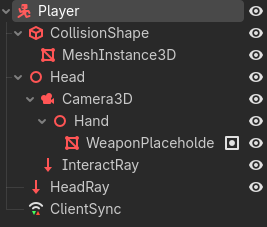
ClientSync properties that are synced:

Latest testing session errors:
Host:
ERROR: Condition "uint32_t(consumed) != size" is true. Returning: ERR_INVALID_DATA
   at: on_delta_receive (modules/multiplayer/scene_replication_interface.cpp:790)
Client:
ERROR: Invalid packet received. Size too small.
   at: decode_and_decompress_variants (scene/main/multiplayer_api.cpp:264)
ERROR: Condition "err" is true. Returning: err
   at: on_replication_start (modules/multiplayer/scene_replication_interface.cpp:257)
1828434934
If anything I’m doing blatantly wrong, please let me know, as I’m relatively new to this and just want to understand what to do, to get multiplayer down before I actually continue with development of my game.
If you need extra info, let me know.
Many thanks!