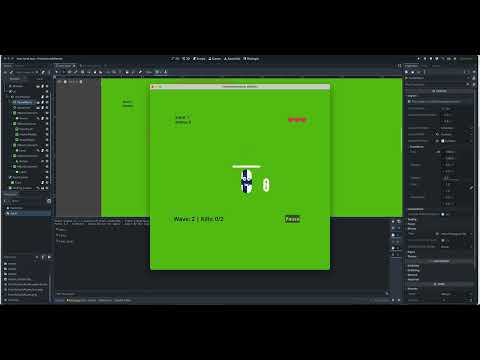
Godot Version
4.4.1 Stable Mac OS
Question
` I’m started to making tutorial_level which should explain elements of game, but as I reused items which have script - specifically arrow_pill which in test_level adds 10 ammo (arrows) to player for dispose .
This is script of pill
extends Area2D

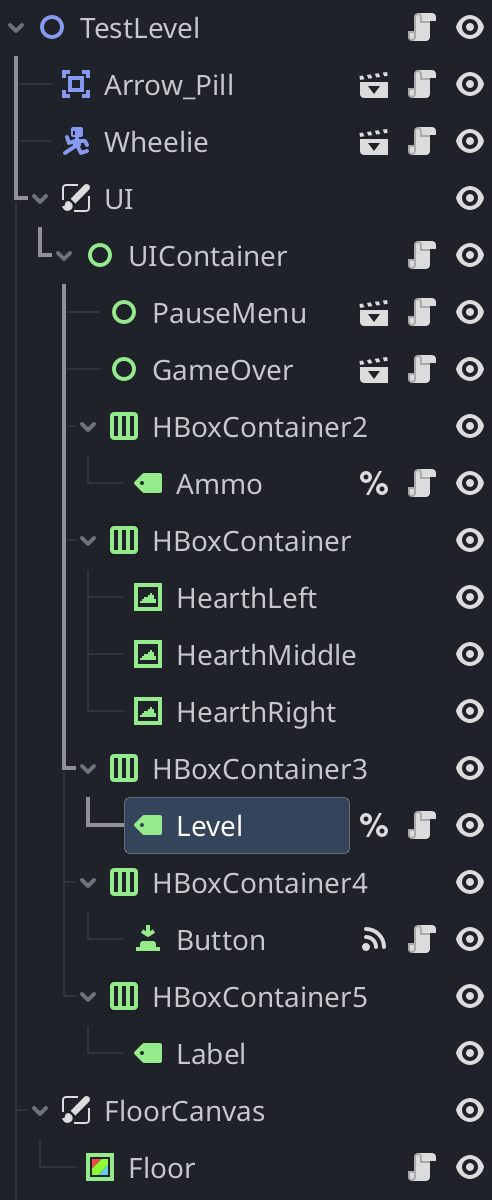
@onready var ammo_label = get_node("/root/TestLevel/UI/UIContainer/HBoxContainer2/Ammo")
@export var ammo_amount := 10

func _ready() -> void:
	connect("body_entered", Callable(self, "_on_body_entered"))

func _on_body_entered(body: Node) -> void:
	if body.is_in_group("Player"):
		if ammo_label:
			ammo_label.reload(ammo_amount)
		queue_free()
for label of Ammo I use this script
extends Label

var ammo_amount := 0

func _ready() -> void:
	var ammo_string = get_tree_string_pretty()
	print(ammo_string)
	text = "Ammo: " + str(ammo_amount)

func ammo_shoot(amount: int) -> void:
	ammo_amount -= amount
	ammo_amount = max(ammo_amount, 0)
	text = "Ammo: " + str(ammo_amount)

func reload(amount: int) -> void:
	ammo_amount += amount
	text = "Ammo: " + str(ammo_amount)
Error I get :
*E 0:00:06:897 arrow_pill.gd:3 @ @implicit_ready(): Node not found: “/root/TestLevel/UI/UIContainer/HBoxContainer2/Ammo” (absolute path attempted from “/root/Turtorial_level/Arrow_Pill”).
<C++ Error> Method/function failed. Returning: nullptr
<C++ Source> scene/main/node.cpp:1875 @ get_node()
arrow_pill.gd:3 @ @implicit_ready()
mentor.gd:42 @ _handle_first_task_finished()
mentor.gd:22 @ _on_timeline_ended()
DialogicGameHandler.gd:281 @ end_timeline()
DialogicGameHandler.gd:247527840 @ clear()
timeline.gd:247526688 @ clean()
What be best way to handle it globally between different levels for Ammo, Scores, Lives, character ?
Scores are function inside of label as well which is called from enemy script itself to update variable of score, this label is currently only in test_level , copy and paste into other levels doesn’t make much sense as I rather just keep one score for entire time .
current tree look in test_level
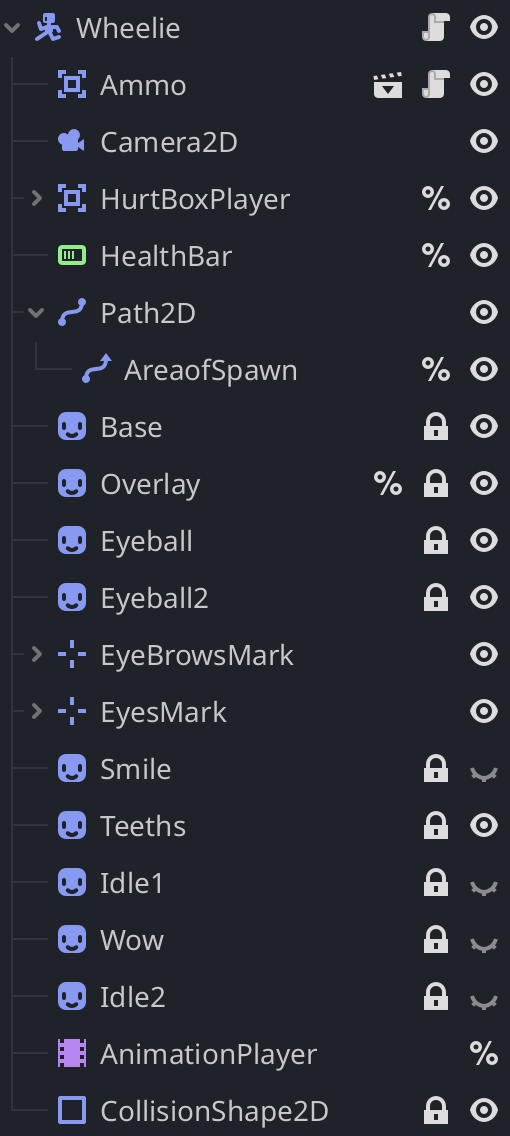
tree of character itself
enemy code
extends CharacterBody2D

var health: int = 3
var speed: float = 250
var current_eye_anim: String = ""

@onready var EnemyBase: Sprite2D = %Base
@onready var player = get_tree().get_first_node_in_group("Player")
var ScoreLabel: Label
@onready var _animation_player = $AnimationPlayer
@onready var _health_bar: ProgressBar = %HealthBar

@export var shoot_interval := 2
@export var shoot_range := 1100

@export var arrow_scene: PackedScene = preload("res://scenes/enemy_arrow.tscn")
@export var arrow_pill_scene: PackedScene = preload("res://scenes/arrow_pill.tscn")
@export var healing_pill_scene: PackedScene = preload("res://scenes/healing_pill.tscn")
@export var life_pill_scene: PackedScene = preload("res://scenes/life_pill.tscn")

signal enemy_died

@export var level_path: NodePath
var level: Node


func _ready() -> void:
	ScoreLabel = get_node("/root/TestLevel/UI/UIContainer/HBoxContainer3/Level")

	var timer := Timer.new()
	timer.wait_time = shoot_interval
	timer.autostart = true
	timer.one_shot = false
	timer.process_mode = Node.PROCESS_MODE_ALWAYS
	add_child(timer)
	timer.timeout.connect(_on_Timer_timeout)


func _on_Timer_timeout() -> void:
	if not player:
		return

	var to_player = player.global_position - global_position
	if to_player.length() > shoot_range:
		return

	var arrow = arrow_scene.instantiate()
	var dir = to_player.normalized()

	arrow.global_position = global_position + dir * 200
	arrow.direction = dir

	get_tree().current_scene.add_child(arrow)


func _physics_process(delta: float) -> void:
	if not player:
		return

	var to_player = player.global_position - global_position

	# Wont push into player
	if to_player.length() < 5:
		velocity = Vector2.ZERO
		if current_eye_anim != "Eyes_neutral":
			_animation_player.play("Eyes_neutral")
			current_eye_anim = "Eyes_neutral"
		return

	# Head to player
	var direction = to_player.normalized()
	velocity = direction * speed
	move_and_slide()

	# Animation based on direction of travel
	var new_anim := ""
	if abs(direction.x) > abs(direction.y):
		new_anim = "Eyes_right" if direction.x > 0 else "Eyes_left"
	else:
		new_anim = "Eyes_down" if direction.y > 0 else "Eyes_up"

	if new_anim != "" and new_anim != current_eye_anim:
		_animation_player.play(new_anim)
		current_eye_anim = new_anim


func take_damage() -> void:
	health -= 1
	flash()
	_health_bar.value = health
	if health <= 0:
		spawn_random_pill()
		emit_signal("enemy_died") # notify level
		queue_free()
		ScoreLabel.add_enemy_score(1)


func spawn_random_pill() -> void:
	var roll := randi() % 100 + 1
	var pill_scene: PackedScene = null

	if roll <= 80:
		pill_scene = arrow_pill_scene
	elif roll <= 90:
		pill_scene = healing_pill_scene
	elif roll <= 91:
		pill_scene = life_pill_scene

	if pill_scene:
		call_deferred("_spawn_pill_instance", pill_scene)


func _spawn_pill_instance(scene: PackedScene) -> void:
	var pill_instance = scene.instantiate()
	get_parent().add_child(pill_instance)
	pill_instance.global_position = global_position


func flash() -> void:
	%Base.modulate = Color(1, 0, 0)
	await get_tree().create_timer(0.2).timeout
	%Base.modulate = Color(1, 0.5, 0.5)
	await get_tree().create_timer(0.2).timeout
	%Base.modulate = Color(1, 1, 1)
player script
extends CharacterBody2D

var target_position: Vector2
var moving_to_click := false
var speed := 400

var health := 100.0
var lives := 3
var is_dead := false

var current_eye_anim: String = ""

signal health_depleted
signal lives_changed(lives: int)

@onready var _animation_player: AnimationPlayer = %AnimationPlayer
@onready var _health_bar: ProgressBar = %HealthBar


func _ready() -> void:
	add_to_group("Player")
	emit_signal("lives_changed", lives)


func _physics_process(delta: float) -> void:
	var direction = Input.get_vector("ui_left", "ui_right", "ui_up", "ui_down")

	if direction != Vector2.ZERO:
		moving_to_click = false
		velocity = direction * speed
	else:
		if moving_to_click:
			var move_dir = (target_position - global_position).normalized()
			velocity = move_dir * speed

			# stop from clicking over player to do stutter move
			if global_position.distance_to(target_position) < 5:
				velocity = Vector2.ZERO
				moving_to_click = false
		else:
			velocity = Vector2.ZERO

	move_and_slide()
	_update_animation(velocity)

	# Reset to make new health_bar
	if is_dead and health > 0.0:
		is_dead = false


func _update_animation(vel: Vector2) -> void:
	var new_anim := ""

	if vel == Vector2.ZERO:
		new_anim = "Eyes_neutral"
	else:
		if abs(vel.x) > abs(vel.y):
			new_anim = "Eyes_right" if vel.x > 0 else "Eyes_left"
		else:
			new_anim = "Eyes_down" if vel.y > 0 else "Eyes_up"

	if new_anim != "" and new_anim != current_eye_anim:
		_animation_player.play(new_anim)
		current_eye_anim = new_anim


func _unhandled_input(event: InputEvent) -> void:
	if event is InputEventMouseButton and event.button_index == MOUSE_BUTTON_LEFT and event.pressed:
		target_position = get_global_mouse_position()
		moving_to_click = true


func take_damage(amount: float) -> void:
	if is_dead:
		return
	flash()
	health -= amount
	_health_bar.value = health

	if health <= 0.0:
		is_dead = true
		lives -= 1
		health = 100.0
		emit_signal("lives_changed", lives)

		if lives <= 0:
			var game_over = get_tree().get_current_scene().get_node("/root/TestLevel/UI/UIContainer/GameOver")
			if game_over:
				game_over.show_game_over()


func flash():
	%Overlay.modulate = Color(0, 0, 0.85)
	await get_tree().create_timer(0.2).timeout
	%Overlay.modulate = Color(1, 1, 1)
Lives script is inside UIContainer which holds them for anchoring inside HBoxContainer
extends Control


@onready var heart_left: TextureRect   = $HBoxContainer/HearthLeft
@onready var heart_middle: TextureRect = $HBoxContainer/HearthMiddle
@onready var heart_right: TextureRect  = $HBoxContainer/HearthRight

# Empty , full texture
@onready var heart_full: Texture2D  = preload("res://Art/buffs/symbol_hearth.png")
@onready var heart_empty: Texture2D = preload("res://Art/buffs/symbol_hearth2.png")

func _ready() -> void:
	var player = get_node("/root/TestLevel/Wheelie")
	player.lives_changed.connect(_on_lives_changed)
	_on_lives_changed(player.lives)

# Heart change texture when depleted from right to left
func _on_lives_changed(lives: int) -> void:
	var hearts = [heart_left, heart_middle, heart_right]
	for i in range(hearts.size()):
		hearts[i].texture = heart_full if i < lives else heart_empty
Any help how to globalise lives, health, score, ammo, damage system to be independent of levels ( scenes ) ?
Many thanks
`