Godot Version
4.5
Question
Hi! How do I make a navigation mesh in 2D without edges getting too close and causing navigation bugs? I’ve tried nearly everything.
I’m making a strategy game where you can move units on a map freely. On this map, there is terrain that determines the shortest path, i.e. “travel cost”. In my first iteration, it worked perfectly. I make holes in the main navigation, and add a separate nav2d for each terrain type.
After testing, the problem occurs in strange areas, where the navigation agent takes a completely irregular pathway:

Ignore the agent jitter, i am aware that this is due to my desired distance on the agent set to 1px and the speed is too fast (it overshoots and undershoots constantly), but this is just to make the gif’s faster.
I am aware that close edges can cause this, but other areas work perfectly fine, and have many more and much closer edges. I am also aware that the radius should probably not be 0px, but my complex terrain demands this. But there is an error that occurs from this:

So I get rid of this bug by putting the Mesh > Agent > Radius in the nav2d back to 10px. It makes the error go away! Yay! But…it makes it worse!!! (even when setting edge connection margin to 20px to connect the meshes, and yes edge connections are enabled in both project and mesh settings):

And i get this worse error:
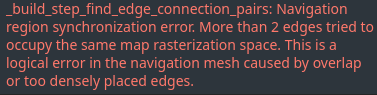
This is basically telling me my nav is too complex. Fine. I’ll simplify it. A LOT. So much that it can’t possibly mess up. No errors this time, no complex geometry, just the absolute minimum that i need. Only one navigation region. It’ll work in the best case scenario, right?

Nope. I am completely out of ideas. I am convinced that Godot’s navigation2d is purely meant for tiles and literally nothing else, and is simply incapable of generating reliable “complex” navigation. Any ideas? Any improvement for the nav system in the works? In the meantime it appears one of my critical game mechanics is screwed.
