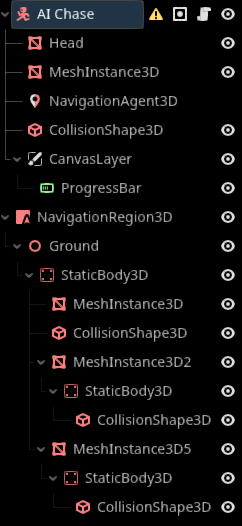
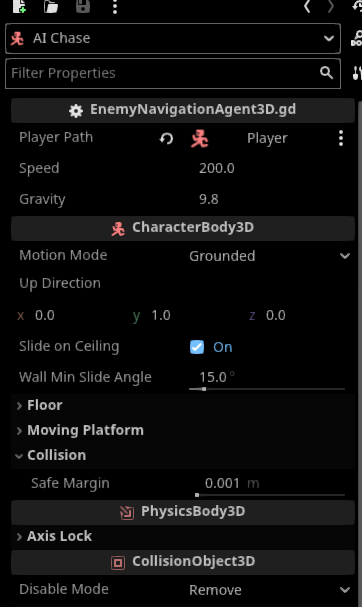
Im trying to make AI chase to chase the player; however, it won’t move or look at me. Here is my script below, and I followed this Youtube. Nothing’s working, unless Im missing something…
Your player reference doesn’t work. And because your _physics_process() immediately returns in that case, you don’t get any errors to realize this problem.
$ is the shorthand for get_node(), so it should be either player = get_node("../Player") or player = $"../Player".
I’ve found another way to bake the Nav: click on Mesh, then Create Navigation Mesh. The blue area appeared, finally. Unfortunately, AIChase is still not chasing the player, but it’s looking at the player. Yes, the Player Path has been assigned to the Player
You can enable the debug property of the NavigationAgent to see the calculated path. The issue could be something like the NavigationMesh being positioned too close to the ground.
If the NavigationAgent is in the center of the enemy and the NavigationRegion is below, the direction towards the next path position might result in a Vector3(0, -1, 0). Since you are only using x and z and collisions are preventing the enemy from moving into the ground, the enemy can’t move at all.
If this is the problem, I’m not sure if it’s baking related or just about the position of the NavigationRegion.
Visible Navigation only shows the navigation meshes. To see the path, you have to enable debug for the specific NavigationAgent in the Inspector.
The Vector3(0,-1,0) wasn’t meant to be added to your code, I was just speculating why your enemy isn’t moving. You could check this by printing your direction variable:
	var direction = (next_location - current_location).normalized()
	print(direction)
If this prints (0.0, -1.0, 0.0) this would indicate a height difference between the NavigationAgent and the NavigationRegion. In that case, try to increase the position.y of the NavigationRegion until the height of its NavigationMesh matches the center of the enemy (because that is probably the NavigationAgent’s height).
1 - try making the character a child of NavigationRegion3D.
2 -
use an autoload or groups to find the player. don’t search up the tree.
you are baking with everything and have no layers set. you need to reserve layers for the characters and things that move, only bake the physics layers that don’t move, like walls and ground.
it could also be that you are scaling your physics bodies, and that could be causing problems with navmesh baking. reset scaling, only change the size of colliders from the shape.
3 - you have a warning on characterbody. there is something wrong with it. maybe scaling is being applied.
4 - make sure player has something on it. you are canceling the entirety of _physics_process if player is null. check your warnings and errors.
5 - rotate before moving. you are moving after not only movement but also move_and_slide(). usually move_and_slide() goes last.
Im really dont understand those errors. How to find autoload?
E 0:00:01:058   PlayerII.gd:6 @ @implicit_ready(): Node not found: "../Ground/MeshInstance3D/StaticBody3D/CollisionShape3D" (relative to "/root/Node3D/Player").
  <C++ Error>   Method/function failed. Returning: nullptr
  <C++ Source>  scene/main/node.cpp:1907 @ get_node()
  <Stack Trace> PlayerII.gd:6 @ @implicit_ready()


E 0:00:01:062   EnemyNavigationAgent3D.gd:12 @ _ready(): Node not found: "$../Player" (relative to "/root/Node3D/AI Chase").
  <C++ Error>   Method/function failed. Returning: nullptr
  <C++ Source>  scene/main/node.cpp:1907 @ get_node()
  <Stack Trace> EnemyNavigationAgent3D.gd:12 @ _ready()
This is a script for a Player. PlayerII
I don’t mean this for Player Two. I wanted to keep it for the future in case I need to switch the scripts.
extends CharacterBody3D

@export var sensitivity = 0.5
@export var speed = 600
@onready var head = $Head
@onready var collision_shape = $"../Ground/MeshInstance3D/StaticBody3D/CollisionShape3D"
@onready var top_cast = $TopCast

var look_rot := Vector2.ZERO

func _ready():
	Input.set_mouse_mode(Input.MOUSE_MODE_CAPTURED)

func _input(event):
	if event is InputEventMouseMotion:
		if event.relative != null:
			look_rot.y -= event.relative.x * sensitivity   # LEFT / RIGHT
			look_rot.x -= event.relative.y * sensitivity   # UP / DOWN
			look_rot.x = clamp(look_rot.x, -80, 80)

func _physics_process(_delta):
	rotation.y = deg_to_rad(look_rot.y)      # Body turns left/right
	head.rotation.z = deg_to_rad(look_rot.x) # Head looks up/down

		# --- WASD movement ---
	var direction = Vector3.ZERO

	if Input.is_action_pressed("left"):
		direction -= transform.basis.z
	if Input.is_action_pressed("right"):
		direction += transform.basis.z
	if Input.is_action_pressed("backward"):
		direction -= transform.basis.x
	if Input.is_action_pressed("forward"):
		direction += transform.basis.x

	direction.y = 0
	direction = direction.normalized()

	velocity = direction * speed
	move_and_slide()

	print(head)
And this is for Enemy for NavigationAgent3D.
EnemyNavigationAgent3D Script.
extends CharacterBody3D

@onready var nav: NavigationAgent3D = $NavigationAgent3D

@export var player_path: NodePath
@export var speed: float = 600
@export var gravity: float = 9.8

var player: Node3D

func _ready():
	player = get_node("$../Player")
	print(nav)

func _physics_process(delta):
	if not player:
		return

	if not is_on_floor():
		velocity.y -= gravity * delta

	nav.target_position = player.global_transform.origin

	var next_location = nav.get_next_path_position()
	var current_location = global_transform.origin
	var direction = (next_location - current_location).normalized()
	print(direction)


	velocity.x = direction.x * speed
	velocity.z = direction.z * speed

	move_and_slide()

	look_at(player.global_transform.origin, Vector3.UP)
E 0:00:01:058   PlayerII.gd:6 @ @implicit_ready(): Node not found: "../Ground/MeshInstance3D/StaticBody3D/CollisionShape3D" (relative to "/root/Node3D/Player").
  <C++ Error>   Method/function failed. Returning: nullptr
  <C++ Source>  scene/main/node.cpp:1907 @ get_node()
  <Stack Trace> PlayerII.gd:6 @ @implicit_ready()


E 0:00:01:062   EnemyNavigationAgent3D.gd:12 @ _ready(): Node not found: "$../Player" (relative to "/root/Node3D/AI Chase").
  <C++ Error>   Method/function failed. Returning: nullptr
  <C++ Source>  scene/main/node.cpp:1907 @ get_node()
  <Stack Trace> EnemyNavigationAgent3D.gd:12 @ _ready()
it’s really simple. if you look at your scene tree, there is no MeshInstance3D. only MeshInstance3D2 and 5.
the second error is because you are searching up the tree for player, but player is not there.
an autoload is one way. in project settings → global, you can create an autoload, which is a node that will load at the start of the game and remain there even when reloading the game. you can put a reference to player there:
node_manager.gd
extends Node

var player : Node3D
player.gd
func _ready() -> void:
	#we register the player when it is created
	NodeManager.player = self
then you can access the player with:
NodeManager.player
a simpler way is to use groups. put the player in a group, then in the enemy do:
#we find all the nodes in group "player", then use the first one "[0]"
player = get_tree().get_nodes_in_group("player")[0]