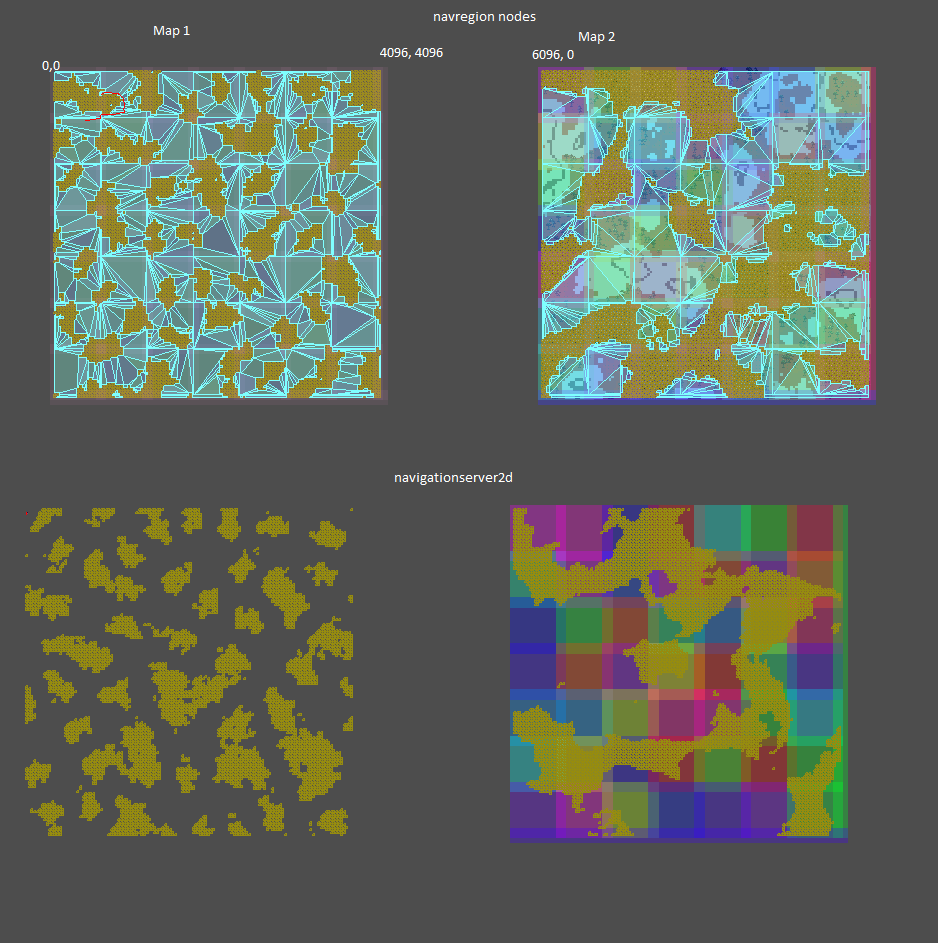
I have a navigation map created for my dynamically created tilemap working properly when using NavigationServer2D OR Nav nodes manually added as children. However when I try to make a 2nd navigation map offset 2000 pixels to the right, even with properly positioned baking rects the navigationserver2D stops creating the map (I think).
It is hard to confirm since the navigation regions are not visible in debug when using the server. However when I change to use manual nodes it does create the 2nd offset navigation map. The baking rects have not changed at all, only how I add the regions.
The coloured squares are the baking rects drawn with drawrect. The top two maps are with the manually created nodes and the bottom two are with the navserver. However the only map that does not have functional navigation is the bottom right. The first map using the navserver is fine. I can’t test visually where/if the nav regions are created with the server.
It seems like the only possibility is some issue internally with navserver2d since all the code that sets the baking rects, traversable region, obstructions etc is unchanged.
ah yes I should’ve thought of that since I was already drawing the baking rects. Ill try that and maybe they’ll be created in the wrong position or something. still seems like a navserver issue but more info is good.
Region Nodes push their own global transform to whatever navmesh resource they are using. When the region nodes bake navmesh they apply the inverse global transform to the geometry, else they would push the same transform twice.
So if you want to emulate server-only regions you either need to always keep them at origin with zero global transform, or you need to push the global transform to the region RID on the server. Same with the baking bounds, they are in global coordinates as is the entire NavigationServer.
That helps a lot to know internally it uses global coordinates. I’m able to create nav regions using the nav server when I switch the baking rects and traversable region to use global position of the tile map. It seems to be the correct positioning; I’m drawing the polygons like @lastbender suggestedby calling toLocal in the draw function and it is positioned correctly:
This is the 2nd map (Global Origin is 6096,0) and as you can see the polygons are not carved by obstructions in the root node I passed to ParseSourceGeometryData which parents all the yellow square obstruction tile squares. The nav regions end up as squares since they are not carved by any obstructions so my characters walk through rocks etc.
TileRectCollisionContainerNode is the Node2D that is the Parent to the yellow square obstructions. I assume this is another issue related to global position because the 2nd map is 6096 pixels to the right of the first map. How can I adjust to account for this when ParseSourceGeometryData accepts a Node as parameter and not a Vector2 like the baking rect or traversable outline?
You can see when generating that 2nd map the root node has the correct global position:
Normally you would just switch the root node to whatever is your actual root but if nothing helps because you need to arbitrary offset for other reasons you can just loop over the vertices of the baked navigation polygon and add this offset to every vertex manually.
Ok cool thanks smix, I might do that solution and just offset the vertices.
Ideally I’d pass in the correct node though; what do you mean by actual root? Isn’t the root supposed to be the parent to all the obstructions? That would make the object in that image with the 6k children and the correct global position the correct root.
The root node is whatever node is used as start of the navmesh source geometry parsing. That nodes inverse global transform is added to all the geometry so if you do not want any of that you just use a node without or with zero transform.
How that parsing process travels along nodes depends on your bake settings on the navigation mesh resource. E.g. if you switch to parse nodes by group name their actual scenetree placement does not really matter anymore, you can place them anywhere.
I had a whole big post going through my parse settings and collision creation with Groups then I tried setting the root node global position to Vector2.Zero and it worked properly. It didn’t really matter what settings I used, having the root node with an offset global position broke it.
I’d rather not have to manually set the global pos but it’s 1 line in _ready so shouldn’t make a difference. Better than a bunch of work to change my scenetree structure significantly. Thanks @smix8!