I’m making a metroidvania platformer game and can’t figure out how to make my bullets despawn when they collide with my tilemap. They collide with it, but the signal I created doesn’t seem to run, so instead they just despawn after the timer I made for them runs out. The tilemap is part of the “Walls” Group.
When shooting, I am given this error: emit_signalp: Error calling from signal ‘body_entered’ to callable: ‘CharacterBody2D(bullet.gd)::_on_area_2d_body_entered’: Cannot convert argument 1 from Object to Object.
func _on_area_2d_body_entered(body:TileMap):
	if body.is_in_group("Walls"):
		queue_free()
Your error indicates that the thing your Area2D is colliding with is not a TileMap and it cannot convert it from whatever it is, to a TileMap.
First, you said you are using 6.4.1.stable. That is not a version that exists. I suspect you are using 4.6.1.stable. I recommend upgrading to 4.6.2.stable for bug fixes - but that is not your issue.
Second, if you are looking for a TileMap, you should know that node type has been deprecated (it’s being discontinued). Switch to using a TileMapLayer. If you are using a TileMapLayer, have you painted the correct physics layer onto your tiles?
As @MrWetsnow said, you’re looking for a type you’re not getting. You should be looking for a Node2D. Try this code:
func _on_area_2d_body_entered(body: Node2D):
	print("Hit %s" % body.name)
	if body.is_in_group("Walls"):
		print("%s was in Walls" % body.name)
		queue_free()
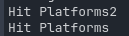
What gets printed out? I get this when I hit my TileMapLayers in my game Eternal Echoes. (You can throw daggers and they stick into the walls and enemies.)
Ive changed to TileMapLayers and tried the code youve given me but it doesnt print anything when colliding with the wall. And yes I am in 4.6.1, accidental typo, whoops.